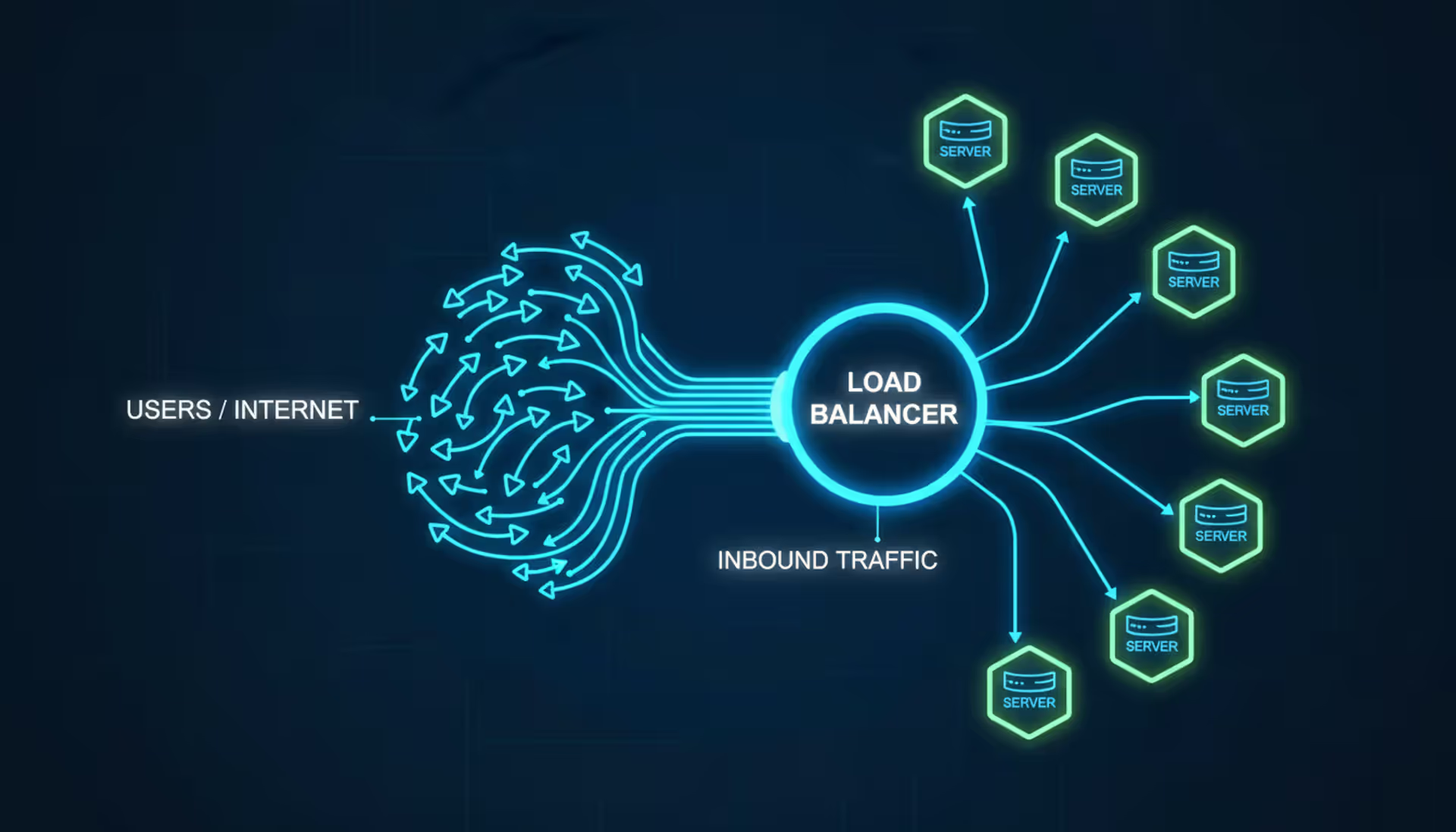
Think of your busiest application server sweating bullets at 3 AM because ten thousand users just hit your homepage simultaneously. That's where load balancers earn their keep—they're the traffic cops standing between your users and your backend infrastructure, making split-second decisions about which server handles each request.
Here's what actually happens: someone clicks a link to your site. Instead of slamming into a single overwhelmed server, their request hits the load balancer first. In microseconds, it checks which backend machines have available capacity, confirms they're responding properly, then routes the connection to the best candidate. The user gets a fast response, blissfully unaware that five different servers might handle their next five page views.
Modern web infrastructure pretty much requires this setup. You can't build for scale, survive hardware failures, or sleep soundly at night with just one server handling everything. Load balancers automatically shuffle traffic away from dying machines, distribute requests across data centers on three continents, and flex your capacity up or down as traffic swings throughout the day.
What Does a Load Balancer Do
Four core jobs define what load balancers accomplish, though modern implementations do considerably more.
Traffic distribution solves the fundamental problem: one server maxes out while others sit idle. Rather than forcing all connections through a single bottleneck until it keels over, the load balancer spreads incoming requests across your entire server fleet. You've effectively achieved horizontal scaling—double your servers, roughly double your capacity. Ten servers each handling 500 concurrent users beats one server choking on 5,000.
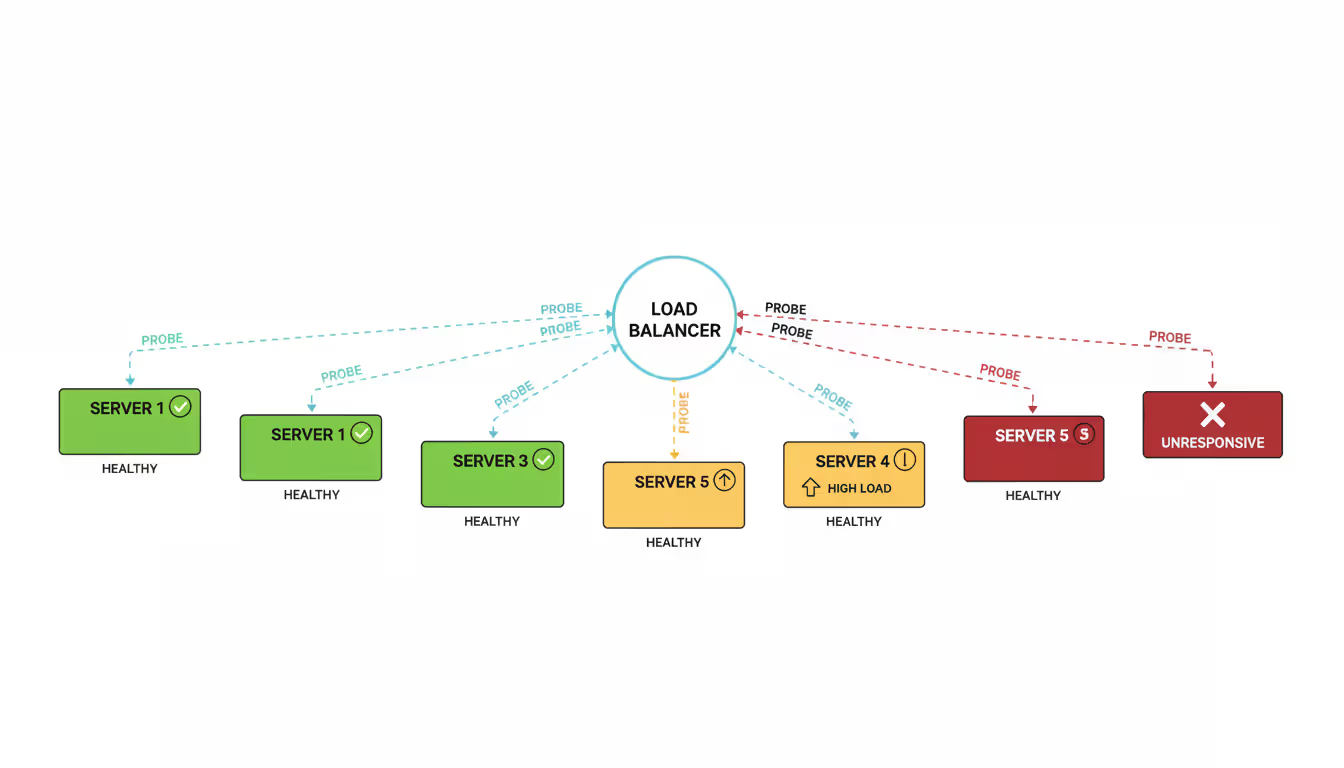
Health monitoring runs non-stop verification checks against every backend machine. The load balancer sends probe requests every few seconds—sometimes basic "are you alive?" pings, sometimes full HTTP requests to specific URLs, occasionally complex scripts that verify database connectivity and payment processor availability. Miss three consecutive health checks? That server gets yanked from rotation immediately until it proves itself healthy again.
Author: Ethan Norwood;
Source: baltazor.com
Automatic failovertransforms catastrophic outages into non-events. You're running eight servers when one suffers a motherboard failure at 2 PM. Without human intervention, the load balancer detects the problem within seconds and redistributes that dead server's traffic among the seven survivors. Your users notice nothing. You fix the hardware whenever convenient rather than dropping everything for emergency repairs.
Session persistence keeps specific users glued to specific servers throughout their visit. Some applications cache user session data locally instead of sharing it across a central database (performance reasons, usually). The load balancer remembers which user landed on which server—typically using cookies or IP address tracking—then consistently routes their subsequent requests back to that same machine. Otherwise, users would randomly lose their shopping carts or get logged out between page views.
Beyond these fundamentals? Modern load balancers handle SSL decryption (offloading that CPU-intensive work from your application servers), buffer sudden traffic spikes, maintain connection pools that reduce overhead, and sometimes even rewrite request headers or inject tracking information.
Load Balancer Architecture Explained
Understanding architecture means seeing both the physical layout and the request journey through your system.
Most deployments position the load balancer at your network's front door. It owns the public IP address that DNS points to. Your actual application servers hide behind private network segments, unreachable from the internet. This creates a security perimeter—attackers can only probe your hardened load balancer, never touching application servers directly.
Every incoming request follows the same path. User's browser initiates a connection to yoursite.com. DNS resolves that to 203.0.113.50 (your load balancer's IP). Traffic arrives at the load balancer, which applies its distribution algorithm to pick a backend server. It either opens a fresh connection to that server or reuses an existing one, forwards the request, waits for the response, then sends that response back to the user.
This cycle repeats thousands or millions of times daily. Meanwhile, the load balancer tracks active sessions, collects health metrics from every server, and recalculates routing decisions constantly.
Hardware vs Software Load Balancers
Hardware load balancers are physical boxes—purpose-built appliances from vendors like F5 or Citrix that sit in your server rack. They pack specialized silicon optimized for packet processing, capable of handling millions of concurrent connections. Expect to pay anywhere from $20,000 to $150,000 per unit depending on throughput specifications, plus annual maintenance contracts that'll cost you 15-25% of that purchase price.
These appliances shine at raw performance and include comprehensive vendor support. The downsides? Massive upfront costs, physical space requirements, and inflexibility—you can't easily scale capacity up or down, and configuration changes often require specialized training.
Software load balancers run on standard servers or virtual machines. Open-source options like HAProxy and NGINX cost zero dollars (though enterprises often pay for support). Commercial software like Kemp LoadMaster splits the difference—lower costs than hardware, professional support included. You install them on Linux or Windows systems, configure via text files or web dashboards, and scale by spinning up additional instances.
Software costs dramatically less—maybe $5,000-15,000 yearly for commercial support, or literally nothing for self-supported open-source. You gain flexibility to add capacity by launching more instances, and configuration happens through standard files or APIs. The tradeoff? You're responsible for the underlying infrastructure, OS patches, and capacity planning.
In 2026, most organizations choose software or cloud-native load balancing over hardware. The economics simply favor it unless you're pushing extreme throughput (100+ Gbps) or compliance mandates require physical appliances.
Load Balancer Algorithms
The algorithm determines which backend server gets each new connection. Choosing wisely requires understanding your application's behavior.
Round Robin cycles through available servers in order. Request one hits server A, request two hits server B, request three hits server C, then loops back to A for request four. Works great when all servers match specs and requests require similar processing time. Dead simple to implement, perfectly balanced over time.
Least Connections sends each new request to whichever server currently handles the fewest active connections. More adaptive than Round Robin when processing times vary wildly—a server busy with a 30-second database query won't get pummeled with fresh requests until that work completes. Requires the load balancer to track real-time connection counts.
IP Hash runs a hash function on each client's IP address and uses that result to select a destination server. Same client IP always reaches the same server, providing session persistence without cookies. Falls apart when clients share IP addresses (corporate NAT scenarios) or when you add/remove servers (hash calculations produce different results).
Weighted Round Robin assigns capacity multipliers to each server. A beefy machine with weight 5 receives five times the traffic of a smaller machine with weight 1. Handles mixed hardware gracefully—your new servers with 32 cores can pull proportionally more weight than aging 8-core boxes.
Least Response Time evaluates both connection counts and average latency together. Traffic flows toward the server showing the best combination of low connections and fast responses. Demands continuous latency monitoring and heavier computation, but often delivers the best user experience.
Algorithm
Mechanism
Ideal Scenario
Advantages
Drawbacks
Round Robin
Cycles through servers sequentially
Uniform server hardware with similar request durations
Simple configuration, even distribution over time
Ignores real-time server load
Least Connections
Routes to server with minimum active sessions
Variable processing times per request
Adapts to changing load conditions
Requires state tracking overhead
IP Hash
Maps client IP to specific server via hash function
Session affinity requirements
No cookie dependencies
Breaks with NAT, inflexible scaling
Weighted Round Robin
Distributes proportionally based on capacity scores
Mixed hardware specifications
Leverages different server capabilities
Manual weight tuning needed
Least Response Time
Considers both connection count and latency
Performance-sensitive applications
Optimizes user experience
Complex implementation, higher resource usage
Types of Load Balancing Methods
Load balancing operates at different network layers, each with distinct capabilities and appropriate use cases.
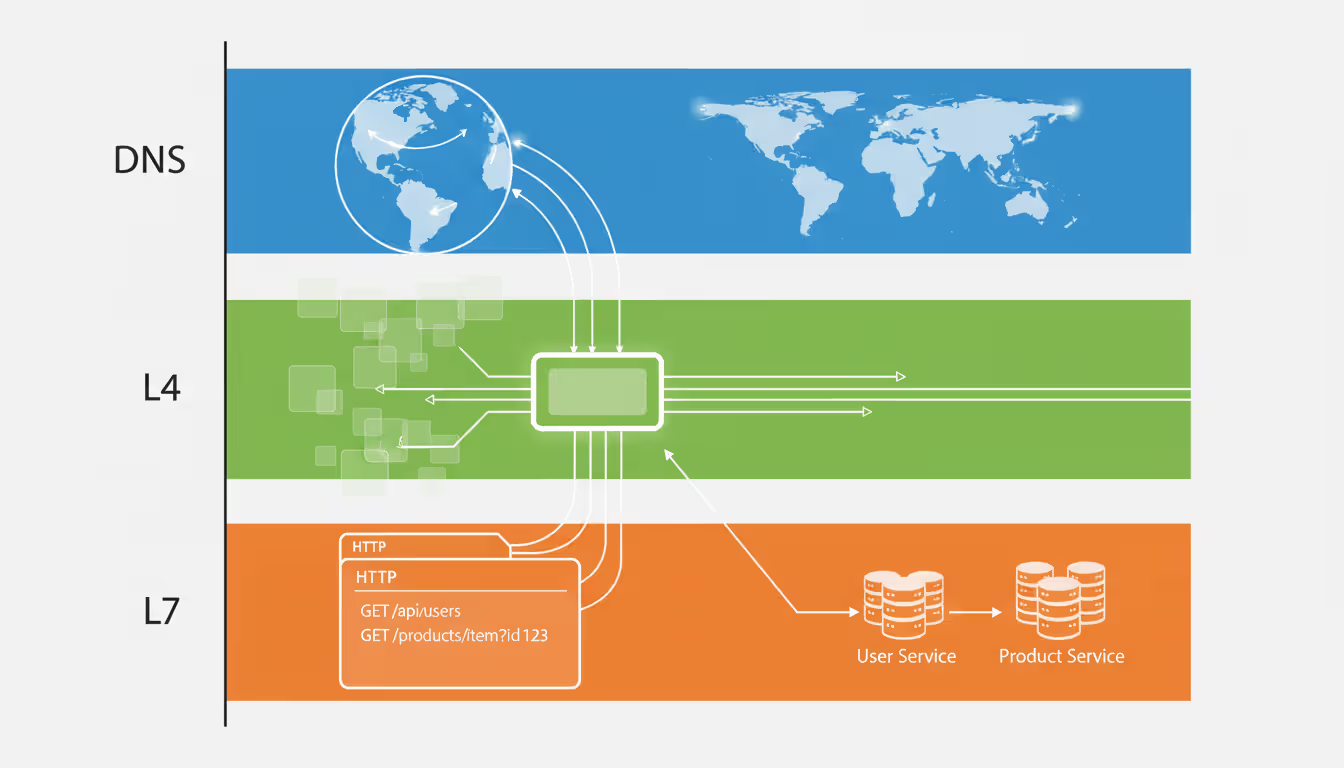
DNS load balancing happens before traffic reaches any dedicated load balancer. Configure multiple A records for your domain and DNS servers hand out different IP addresses to different clients. One person querying shop.example.com gets 192.0.2.1 while another receives 192.0.2.2. Each address points to separate servers or data centers.
Zero cost—just DNS configuration—and it distributes traffic globally across geographic regions. But DNS caching severely limits control precision. After a client receives an IP address, it stays cached for the TTL period (often 5-60 minutes). If that server dies, the client keeps attempting connections until the TTL expires. DNS load balancing excels at continental-scale distribution, fails at fine-grained traffic management.
Author: Ethan Norwood;
Source: baltazor.com
Layer 4 (network layer) load balancing operates at TCP/UDP protocol level. Routing decisions examine IP addresses and port numbers without peeking inside packets. This delivers screaming performance—millions of packets per second—because the load balancer skips SSL decryption and HTTP parsing. Works with any TCP or UDP protocol: HTTP, HTTPS, SMTP, DNS, database connections, proprietary apps, whatever.
The limitation? Zero application awareness. Layer 4 can't route /api/ requests to one server pool while sending /images/ to another.
Layer 7 (application layer) load balancing inspects HTTP/HTTPS request contents for intelligent routing. You can direct /api/ to one server cluster, /images/ to a CDN-fronted group, and everything else to a third pool. Routing leverages cookies, user agent strings, geolocation from IPs, or any HTTP header data.
This flexibility enables sophisticated architectures: separating mobile traffic from desktop traffic, A/B testing by routing 15% of users to experimental servers, or channeling premium customers toward dedicated infrastructure. Performance takes a hit—Layer 7 demands SSL termination and HTTP parsing, limiting maximum throughput compared to Layer 4.
Global server load balancing (GSLB) distributes traffic among data centers in different geographic regions. European users hit European infrastructure. Asian users connect to Asian facilities. This cuts latency (users reach nearby servers) and provides disaster recovery (if one region fails, GSLB redirects traffic to surviving locations).
GSLB typically combines DNS-based routing with active health checks and location databases. It verifies which data centers remain operational, determines user locations from IP addresses, then returns DNS responses pointing toward the nearest healthy facility.
Load Balancer as a Service vs On-Premises Solutions
Choosing between cloud-based LBaaS and self-managed implementations shapes your operational model and cost structure.
Load balancer as a service from AWS (Elastic Load Balancing), Google Cloud (Cloud Load Balancing), Azure (Load Balancer and Application Gateway), and others provides on-demand capacity. You configure rules via web console or API, point your DNS at the service endpoint, and traffic starts flowing. The cloud provider handles hardware, patches, scaling, and redundancy.
Billing typically mixes hourly fees ($0.025-0.05/hour) with data transfer charges ($0.008-0.01/GB). A moderate application pushing 1TB monthly might pay $20-30 for load balancing. High-volume sites processing 100TB could see $1,000+ monthly bills.
Benefits include zero capital expense, automatic scaling (the service handles traffic surges without your involvement), built-in high availability (cloud vendors run redundant load balancer infrastructure by default), and tight integration with other cloud services. You're operational in minutes rather than weeks.
Downsides encompass perpetual recurring costs, less control over underlying infrastructure, and potential vendor lock-in (switching providers means rebuilding configurations). Organizations with enormous traffic sometimes discover cloud load balancing costs exceed self-managed alternatives.
On-premises solutions require provisioning servers (physical or virtual), installing load balancing software, configuring network settings, and maintaining ongoing operations. Open-source options like HAProxy or NGINX carry zero licensing fees but consume staff hours for deployment and management. Commercial products add licensing costs but include vendor support and enterprise features.
Total ownership costs vary dramatically with scale. A basic deployment needs two load balancer VMs for redundancy, consuming maybe 8 vCPUs and 16GB RAM total—$100-200 monthly in cloud infrastructure if running IaaS, or equivalent to one physical server in your own data center. Initial setup might take 20-40 staff hours, followed by 2-5 hours monthly for maintenance and monitoring.
On-premises makes financial sense when you already operate your own data center, face strict data sovereignty requirements, handle extreme traffic where cloud costs become prohibitive, or need customization beyond what cloud services allow.
Many organizations run hybrid models: cloud load balancers for dev/test environments (where convenience beats cost concerns) while operating self-managed load balancers in production (where scale justifies operational investment).
How Load Balancer DNS Works
DNS-based load balancing uses the Domain Name System itself for traffic distribution, offering a straightforward approach with specific strengths and weaknesses.
Setting up DNS load balancing means creating multiple DNS records for one hostname. For instance, www.shop.com might have three A records:
www.shop.com. 300 IN A 192.0.2.1
www.shop.com. 300 IN A 192.0.2.2
www.shop.com. 300 IN A 192.0.2.3
DNS servers rotate through these addresses (round-robin DNS) or return all addresses and let clients pick. Different clients get different IPs, spreading traffic across multiple servers without dedicated load balancer hardware.
That TTL value (300 seconds here) controls how long clients cache DNS responses. Shorter TTLs enable faster reaction to failures but generate more DNS queries. Longer TTLs reduce DNS traffic but mean clients might keep hitting dead servers for extended periods.
Advantages include zero infrastructure cost (just DNS tweaks), universal compatibility (DNS works everywhere), and simplicity (no additional hardware). DNS load balancing effectively spreads traffic among geographically separated data centers or provides basic redundancy.
Limitations are substantial. DNS caching prevents precise traffic control—you can't instantly redirect traffic from failing servers. Client behavior varies wildly (some use the first IP returned, others randomize, some try multiple addresses). Session persistence becomes impossible without additional mechanisms. Health monitoring stays rudimentary or nonexistent (though some DNS providers offer health-check-driven record updates).
A common architecture layers DNS load balancing with application-tier load balancers: DNS distributes traffic across geographic regions or data centers while dedicated load balancers within each location handle granular distribution across server pools.
For example, DNS might route European users to eu.shop.com (resolving to 203.0.113.10) and American users to us.shop.com (resolving to 198.51.100.10). Each IP points to a Layer 7 load balancer distributing traffic among dozens of application servers within that region.
I see teams make the same mistake repeatedly—treating DNS load balancing as their complete high availability solution instead of one piece in a layered strategy. DNS handles geographic distribution and provides basic failover, sure, but you need real load balancers underneath managing health checks, SSL termination, and application-aware routing. Teams that skip the application layer consistently regret it when they hit their first major outage. DNS alone just doesn't cut it for production reliability
— Sarah Chen
When Your Business Needs a Load Balancer Service
Deciding when to implement load balancing depends on traffic patterns, availability requirements, and growth trajectory rather than hitting specific numerical thresholds.
Traffic volume provides the clearest indicator. A modern server handles 500-2,000 simultaneous connections depending on application complexity. When you're regularly hitting 50-60% of that capacity during normal operations, you're cutting it too close—any unexpected spike or server hiccup causes problems. That's your signal to add a second server plus a load balancer.
As a rough benchmark, 500 concurrent connections translates to roughly 5,000-10,000 daily active users for typical web apps, though this varies widely based on session duration and request patterns. A busy e-commerce site might hit this at 2,000-3,000 daily visitors during holiday peaks.
Availability requirements often justify load balancing before traffic volume demands it. When your application supports business operations where downtime costs $1,000+ per hour (lost revenue, reputation damage, SLA penalties), single-server architectures represent unacceptable risk. Hardware fails, software has bugs, maintenance windows require restarts. A load balancer with multiple backend servers transforms these from outages into invisible events.
Author: Ethan Norwood;
Source: baltazor.com
Calculate your downtime cost: annual revenue divided by 8,760 hours yearly, multiplied by your impact factor (typically 2-5x since downtime hurts future revenue beyond immediate losses). If that exceeds $500/hour, load balancing is cheap insurance.
Scaling velocity matters more than current size. An application that grew from 100 to 1,000 users in six months will likely hit 10,000 in the next six months. Implementing load balancing proactively—before capacity constraints bite—prevents emergency architectural scrambles during rapid growth.
Conversely, a stable application serving 500 users consistently for three years with flat growth projections might not need load balancing. A well-specced single server with solid backups could be the right answer.
Cost considerations are straightforward. Cloud load balancer services run $20-50 monthly for applications under 1TB data transfer. Self-managed open-source load balancers cost whatever the VM runs—maybe $50-100 monthly for modest instances. Compare these figures against downtime costs, the value of peaceful sleep (no 3 AM panic responses), and business impact of degraded performance during traffic spikes.
For businesses generating $10,000+ monthly revenue from web applications, load balancing typically pays for itself many times over through improved reliability and performance.
Technical signals indicating load balancing readiness include: response times degrading during peak hours, server CPU consistently above 60-70%, inability to perform maintenance without downtime, and customer complaints about intermittent unavailability.
FAQ
What is the difference between a load balancer and a reverse proxy?
Reverse proxies sit between clients and servers, forwarding requests and responses while potentially adding features like caching, SSL termination, or header manipulation. Load balancers are specialized reverse proxies focused specifically on distributing traffic across multiple backend servers. Every load balancer acts as a reverse proxy, but not every reverse proxy balances load—a single-server reverse proxy might provide security and caching benefits without any traffic distribution. In practice, tools like NGINX and HAProxy handle both roles simultaneously, making the terminology distinction increasingly blurry.
How much does a load balancer service cost?
Cloud load balancer services charge $0.025-0.05 per hour ($18-36 monthly) plus $0.008-0.01 per GB transferred. Small applications processing 500GB monthly pay roughly $25-40 total. High-volume sites handling 10TB monthly might pay $100-150 in bandwidth charges. Self-managed software load balancers cost whatever the underlying server infrastructure runs—$50-200 monthly for VMs—plus staff time for configuration and maintenance. Hardware load balancers demand $20,000-100,000+ upfront capital with 15-25% annual support contracts.
Can I use DNS for load balancing instead of a dedicated load balancer?
DNS load balancing handles basic geographic distribution and provides rudimentary redundancy, but lacks the health checking, session affinity, and rapid failover that dedicated load balancers deliver. DNS caching means clients may keep hitting failed servers for 5-60 minutes after outages start. Use DNS load balancing for distributing traffic across geographic regions or data center locations, but implement proper load balancers within each location for production applications requiring high availability.
What happens if the load balancer itself fails?
Load balancers create single points of failure unless you deploy them with redundancy. Standard solution: deploy two load balancers in active-passive or active-active configurations. Active-passive pairs share a virtual IP that migrates between them—when the primary dies, the secondary takes over the IP and maintains service. Active-active setups use DNS to split traffic across multiple load balancer instances. Cloud load balancer services build in this redundancy automatically; self-managed deployments need explicit configuration using tools like Keepalived or cloud high-availability features.
Do I need a load balancer for a small website?
Small websites serving under 1,000 daily visitors from a single server rarely need load balancing for performance reasons. However, when that website supports business operations where downtime creates financial losses or reputation damage, load balancing provides availability benefits even at small scale. A two-server setup with a load balancer turns server failures from complete outages into transparent events. For personal projects or informational sites where occasional downtime is acceptable, a single server with reliable backups works fine.
What's the difference between Layer 4 and Layer 7 load balancing?
Layer 4 operates at the network transport layer (TCP/UDP), making routing choices based on IP addresses and ports without examining packet contents. This approach delivers maximum performance and works with any network protocol. Layer 7 operates at the application layer, inspecting HTTP/HTTPS request details to route based on URL paths, headers, cookies, or other application data. Layer 7 enables sophisticated routing logic (sending /api/ requests to one server pool while directing /images/ to another) but requires more computational resources. Choose Layer 4 for maximum throughput and non-HTTP protocols; choose Layer 7 when you need application-aware routing decisions.
Load balancers transform fragile single-server setups into resilient, scalable infrastructure that handles growth and survives failures gracefully. The core capabilities—traffic distribution, health monitoring, automatic failover, and session persistence—work together to boost both performance and availability simultaneously.
Picking the right implementation depends on your specific situation. Cloud-based load balancer services provide simplicity and fast deployment for most scenarios. Self-managed solutions offer cost advantages at large scale and maximum customization control. DNS load balancing handles geographic distribution but needs application-layer load balancers supporting it for production-grade reliability.
Timing matters less than understanding the tradeoffs involved. Growing applications benefit from load balancing before hitting capacity walls, while availability requirements often justify the investment even for smaller implementations. Downtime costs typically exceed infrastructure expenses by orders of magnitude.
The load balancing architecture you build today should carry your application through the next 2-3 years of growth. Start with proven algorithms like Least Connections or Round Robin, deploy redundant load balancers eliminating single points of failure, and monitor performance metrics to refine configuration over time. The investment in proper load balancing pays dividends through better user experience, operational simplicity, and business continuity assurance.
When you print thousands of product labels or engrave a QR code onto a memorial plaque, that code must work indefinitely. Learn which QR code types never expire, how to generate permanent codes, and mistakes that can make even 'permanent' codes fail
Organizations lose $5,600 per minute during network downtime. A network traffic monitor provides visibility into data flows, enabling IT teams to maintain performance, troubleshoot issues, and detect threats before escalation. This guide covers implementation, tool selection, and best practices
Network infrastructure failures cost enterprises an average of $9,000 per minute in 2026. This comprehensive guide covers network monitoring fundamentals, tool selection, deployment options, and alert configuration best practices to help organizations maintain optimal network performance
Deploying connected devices across states or countries requires more than a standard cellular plan. An internet of things sim card provides specialized connectivity for sensors, trackers, and industrial equipment—often for years without manual intervention
The content on this website is provided for general informational and educational purposes only. It is intended to explain concepts related to cloud computing, computer networking, infrastructure, and modern IT systems.
All information on this website, including articles, guides, and examples, is presented for general educational purposes. Technology implementations may vary depending on specific environments, business needs, infrastructure design, and technical requirements.
This website does not provide professional IT, engineering, or technical advice, and the information presented should not be used as a substitute for consultation with qualified IT professionals.
The website and its authors are not responsible for any errors or omissions, or for any outcomes resulting from decisions made based on the information provided on this website.