Setting up an intranet transforms how your team communicates, but I've seen countless organizations burn through budgets on fancy platforms their employees never touch. The difference between success and failure rarely comes down to technology choices—it's about matching your system to actual workflows and getting people to embrace the change.
What Is an Intranet and Why Your Business Needs One
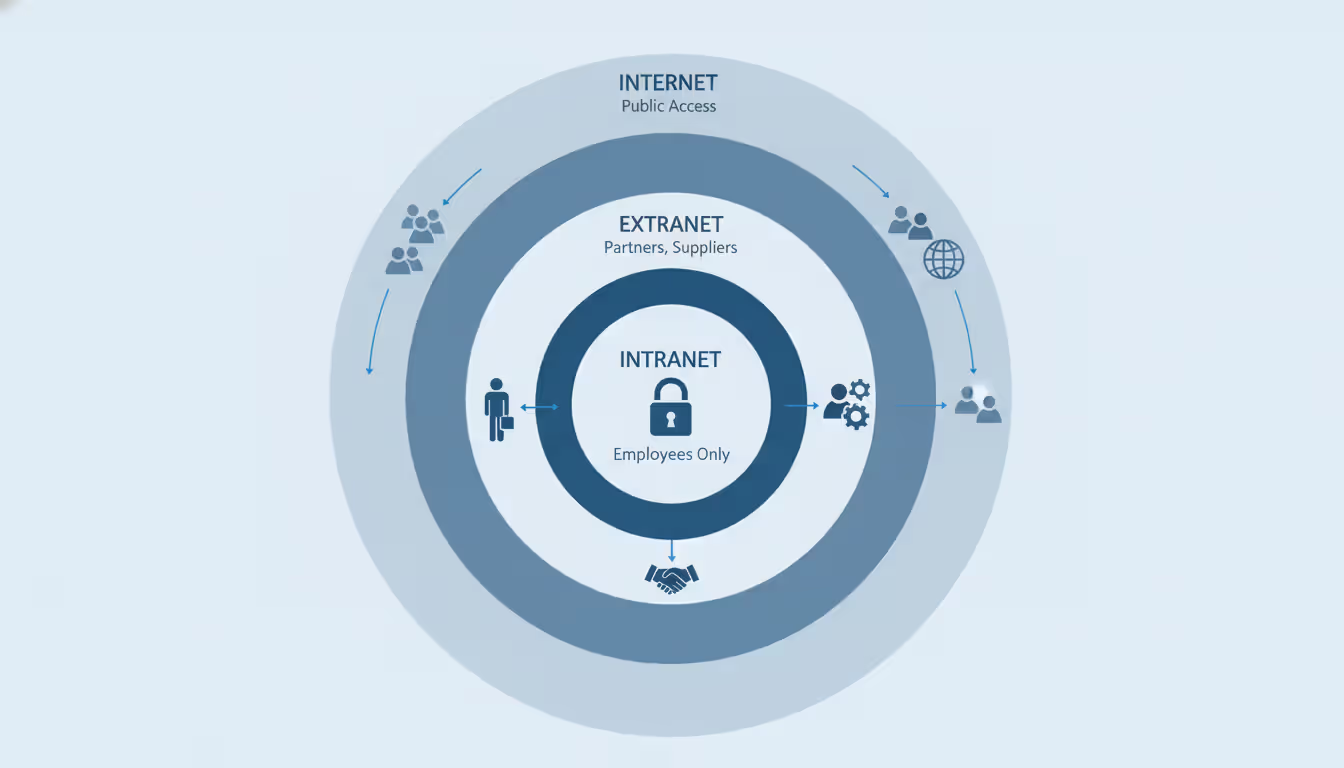
Think of an intranet as your company's private website that only your team can access. You can't Google your way into someone else's intranet (unlike the public internet), and it's more restrictive than an extranet, which might give limited access to contractors or clients.
Here's what actually happens when intranets work well: Your employee handbook stops being a PDF that nobody reads. Instead, people search for "PTO policy" and find the answer in five seconds. Your sales team stops asking "Where's the latest pricing sheet?" because they know exactly where to look. New hires find training videos, org charts, and department contacts without scheduling three different meetings.
The statistics tell part of the story—companies with working intranets cut internal emails by 20-25% and onboard new people faster. But I've watched the real impact firsthand: fewer interruptions, less time hunting for information, and remote teams that actually stay connected.
There's also the security angle. When your finance team stores spreadsheets in personal Dropbox accounts or engineers email source code to their Gmail, you've got compliance problems waiting to happen. An intranet keeps sensitive files behind proper authentication with logs showing exactly who viewed what.
Author: Logan Kessler;
Source: baltazor.com
Planning Your Intranet Before Technical Setup
Jumping straight to "Which platform should we buy?" wastes money. I've consulted for companies that spent $50,000 on SharePoint only to discover their field technicians needed offline mobile access—something they didn't configure upfront.
Start by talking to department heads. Ask specific questions: Does HR spend hours answering the same benefits questions? Does marketing struggle because nobody can find approved logos? Does IT field constant "What's the WiFi password?" tickets?
Write down your requirements across these areas:
Who's using this thing: Count concurrent users, not total employees. Your 500-person company might have 200 people logged in simultaneously. Remote workers need interfaces that load quickly on home internet. Factory floor staff might need kiosks instead of personal logins.
What content you're managing: Video files eat storage differently than text documents. Legal teams need version history showing every edit. Marketing needs image previews, not just file names. Engineering might require technical diagrams that display properly across devices.
What already exists that needs to connect: List every tool that should integrate. If you're using Okta or Azure AD for logins, you'll want single sign-on. Calendar integration stops double-booking. CRM connections let salespeople update deals without switching tabs.
When setting up a small business network from scratch, think about where your intranet fits in the bigger picture. Bandwidth matters—if you're hosting video training libraries, allocate network capacity accordingly. VLAN segmentation keeps intranet traffic separate from guest WiFi. These decisions affect performance later.
Create a governance plan now, not later. Who owns updating each section? How often do you review content for accuracy? What's the approval process for company-wide announcements? Without clear ownership, your intranet becomes a ghost town filled with outdated information that trains people to look elsewhere.
Author: Logan Kessler;
Source: baltazor.com
Choosing the Right Intranet Platform or Solution
The hosted-versus-self-hosted question shapes everything else: costs, maintenance burden, control level, and what happens when things break.
Cloud-Based Intranet Solutions
Platforms like Microsoft SharePoint Online, Google Workspace, Notion, and Confluence Cloud handle the infrastructure headaches for you. You pay monthly per-user fees and access everything through browsers.
The appeal is obvious: You can launch in days, not months. Vendors guarantee 99.9% uptime, handle security patches automatically, and provide geographic redundancy. Compliance certifications (SOC 2, ISO 27001, GDPR) come included.
What you give up: You're stuck with the vendor's feature set and data policies. Customization exists but hits walls quickly. Bandwidth surprises happen—uploading a 50GB video library on standard business internet might take overnight. Pricing changes are unilateral; if they triple costs next year, your options are "pay it" or "migrate everything."
When setting up a cloud server as your intranet foundation, check data center locations carefully. European branches might legally require EU-hosted data for GDPR. API rate limits matter if you're building automated workflows—some platforms throttle you during business hours when you need them most.
Self-Hosted Intranet Options
Self-hosting means installing software on infrastructure you control—physical servers in your office or a VPS you rent. Open-source options include WordPress with intranet plugins, Drupal, HumHub, or OpenProject.
The benefits: Total data control, unlimited customization potential, and no per-user fees beyond initial licensing. Organizations with unusual security needs or workflows that don't fit standard software templates find this flexibility essential.
When setting up a VPS for intranet hosting, budget beyond the base server rental. You need SSL certificates, backup systems, monitoring tools, possibly a CDN for global offices. A VPS handling 100 users typically starts at 8GB RAM, 4 CPU cores, and 200GB SSD storage—figure $80-150 monthly from DigitalOcean, Linode, or Vultr.
The catch: Your team owns everything that can go wrong. Security patches, database tuning, troubleshooting slow queries—all on you. A misconfigured server exposes your entire company to breaches. Unless you employ actual system administrators or developers, self-hosting often costs more than it saves when you factor in staff time and risk.
Technical Requirements for Setting Up an Intranet
Infrastructure needs scale with usage, though some requirements apply universally.
Server specifications: Cloud solutions hide these details. For self-hosting, calculate based on who's online simultaneously. Fifty employees need at least 4GB RAM and 2 CPU cores as a starting point. Once you exceed 500 users, consider splitting your database and application onto separate servers with load balancing.
Network configuration: Your intranet must reach all employee locations. Remote workers need VPN access or modern zero-trust network access (ZTNA) that authenticates without traditional VPN overhead. When setting up a small business network infrastructure, configure firewall rules permitting intranet traffic while blocking unauthorized attempts from the internet.
Internal DNS makes life easier—people visit "intranet.company.local" instead of memorizing IP addresses. For VPS hosting, set up reverse proxy servers (nginx or Apache) handling SSL and routing traffic efficiently.
Security layers: HTTPS with valid SSL certificates is mandatory—browsers flag HTTP sites as dangerous, training users to ignore warnings. Multi-factor authentication, especially for admins, blocks 99% of credential theft attacks. Role-based access control (RBAC) shows employees only relevant content; finance shouldn't accidentally browse engineering specs.
Schedule security audits to catch vulnerabilities before attackers exploit them. Tools like OWASP ZAP or Nessus scan for common weaknesses automatically. Review user permissions quarterly—employees who switch roles often keep access they shouldn't have anymore.
Backup and disaster recovery: Automate daily backups stored off-site. Test restoring from backup every quarter—untested backups fail exactly when you're desperate. Cloud platforms include backup features, but verify their retention policies meet your compliance requirements.
Step-by-Step Intranet Setup Process
This walkthrough covers self-hosted deployment on a VPS, which demonstrates maximum complexity. Cloud platforms automate many of these steps through provisioning wizards.
Step 1: Provision infrastructure When setting up a VPS, pick a data center near most users to reduce latency. Install a recent LTS operating system—Ubuntu 24.04 LTS or Debian 12 receive security updates for years. Create a non-root admin user immediately and disable password authentication, requiring SSH keys instead.
Step 2: Install dependencies Most intranet platforms need a web server (nginx or Apache), database (MySQL or PostgreSQL), and runtime environment (PHP, Node.js, or Python depending on platform choice). Use package managers for installation rather than compiling from source—you'll get security updates automatically through normal system updates.
Configure your database with strong passwords and restrict connections to localhost unless you're deliberately running a separate database server. Tune database parameters based on available RAM; defaults assume minimal resources and perform poorly under load.
Step 3: Deploy intranet software Download your chosen platform's latest stable release from official sources. Verify checksums to confirm files weren't tampered with during download. Follow official documentation exactly—shortcuts and "improvements" cause mysterious failures later. Run the installation wizard or command-line setup to create database schemas and default configurations.
Step 4: Configure SSL/TLS Obtain an SSL certificate from Let's Encrypt (free) or commercial certificate authorities. Configure your web server redirecting all HTTP traffic to HTTPS and enable HTTP Strict Transport Security (HSTS) headers. Test your configuration at SSL Labs' server test—aim for A+ rating by disabling outdated protocols and weak ciphers.
Step 5: Integrate authentication Connect your intranet to existing identity providers. Microsoft environments configure SAML or OAuth integration with Azure Active Directory. Google Workspace uses OAuth 2.0. This creates single sign-on—employees use their regular credentials without remembering another password.
Import your user directory or configure automatic provisioning. Map organizational units to intranet groups so the marketing department automatically accesses marketing spaces without manual permission grants.
Step 6: Structure content and permissions Design your information architecture before adding content. Create top-level sections for departments, projects, and company-wide resources. Define permission templates: public (all employees), departmental (specific teams), and confidential (named individuals only).
Avoid deep hierarchies—content buried four levels down never gets found. Successful intranets rarely exceed two or three hierarchy levels.
Step 7: Populate initial content Add high-value content first: employee directory, org chart, benefits information, IT support contacts. Include a "getting started" guide explaining navigation. Publish a roadmap showing what content is coming and when, so people know the system will grow.
Step 8: Conduct user acceptance testing Before company-wide launch, recruit 10-15 employees representing different roles and technical comfort levels. Give them specific tasks: "Find the PTO request form," "Upload a document to the sales folder," "Comment on the Q2 strategy post." Watch where they get confused and adjust before broader rollout.
Step 9: Launch and monitor Roll out access in phases for organizations exceeding 200 people. Start with early adopters who'll champion the platform to skeptical colleagues. Watch server performance closely for CPU spikes or memory problems. Track usage analytics identifying popular features and neglected sections.
Author: Logan Kessler;
Source: baltazor.com
Common Mistakes When Setting Up an Intranet
Skipping mobile optimization: Over 40% of intranet access now happens on phones. If your intranet requires pinching and zooming on smartphones, people will stop using it. Test on actual devices—desktop browser emulators miss real-world performance problems and touch interaction issues.
Neglecting search functionality: Employees won't browse through categories when they can search and find answers instantly. Configure full-text indexing and tune search algorithms. Many organizations discover their intranet search returns garbage results because nobody configured content weighting, synonyms, or relevance scoring.
Ignoring change management: Technology adoption is fundamentally a people problem. Announcing "We have an intranet now" via email doesn't change ingrained habits. Create video tutorials for common tasks. Assign "intranet champions" in each department answering colleague questions. Get executives to visibly use the platform—if leadership ignores it, everyone else will too.
The most common failure mode I see is treating intranet deployment as an IT project rather than an organizational change initiative. The technology is the easy part—getting people to change ingrained habits requires executive sponsorship, ongoing training, and patience. We've seen beautifully architected intranets gather dust because leadership didn't model the behavior they expected from employees
— Michael Chen
Inadequate security configurations: Default passwords, unpatched software, and overly permissive access controls create vulnerabilities. Run security audits before going live. Subscribe to security mailing lists for your chosen platform to receive vulnerability notifications promptly.
Overcomplicating the initial release: Launch with core functionality rather than building everything at once. A simple, fast intranet doing three things well beats a feature-packed platform that confuses everyone. Add capabilities based on actual usage patterns rather than hypothetical "nice to have" features.
Maintaining and Scaling Your Intranet Over Time
Intranets require ongoing attention to stay valuable. Establish these maintenance routines:
Content freshness reviews: Schedule quarterly audits where content owners verify their sections remain accurate. Archive or delete outdated material—pages about discontinued products waste everyone's time. Many platforms support automated expiration reminders notifying owners when content ages beyond defined thresholds.
Performance monitoring: Track page load times, server resource utilization, and user session metrics. Set up alerts for anomalies—sudden database query spikes might indicate a misconfigured plugin or bot attack. Tools like Grafana or New Relic provide visibility into system health and help catch problems before users complain.
User feedback loops: Create simple mechanisms for reporting problems or suggesting improvements. A "Was this page helpful?" widget on every page generates actionable data. Monthly surveys with 3-4 targeted questions maintain engagement without survey fatigue.
Feature expansion based on adoption: Once your intranet reaches 70%+ monthly active usage, consider advanced capabilities. When setting up a conference room for video conferencing, integrate the booking calendar into your intranet so employees reserve rooms without switching applications. This reduces friction and increases usage of both systems.
Organizations with IoT devices or industrial equipment might benefit from setting up an MQTT broker publishing sensor data to intranet dashboards. Manufacturing facilities could display real-time production metrics, while office buildings might show conference room occupancy or air quality readings, making the intranet more useful and visited more frequently.
Author: Logan Kessler;
Source: baltazor.com
Scaling infrastructure: Cloud platforms scale automatically, though costs increase with usage. Self-hosted deployments require capacity planning. Monitor trends in concurrent users, storage consumption, and bandwidth utilization. Upgrade proactively before hitting limits—an intranet that crashes during company-wide meetings damages credibility permanently.
Consider implementing caching layers (Redis or Memcached) when response times exceed 500ms. Database query optimization often yields better performance improvements than hardware upgrades. Enable compression for text assets and use a CDN for images and videos served to distributed offices.
Governance evolution: As your organization grows, formalize governance policies. Document who can create spaces, approval workflows for homepage announcements, and data retention schedules. Regular governance committee meetings ensure the intranet evolves with business needs rather than becoming a static archive nobody updates.
Comparison Table: Intranet Hosting Options
Criteria
Cloud-Based Platforms
VPS Hosting
On-Premises Servers
Upfront Cost
Low ($5-15/user/month)
Medium ($100-300 setup plus monthly hosting)
High ($5,000-50,000 hardware investment)
Technical Skill Required
Minimal (configuration only)
Moderate (server administration knowledge)
Advanced (full infrastructure management)
Scalability
Automatic (pay for additional users)
Manual (upgrade VPS or add more servers)
Manual (purchase additional hardware)
Security Control
Limited (vendor-managed policies)
High (you control all configurations)
Complete (physical and logical control)
Maintenance Burden
Minimal (vendor handles all updates)
Moderate (OS and application updates)
High (hardware, software, facilities management)
Customization Depth
Limited to platform features and settings
Extensive (modify code when needed)
Complete (any custom development possible)
Data Residency Control
Depends on vendor's available regions
Choose VPS location anywhere
Complete control over physical location
Internet Dependency
Required for any access
Required for remote access scenarios
Optional (can function on LAN exclusively)
Frequently Asked Questions
How much does it cost to set up an intranet?
Expect anywhere from $500 to $100,000+ depending on your approach and organization size. Cloud platforms charge $5-25 per user monthly, meaning a 50-person company pays $3,000-15,000 yearly. Self-hosted open-source solutions cost $1,200-5,000 for initial setup (covering VPS, SSL certificates, backup services) plus $100-300 monthly for hosting. Enterprise on-premises deployments with custom development start around $50,000. Plan for an additional 15-20% of initial costs annually for maintenance and updates.
Can I set up an intranet without IT expertise?
Cloud-based platforms like Google Sites, Microsoft SharePoint Online, or Notion require minimal technical knowledge—if you've built a website with a drag-and-drop builder, you can configure these systems. Self-hosted options demand server administration skills including command-line proficiency, security hardening knowledge, and troubleshooting capabilities. Organizations lacking dedicated IT staff should choose hosted solutions or budget for consultant help during initial setup. Attempting complex self-hosted deployments without proper expertise typically results in security vulnerabilities or abandoned half-finished projects.
What's the difference between setting up an intranet on-premises vs. in the cloud?
On-premises means running physical servers in your office or data center—you purchase the hardware and control everything directly. Cloud hosting uses servers in vendor data centers you access via internet connections. On-premises provides complete control and functions without internet connectivity but requires substantial upfront investment and ongoing maintenance expertise. Cloud solutions offer faster deployment, automatic updates, and predictable monthly costs but depend on internet connectivity and vendor policies you can't change. Hybrid approaches are possible—hosting your core intranet in the cloud while maintaining on-premises integration points for legacy systems.
How long does it take to set up a functional intranet?
Cloud platforms can go live in 1-3 days for basic functionality—account creation, permission configuration, initial content addition. Reaching full deployment with integrations, custom branding, and comprehensive content typically requires 4-8 weeks. Self-hosted solutions need 2-4 weeks for infrastructure setup and configuration, plus another 6-12 weeks for content migration and thorough testing. Large enterprises with complex requirements should plan 4-6 months for complete deployment including proper change management. The technical setup usually finishes fastest; content creation and driving user adoption take significantly longer.
Do I need special hardware to set up an intranet for a small business?
Not if you choose cloud hosting—you only need employee devices (computers, tablets, phones) with modern web browsers. Self-hosted deployments require a server, which could be a dedicated physical machine, a repurposed computer, or a VPS. For under 25 users, a VPS with 4GB RAM and 2 CPU cores works fine ($20-40 monthly). Between 25-100 users, upgrade to 8GB RAM and 4 cores ($80-120 monthly). Physical servers make sense primarily for organizations with existing data centers or specific compliance requirements preventing cloud usage. Most small businesses save significant money and complexity by avoiding hardware ownership entirely.
Can an intranet integrate with video conferencing and other tools?
Modern intranets connect with virtually any business application through APIs, webhooks, or pre-built connectors. You can embed Zoom or Microsoft Teams meetings directly in intranet pages, sync calendar events automatically, or trigger video calls from employee profile pages. Project management tools (Asana, Jira), CRM systems (Salesforce, HubSpot), and file storage services (Dropbox, Box) commonly integrate with major intranet platforms. When setting up a conference room for video conferencing, integrate the room booking system into your intranet so employees see real-time availability and reserve spaces without leaving the platform. Evaluate integration capabilities carefully during platform selection—extensive API documentation usually indicates robust integration support and active developer community.
Setting up an intranet changes how organizations share knowledge, collaborate on projects, and maintain operational efficiency. Success depends far more on planning and change management than technical complexity. Start by understanding your organization's specific needs rather than being dazzled by feature lists. Choose hosting approaches matching your technical capabilities and budget realities.
Cloud platforms offer the fastest path to value for most organizations, eliminating infrastructure management headaches while providing enterprise-grade reliability. Self-hosted deployments suit organizations with specialized requirements or existing IT infrastructure, though they demand ongoing technical investment and expertise.
The most critical success factor remains user adoption. An intranet that employees actually use delivers exponential returns compared to a technically sophisticated system gathering digital dust. Focus on solving real problems people face daily, maintain content freshness religiously, and iterate based on actual usage patterns. Organizations that treat intranets as evolving platforms rather than one-time projects realize the full potential of centralized, secure internal collaboration.
A software defined network (SDN) separates control intelligence from physical equipment, enabling centralized management and programmable network behavior. Discover the three-layer architecture, key components, and how SDN transforms enterprise networking
Remote desktop hosting delivers centralized desktop environments accessible from anywhere. This guide covers infrastructure selection, security implementation with multi-factor authentication and VPN, printing solutions, and common pitfalls to avoid when deploying remote desktop services for your business
Private cloud infrastructure dedicates computing resources to a single organization, offering control and compliance advantages over shared public cloud. This guide examines architecture, platform choices, managed services options, and decision criteria for enterprises evaluating private cloud deployment
Network infrastructure failures cost enterprises $9,000 per minute in 2026. Open source network monitoring delivers visibility without licensing fees or vendor restrictions. This guide covers how monitoring tools work, compares popular platforms, and provides implementation strategies for cloud environments
The content on this website is provided for general informational and educational purposes only. It is intended to explain concepts related to cloud computing, computer networking, infrastructure, and modern IT systems.
All information on this website, including articles, guides, and examples, is presented for general educational purposes. Technology implementations may vary depending on specific environments, business needs, infrastructure design, and technical requirements.
This website does not provide professional IT, engineering, or technical advice, and the information presented should not be used as a substitute for consultation with qualified IT professionals.
The website and its authors are not responsible for any errors or omissions, or for any outcomes resulting from decisions made based on the information provided on this website.