Your company's network went down last Tuesday at 2 PM. By 2:15, the sales team couldn't access customer records. At 2:30, accounting was staring at frozen screens during month-end close. By 3:00, you'd lost three hours of productivity across 50 employees. Sound familiar?
Modern businesses run on networks—they're as essential as electricity, and just as noticeable when they stop working. Every email, file transfer, video call, and database query flows through this infrastructure.
Network support covers a huge range—from helping one person reconnect their laptop to redesigning how three offices share data. Knowing what this support actually involves, recognizing when you need professional help, and picking the right solution separates businesses that thrive from those constantly firefighting IT emergencies.
What Is Computer Network Support
Think of computer network support as the technical expertise that keeps your digital infrastructure running smoothly. It's everything required to maintain the routers, switches, firewalls, wireless access points, servers, and cables connecting your business.
Support teams juggle planned work and emergency fixes. They set up new equipment, watch traffic patterns for problems, install security updates, figure out why someone can't print, and keep detailed records of how everything connects. The real goal? Stop problems before anyone notices—not just fix things after they break.
Most companies don't realize they have a network problem until it costs them money. The difference between reactive and proactive network support often shows up in your quarterly revenue reports, not just your IT budget
— Chloe Bramwell
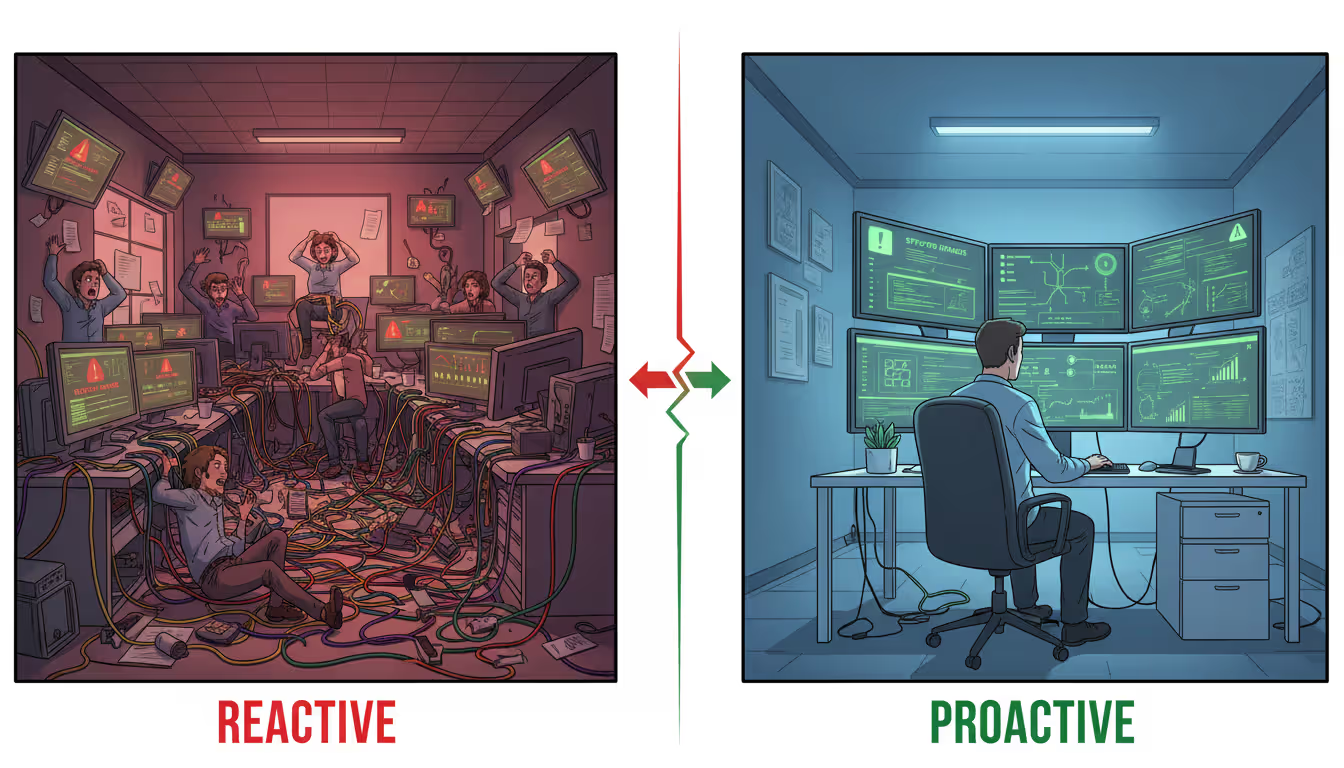
How teams approach this work falls into two camps:
Reactive troubleshooting waits for things to break. Someone yells "I can't get to the file server!" and technicians scramble to diagnose the issue. Many companies stuck with this approach for years because it seemed cheaper—why pay for help when nothing's broken? The reality hits when you calculate lost productivity, angry employees, and potential data loss during each outage.
Proactive maintenance catches failures before they happen. Technicians notice a hard drive is filling up and replace it before it runs out of space. They spot bandwidth hitting 80% capacity and upgrade the connection before applications start timing out. They review security logs every morning and patch vulnerabilities before hackers find them.
Here's the shift that changed everything over the past decade: companies that wait for smoke alarms spend more fighting fires than those who prevent them. Organizations stuck in reactive mode typically burn through budgets on emergency repairs while suffering constant business disruptions.
Author: Chloe Bramwell;
Source: baltazor.com
Common Computer Network Support Services
Support offerings vary wildly between providers and internal IT departments. Here's what you'll typically encounter and what actually matters.
Help desk and technical troubleshooting serve as your first line of defense. Employee can't connect? Printer won't work? Cloud app timing out? Help desk technicians track down whether the problem lives in that person's laptop, your network settings, a server issue, or your internet provider. Response times tell the real story—some companies promise 15-minute callbacks for critical issues, others just say "we'll get to it."
Network configuration and installation is the hands-on work of building and changing infrastructure. Setting up switches, creating VLANs to separate guest WiFi from your accounting systems, configuring VPN access for remote workers, deploying new wireless coverage. Done right, this work prevents security holes and performance nightmares. Done hastily, it creates problems you'll spend years untangling.
Security monitoring and threat response has moved from "nice to have" to absolutely critical. Technicians watch for weird traffic suggesting ransomware infections, monitor firewall logs for break-in attempts, and jump on security alerts. They also lock down who can access what, manage password systems, and keep you compliant with regulations like HIPAA or PCI-DSS that carry serious penalties.
Hardware and software updates keep everything stable and secure. Your switches need firmware patches. Servers need operating system updates. Applications need new versions. Support teams test these updates in safe environments before touching production systems—nobody wants an update that breaks your accounting software during tax season.
Performance optimization tackles the slow degradation that happens as networks grow. Technicians analyze where data flows, spot bottlenecks, adjust Quality of Service settings so video calls don't stutter when someone downloads a huge file, and recommend upgrades when current equipment can't handle the load. A network that worked fine for 50 people might crawl with 150, even with the same internet speed.
Author: Chloe Bramwell;
Source: baltazor.com
How Computer Network Management Works
Good computer network management follows structured processes instead of random reactions. These processes transform support from constant firefighting into strategic infrastructure oversight.
Assessment and documentation of existing infrastructure creates your baseline. Support teams inventory every network device, document how things connect, map out IP addresses, and record configurations. This documentation becomes gold during troubleshooting—technicians quickly spot what changed when problems appear. Most organizations maintain a computer network diagram showing physical and logical connections as the reference point for all future work.
Monitoring tools and alert systems give you continuous visibility into network health. Modern platforms track dozens of metrics: bandwidth usage, packet loss, latency, whether devices respond, CPU usage on routers and switches, error rates on cables. These tools fire off alerts when metrics cross thresholds—like when a switch port shows excessive errors indicating a dying cable, or bandwidth usage climbs toward maximum capacity.
The gap between basic monitoring and comprehensive monitoring often determines whether you catch problems early. Basic monitoring might just ping devices to see if they respond. Comprehensive monitoring examines interface statistics, tracks historical trends, correlates events across multiple devices, and uses machine learning to spot anomalies that wouldn't trigger simple alerts.
Scheduled maintenance procedures prevent chaos from unplanned outages. Support teams establish regular maintenance windows—usually during low-usage periods—for applying updates, testing backup systems, and handling preventive tasks. Companies running 24/7 operations often stagger maintenance schedules, updating redundant systems separately to maintain availability throughout the process.
Incident response protocols define exactly how teams handle problems. Documented procedures specify who gets called for different issue types, what diagnostic steps technicians follow, required response speeds, and escalation triggers. Without these protocols, critical issues sit while technicians work on minor annoyances, or multiple people waste time duplicating diagnostic work.
Network Monitoring vs. Active Management
Computer network monitoring and active management represent different engagement levels with your infrastructure.
Monitoring watches and reports. Software tracks performance, generates alerts when problems occur, and creates reports showing trends over time. Monitoring tells you a problem exists and provides diagnostic data. Many monitoring solutions just observe infrastructure without taking action.
Active management combines monitoring with intervention. When monitoring detects a problem, management systems either automatically fix it or immediately notify technicians who jump on corrective action. This includes automatically failing over to backup connections when primary links die, restarting frozen services, or blocking IP addresses showing malicious behavior.
This distinction matters when evaluating support options. A provider offering "24/7 monitoring" might watch your network and email when problems occur, but you still fix those problems yourself. A provider offering "24/7 managed services" monitors your network and has technicians ready to resolve issues the moment they appear.
Signs Your Business Needs Network Support
Too many organizations wait until problems become catastrophic before investing in proper network support. Catching these warning signs early prevents small issues from becoming business-threatening disasters.
Frequent downtime or connectivity issues signal underlying problems needing professional attention. Employees regularly complain they can't access servers? Connections drop randomly? Everything runs slow? One-off problems happen anywhere, but recurring issues point to configuration errors, dying equipment, or capacity limits that will only get worse.
Slow performance affecting productivity often comes from network bottlenecks, not individual computer problems. File transfers crawl. Video conferences freeze constantly. Cloud applications timeout. The network might lack bandwidth or suffer from misconfigured traffic prioritization. Employees adapt by finding workarounds—emailing files instead of using shared drives, avoiding video calls—but these adaptations kill collaboration and efficiency.
Security vulnerabilities and compliance concerns require specialized expertise. Networks face relentless threats from ransomware, phishing attacks, and unauthorized access attempts. Without proper security monitoring, intruders might lurk for months while stealing data or planting backdoors. Healthcare organizations must satisfy HIPAA requirements. Financial services face PCI-DSS rules. Many businesses juggle various data protection laws. Violations carry hefty fines.
Growth requiring infrastructure scaling reveals whether your current approach handles change. Opening a new office? Supporting remote workers? Deploying new business applications? All these stress network infrastructure. Organizations without dedicated network expertise struggle during growth phases, slapping together quick fixes that create technical debt requiring expensive cleanup later.
Lack of in-house IT expertise becomes obvious when network changes take weeks instead of days, nobody can explain how the network actually works, or the person who "knows the network" leaves the company. Small businesses frequently start with a tech-savvy employee handling IT alongside other duties. This works until that person's knowledge becomes a single point of failure or network complexity exceeds their skill level.
Author: Chloe Bramwell;
Source: baltazor.com
Choosing Between In-House and Outsourced Support
Building an internal IT team versus outsourcing computer network service involves more than comparing price tags.
Cost comparison and budget considerations start with calculating total compensation for internal staff versus monthly managed service fees. An experienced network engineer in a mid-sized US market runs $75,000-$95,000 yearly in salary, plus benefits adding another 25-35%, plus training, certifications, and tools. One engineer covers business hours, with after-hours emergencies requiring overtime or waiting until tomorrow.
Managed service providers typically charge per device, per user, or flat monthly rates. A 50-employee business might pay $3,000-$7,000 monthly for comprehensive managed services, depending on infrastructure complexity and service levels. This buys access to multiple engineers with different specializations and round-the-clock availability.
The math shifts based on organization size. Twenty employees rarely justify a full-time network specialist. Two hundred employees probably need multiple IT staff regardless, making the decision more about augmenting internal capabilities versus replacing them entirely.
Expertise and specialization differences often favor external providers for small to mid-sized businesses. Managed service providers employ engineers with diverse backgrounds—one specializing in security, another in wireless systems, another in voice-over-IP. An internal IT generalist handles many tasks competently but may lack deep expertise in specialized areas. When a complex problem requiring specialized knowledge appears, organizations relying solely on internal staff must either pay consultants or muddle through learning curves.
Response time and availability expectations vary by support model. Internal staff provide immediate physical access to equipment and deep familiarity with your specific environment. They understand business processes and can prioritize issues based on operational impact rather than generic severity levels. However, they take vacations, get sick, and eventually leave for other opportunities.
External providers offer redundancy—your primary technician unavailable? Another steps in. They cover after-hours without overtime. The tradeoff involves response time for on-site visits (remote support may be instant, but physical access takes longer) and less intimate knowledge of your business operations.
Scalability for growing businesses often tips the balance toward managed services. Adding 30 employees doesn't require hiring another IT person with a managed service provider—you just pay incrementally more. Building internal capacity means hiring ahead of need or scrambling to catch up when growth strains existing staff.
Factor
In-House IT Team
Managed Service Provider
Cost Structure
Fixed salary plus benefits plus tools
Monthly fees based on users or devices
Expertise Level
Generalist knowledge with limited specialization
Access to multiple specialists across disciplines
Availability
Standard business hours with overtime for emergencies
Round-the-clock coverage already included
Scalability
Must hire additional staff as business grows
Automatically scales with business growth
Monitoring Tools
Must purchase and maintain these separately
Enterprise-grade tools already included
Response Time
Instant for on-site issues
Fast for remote issues, scheduled for on-site
Many organizations discover that hybrid approaches work best: internal IT staff handle daily user support and business-specific applications, while managed service providers handle computer network infrastructure, security monitoring, and after-hours coverage. This model provides business-context expertise internally while accessing specialized network skills externally.
What to Look for in a Network Support Provider
Selecting a network support provider requires evaluating multiple dimensions beyond price and marketing promises. Poor provider selection creates ongoing frustration, while the right partner becomes a strategic asset.
Service level agreements (SLAs) and guarantees define what you actually receive. SLAs should specify response times for different issue severities: critical issues affecting all users might require 15-minute response, while minor problems allow four-hour responses. Look for guarantees around uptime percentages and what compensation you receive when providers miss targets. Watch for SLAs with extensive exclusions making guarantees meaningless.
Response time means when a qualified technician begins working on your problem, not when you reach someone who creates a ticket. Some providers count "response time" from when they acknowledge your request, even if actual troubleshooting doesn't start for hours.
Experience with your industry and infrastructure type matters more than general IT credentials. A provider primarily supporting retail businesses may struggle with manufacturing environments involving industrial networking equipment. Inquire about their experience with your specific equipment brands and network architecture. Check whether they've handled similar client scenarios in your industry.
Monitoring capabilities and reporting separate adequate providers from excellent ones. What metrics do they monitor? How frequently do they check systems? What are their alert response procedures? Request sample reports showing the information you'll receive. Top-tier providers offer dashboards where you view network health in real-time, not just monthly PDF reports.
Documentation practices reveal provider maturity. Professional providers maintain detailed documentation of your network infrastructure, including current computer network diagrams showing device connections and configurations. They document every change made to your systems and provide copies. Poor documentation practices mean knowledge stays locked in individual technicians' heads, creating problems when staff turnover occurs.
Request sample documentation from other clients with identifying information removed. If a provider can't produce documentation examples, they probably don't maintain documentation consistently.
Author: Chloe Bramwell;
Source: baltazor.com
References and certifications provide validation. Get contact information for clients with similar business sizes and industries. Contact those references about response times, problem resolution effectiveness, and how the provider handles mistakes—every provider makes errors occasionally, but good providers own mistakes and resolve them quickly.
Certifications from vendors like Cisco, Microsoft, and CompTIA indicate technicians have validated skills. Industry certifications like CISSP for security show specialized expertise. However, certifications alone don't guarantee quality service—they demonstrate baseline knowledge but not practical experience or customer service abilities.
Frequently Asked Questions About Computer Network Support
What is the average response time for network issues?
Response times swing widely based on issue severity and your service agreement. Critical issues affecting all users typically get 15-30 minute responses from managed service providers with strong SLAs. High-priority issues affecting multiple users might see 1-2 hour response times, while low-priority issues could wait 4-8 hours. In-house IT teams usually respond instantly during business hours but may offer no after-hours coverage. Always clarify whether "response time" means when someone acknowledges your issue versus when qualified technicians actually begin troubleshooting work.
How much does computer network support cost per month?
Costs swing based on business size, infrastructure complexity, and service levels. Small businesses with 10-25 users might pay $1,500-$3,500 monthly for managed network support. Mid-sized businesses with 50-100 users typically pay $4,000-$10,000 monthly. Pricing models vary: some providers charge per user ($50-$150 per user monthly), others charge per device, some offer flat-rate packages. Basic support covering monitoring and break-fix services costs less than comprehensive management including proactive optimization and strategic planning. Get detailed quotes showing exactly what services come at each price tier.
Do I need 24/7 monitoring for a small business?
Most businesses benefit from continuous monitoring even when they don't operate around the clock. Network problems don't respect business hours—a server dying at midnight means employees arrive to broken systems the next morning. With round-the-clock monitoring, issues get detected and often resolved before anyone notices. That said, you might not need 24/7 human response for every issue. A cost-effective approach involves continuous automated monitoring with business-hours support for non-critical issues and after-hours response only for critical problems affecting core operations.
What's included in basic vs. comprehensive support?
Basic network support typically includes reactive troubleshooting, help desk access during business hours, and monitoring for device availability. You call when problems occur, technicians work to resolve them. Comprehensive support adds proactive monitoring with automated alerts, regular maintenance, security management, performance optimization, strategic planning, documentation, after-hours coverage, and regular reporting. Basic support costs 40-60% less but results in more downtime and emergency situations. Comprehensive support prevents problems rather than just fixing them after they disrupt operations.
How frequently should network infrastructure get upgraded?
Network equipment typically remains viable 5-7 years before needing replacement, though this varies by component and usage. Switches and routers often last 5-7 years. Wireless access points need replacement every 3-5 years as WiFi standards evolve. Servers typically run 4-6 years. However, functional lifespan differs from optimal lifespan—equipment may work but lack security updates or performance capabilities needed for current applications. Schedule infrastructure assessments every 2-3 years to identify components approaching end-of-life and budget for replacements before failures force emergency purchases.
Can network support prevent all downtime?
No support arrangement eliminates downtime entirely, but proactive management dramatically cuts both frequency and duration. Redundant systems, regular maintenance, continuous monitoring, and quick incident response minimize disruptions. Well-managed networks typically achieve 99.9% uptime (roughly 8 hours downtime annually) or better. However, some outages remain unavoidable: internet provider failures, natural disasters, or vendor-wide security issues affecting cloud services. The goal involves reducing downtime from unplanned outages measured in days or weeks annually to planned maintenance windows measured in hours, plus rare unexpected incidents measured in minutes.
Computer network support has transformed from a reactive technical service into a strategic business function. Networks underpin every aspect of modern operations, making their reliability, security, and performance direct contributors to business success.
Organizations face a fundamental choice: treat network support as an expense to minimize or recognize it as an investment in operational stability. Those choosing the expense approach often pay more long-term through repeated emergency repairs, lost productivity, and security incidents. Those viewing support as investment benefit from reliable infrastructure that enables rather than hinders business activities.
The right support approach depends on your specific situation—business size, growth trajectory, industry requirements, existing expertise, and risk tolerance. Small businesses often find managed services provide enterprise-grade capabilities at accessible costs. Larger organizations might build internal teams augmented with external specialists. Hybrid models combining internal and external resources work well for mid-sized businesses needing both business-specific knowledge and technical depth.
Regardless of which model you choose, effective network support requires clear expectations, documented processes, continuous monitoring, and regular communication between IT teams and business leadership. Your network should be an asset you trust, not a problem you tolerate.
Begin by evaluating your current situation honestly. Document recent network issues and their business impact. Determine whether your existing support approach prevents problems or simply reacts to them. Then explore options aligning with your needs and budget, remembering that the cheapest solution rarely proves most cost-effective when downtime and security risks enter the calculation.
A software defined network (SDN) separates control intelligence from physical equipment, enabling centralized management and programmable network behavior. Discover the three-layer architecture, key components, and how SDN transforms enterprise networking
A complete guide to setting up an intranet for your organization. Covers planning requirements, choosing between cloud and self-hosted platforms, technical setup steps, common mistakes to avoid, and strategies for maintaining and scaling your intranet over time
Remote desktop hosting delivers centralized desktop environments accessible from anywhere. This guide covers infrastructure selection, security implementation with multi-factor authentication and VPN, printing solutions, and common pitfalls to avoid when deploying remote desktop services for your business
Private cloud infrastructure dedicates computing resources to a single organization, offering control and compliance advantages over shared public cloud. This guide examines architecture, platform choices, managed services options, and decision criteria for enterprises evaluating private cloud deployment
The content on this website is provided for general informational and educational purposes only. It is intended to explain concepts related to cloud computing, computer networking, infrastructure, and modern IT systems.
All information on this website, including articles, guides, and examples, is presented for general educational purposes. Technology implementations may vary depending on specific environments, business needs, infrastructure design, and technical requirements.
This website does not provide professional IT, engineering, or technical advice, and the information presented should not be used as a substitute for consultation with qualified IT professionals.
The website and its authors are not responsible for any errors or omissions, or for any outcomes resulting from decisions made based on the information provided on this website.