Cloud migration is the process of moving digital assets—applications, data, workloads, and IT infrastructure—from on-premises environments to cloud-based platforms, or from one cloud environment to another. Organizations undertake this shift to leverage the scalability, flexibility, and cost efficiency that cloud computing offers.
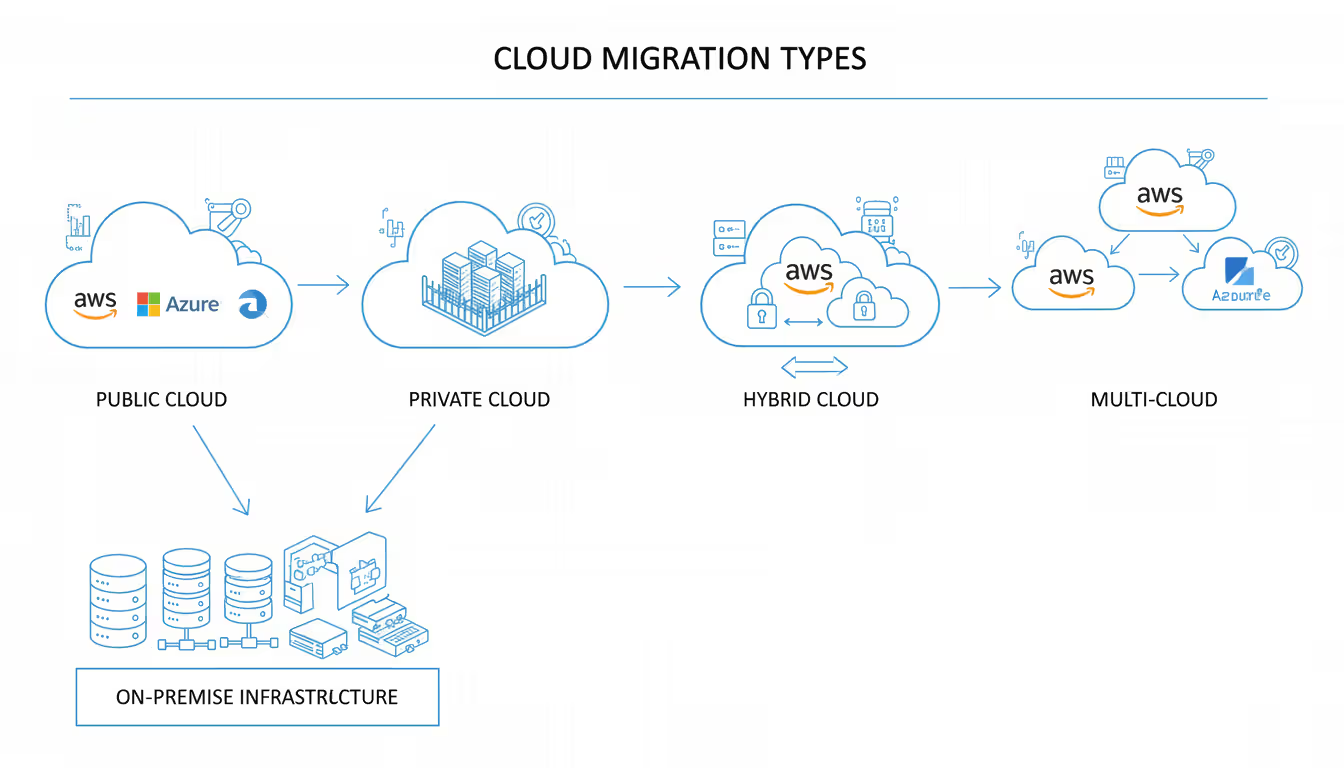
There are several types of cloud migration. A public cloud migration moves resources to third-party providers like AWS, Azure, or Google Cloud. Private cloud migration involves transferring to dedicated infrastructure, either on-premises or hosted. Hybrid cloud migration combines both approaches, allowing workloads to move between public and private environments based on specific requirements. Multi-cloud strategies distribute resources across multiple cloud providers to avoid dependency on a single vendor.
Business drivers for cloud migration have evolved significantly. Cost reduction remains a primary motivator, but organizations now prioritize agility and innovation capacity. Companies need to scale resources rapidly during peak demand periods without maintaining expensive infrastructure year-round. A retail business might double its computing capacity during holiday shopping seasons, then scale back in January.
Remote work requirements accelerated cloud adoption dramatically. When teams scattered across continents need access to the same tools and data, cloud infrastructure eliminates the bottlenecks of VPN connections to physical data centers. Development teams can spin up testing environments in minutes rather than waiting weeks for hardware procurement.
Disaster recovery capabilities represent another compelling reason. Traditional backup systems require duplicate physical infrastructure in separate locations. Cloud-based disaster recovery replicates data across geographically distributed data centers automatically, reducing recovery time from days to hours or minutes.
Regulatory compliance also drives migration decisions. Financial institutions and healthcare providers face strict data residency requirements. Cloud providers now offer region-specific deployments that guarantee data never leaves approved jurisdictions, making compliance easier to maintain and audit.
Common migration scenarios include data center consolidation, where organizations reduce their physical footprint by moving workloads to cloud infrastructure. Application modernization scenarios involve re-architecting legacy applications to take advantage of cloud-native features. Some companies migrate development and testing environments first, keeping production systems on-premises until they gain confidence in cloud operations.
Author: Logan Kessler;
Source: baltazor.com
How to Build a Cloud Migration Strategy
A solid cloud migration strategy begins with understanding your current environment. Most organizations underestimate this assessment phase. You need complete visibility into application dependencies, data flows, and performance baselines. Applications that seem simple often have hidden connections to databases, file shares, and third-party services.
Start by cataloging every application and classifying it by business criticality. Which systems would halt operations if they went offline for four hours? Which applications handle sensitive customer data? This classification determines migration priority and acceptable risk levels.
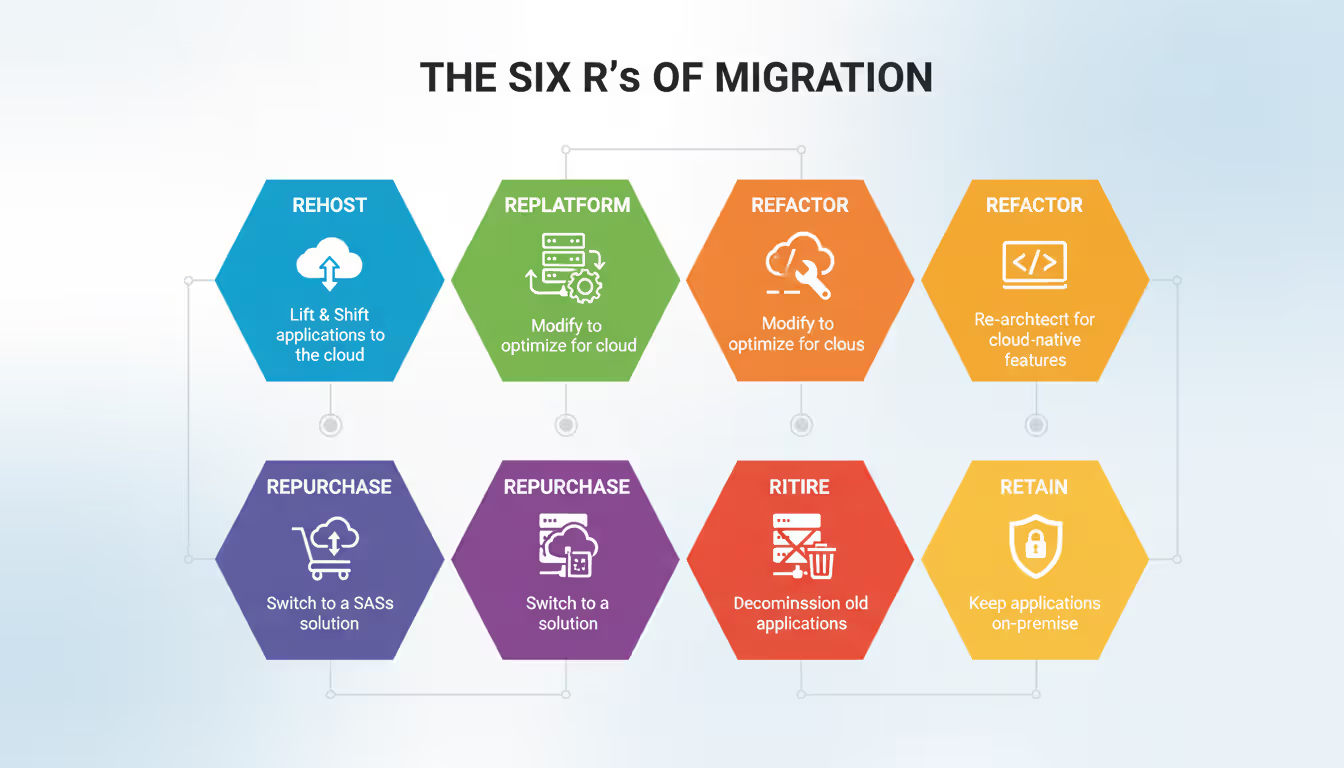
The six R's framework provides a structured approach to choosing migration methods for each workload. Rehosting (lift-and-shift) moves applications to the cloud with minimal changes. This approach works well for applications nearing end-of-life or when speed matters more than optimization. A company might rehost a legacy inventory system that will be replaced within two years rather than investing in refactoring.
Replatforming makes minor optimizations during migration without changing core architecture. You might switch from self-managed databases to a managed database service, gaining automatic backups and scaling without rewriting application code. This middle-ground approach balances speed with some cloud benefits.
Refactoring (re-architecting) involves modifying applications to leverage cloud-native features like auto-scaling, serverless functions, or managed services. This approach requires more time and expertise but delivers the greatest long-term benefits. An e-commerce platform might refactor its monolithic architecture into microservices that scale independently during traffic spikes.
Repurchasing means replacing existing applications with cloud-based SaaS alternatives. Many companies migrate email systems to Microsoft 365 or Google Workspace rather than running Exchange servers in the cloud. This eliminates infrastructure management entirely but may require workflow adjustments.
Author: Logan Kessler;
Source: baltazor.com
Retiring involves identifying applications that no one actually uses anymore. Audits frequently reveal systems consuming resources and licenses without delivering value. Decommissioning these before migration reduces costs and complexity.
Retaining means deliberately keeping certain workloads on-premises. Mainframe systems with decades of customization, applications with extreme latency requirements, or systems under active redevelopment might not be good migration candidates.
Stakeholder alignment prevents migration failures more than any technical consideration. Finance teams need accurate cost projections, including often-overlooked expenses like data transfer fees and training. Operations teams must understand their changing responsibilities—managing cloud infrastructure differs substantially from maintaining physical servers.
Security and compliance teams should participate from day one. They need time to evaluate cloud provider certifications, configure identity management, and establish monitoring protocols. Discovering compliance gaps mid-migration causes expensive delays.
Application owners often resist migration because they fear disruption to business operations. Address this by clearly communicating benefits specific to their needs—faster deployment cycles, better disaster recovery, or reduced maintenance burden. Involve them in testing and validation so they gain confidence before production cutover.
Creating Your Cloud Migration Roadmap
A cloud migration roadmap transforms strategy into executable steps with realistic timelines. The discovery phase typically consumes 15-20% of the total migration timeline but prevents costly mistakes later. Use automated discovery tools to map application dependencies, network traffic patterns, and resource utilization.
Manual documentation misses critical details. An application might query a database that only receives updates on the last day of each month. Without monitoring that spans a full business cycle, you won't capture this dependency. Discovery should run for at least one complete business cycle—longer for companies with seasonal variations.
The planning phase translates discovery findings into a detailed migration sequence. Dependencies dictate order. You can't migrate an application before migrating the databases it requires. Create a dependency graph showing which systems must move together or in sequence.
Wave planning groups applications into migration batches. The first wave should include low-risk, non-critical applications that serve as learning opportunities. A departmental wiki or an internal tool used by a small team makes a better first migration than your customer-facing e-commerce platform.
Each wave should have clear success criteria. Define acceptable performance thresholds, maximum allowable downtime, and rollback triggers. If application response time exceeds baseline by more than 20%, that's a red flag requiring investigation before proceeding.
Pilot migrations validate your approach with real workloads under controlled conditions. Choose one application from your first wave and execute the complete migration process. Document every step, including time required, issues encountered, and workarounds needed.
Pilots reveal gaps in documentation, training, and tooling. Your runbook might assume certain permissions exist, but the cloud environment setup didn't include them. Better to discover this with a test application than during a critical production migration at 2 AM.
Execution requires disciplined change management. Establish maintenance windows and communicate them clearly to all stakeholders. Users need advance notice, not a surprise outage notification. For critical systems, consider parallel running—operating both old and new environments simultaneously until you verify the cloud version performs correctly.
Cutover strategies vary by application tolerance for downtime. Some systems can accept a weekend outage for migration. Others require zero-downtime approaches using database replication and load balancer switching. A financial trading platform can't go offline during market hours, demanding careful orchestration of cutover timing.
Post-migration validation often gets rushed, leading to problems discovered weeks later. Test all functionality, not just happy paths. Verify integrations with other systems, confirm backup and recovery procedures work, and validate monitoring and alerting.
Optimization begins after migration completes. Cloud environments offer rightsizing opportunities—matching resource allocation to actual usage. Many organizations overprovision initially to ensure performance, then optimize once they understand real-world patterns. A server running at 15% CPU utilization probably doesn't need 32 cores.
Timeline considerations depend on scope and complexity. A small business migrating 10 applications might complete the process in 3-6 months. Enterprise migrations involving hundreds of applications and petabytes of data can span 18-36 months. Aggressive timelines increase risk and stress teams, while overly conservative schedules lose momentum and executive support.
Common Cloud Migration Challenges and How to Avoid Them
Security concerns top the list of migration challenges. Organizations worry about data exposure during transfer and storage in shared infrastructure. These concerns are valid but manageable with proper controls.
Encryption in transit and at rest should be non-negotiable. Data moving to the cloud travels across networks you don't control. TLS encryption prevents interception. At-rest encryption ensures that even if someone gains physical access to storage media, data remains protected.
Identity and access management becomes more complex in cloud environments. Your on-premises Active Directory doesn't automatically extend to cloud resources. Federation services bridge this gap, but configuration errors can expose resources to unauthorized access. A misconfigured S3 bucket has leaked customer data for numerous companies—a mistake that takes minutes to make but months to recover from.
Downtime risks increase when migration plans lack detail. Assuming a database migration will take four hours, then discovering it actually requires twelve, leaves you with difficult choices: extend the outage window or roll back and try again later. Both options damage credibility and user trust.
Author: Logan Kessler;
Source: baltazor.com
Mitigate downtime risk through rehearsals. Restore a production backup to a test environment and practice the migration procedure. Time each step and identify bottlenecks. If database export takes longer than expected, can you optimize queries or increase bandwidth?
Cost overruns surprise organizations that focus only on compute and storage pricing. Data egress fees—charges for transferring data out of the cloud—can be substantial. A company migrating 100TB of data might pay $9,000 just in transfer fees to AWS. Applications that frequently sync large datasets between cloud and on-premises systems incur ongoing egress charges.
Unused resources waste money silently. Development teams spin up test environments and forget to shut them down. Without governance policies and automated cleanup, these orphaned resources accumulate. Implementing tagging standards and automated decommissioning prevents this waste.
Skills gaps slow migration and increase dependence on expensive consultants. Cloud platforms offer hundreds of services with different pricing models, configuration options, and best practices. Your team's expertise in VMware and Windows Server doesn't directly translate to managing Kubernetes clusters or configuring cloud-native networking.
Address skills gaps through structured training before migration begins. Cloud providers offer certification programs that build practical skills. Pair experienced cloud engineers with your existing team so knowledge transfers during actual migration work rather than abstract classroom learning.
Vendor lock-in concerns arise when applications become tightly coupled to proprietary cloud services. Using AWS Lambda, Azure Functions, and Google Cloud Run delivers great developer productivity, but switching providers later requires rewriting code. This isn't necessarily bad—the productivity gains often outweigh portability concerns—but make the trade-off consciously.
Mitigate lock-in by using abstraction layers where practical. Containerization with Docker and orchestration with Kubernetes provides more portability than serverless functions. Open-source databases like PostgreSQL run on any cloud, while proprietary options like DynamoDB lock you to AWS.
Cloud Migration Costs and Budget Planning
Cloud migration costs divide into one-time migration expenses and ongoing operational costs. Organizations that focus exclusively on the lower monthly infrastructure bills miss significant upfront investments required for successful migration.
Migration-specific costs include assessment and planning tools, which range from free open-source options to enterprise platforms costing $50,000-$200,000 annually. Professional services fees for migration specialists typically run $150-$300 per hour. A mid-sized migration might require 500-1000 consulting hours.
Application refactoring costs vary enormously based on complexity. Simple replatforming might cost $10,000-$50,000 per application. Full re-architecture of a complex application can exceed $500,000. These costs include development, testing, and validation work.
Data transfer represents a hidden expense that catches many organizations off guard. Moving data into cloud platforms is typically free, but some scenarios incur costs. If you use a third-party migration service or dedicated network connections like AWS Direct Connect, expect setup fees of $5,000-$20,000 plus monthly charges.
Training and certification investments pay long-term dividends but require upfront budget. Sending team members to cloud training courses costs $2,000-$5,000 per person. Certification exam fees add another $300-$500 per attempt. Budget for 40-80 hours of study time per person, which represents opportunity cost even if training is free.
Ongoing operational costs include compute, storage, networking, and managed services. Compute costs depend on instance types and utilization patterns. A server running 24/7 costs more than one that operates only during business hours. Reserved instances offer 30-60% discounts compared to on-demand pricing but require one or three-year commitments.
Storage costs seem trivial until you accumulate petabytes. AWS S3 standard storage costs $0.023 per GB monthly. Storing 500TB costs $11,500 monthly, or $138,000 annually. Infrequently accessed data should move to cheaper storage tiers—glacier storage costs $0.004 per GB monthly, reducing that 500TB bill to $2,000 monthly.
Network costs often surprise organizations. Data transfer within the same availability zone is usually free. Transfer between availability zones costs $0.01-$0.02 per GB. Internet egress costs $0.05-$0.09 per GB depending on volume. An application that serves 10TB monthly to users costs $500-$900 just in bandwidth.
Hidden expenses include third-party software licensing, monitoring and security tools, backup and disaster recovery services, and compliance audit fees. Windows Server licenses in cloud environments cost $0.10-$0.50 per hour depending on instance size. Running 20 Windows servers 24/7 adds $1,500-$7,000 monthly.
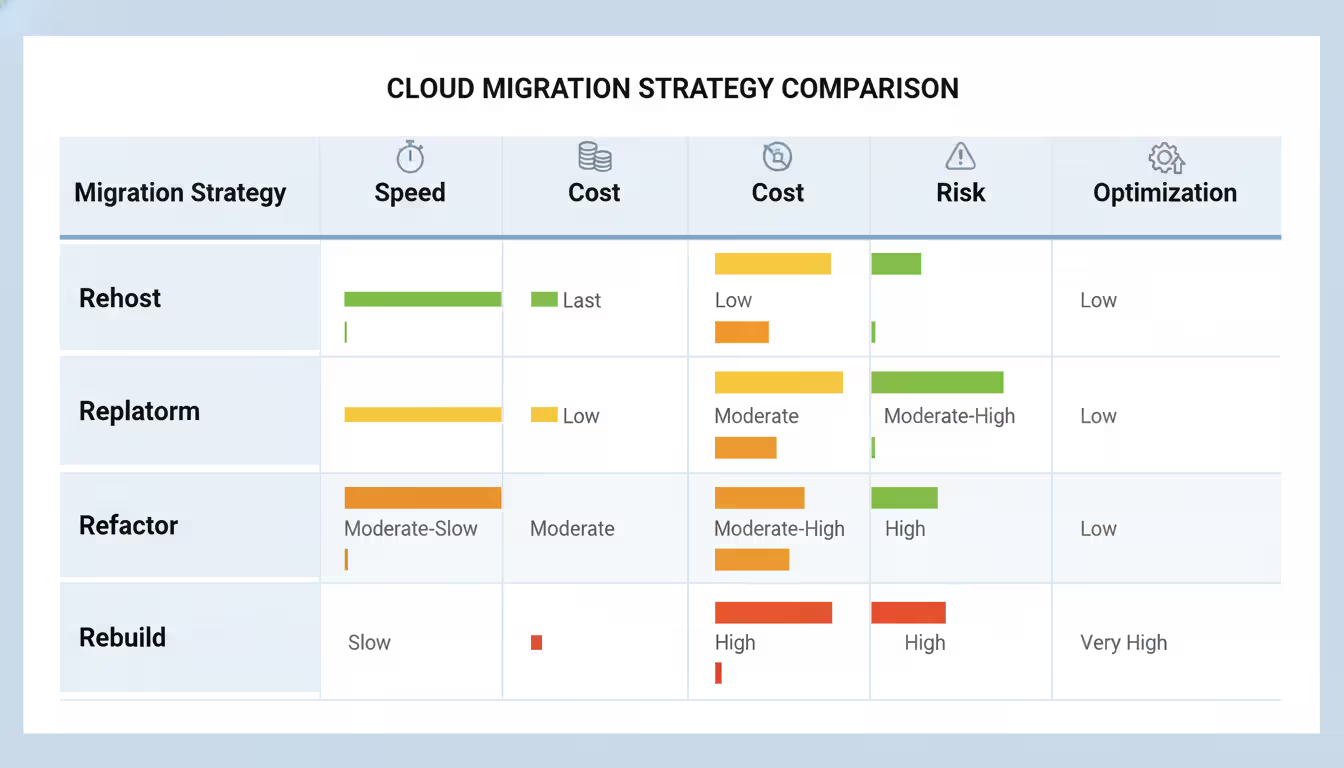
ROI timelines vary by migration approach. Lift-and-shift migrations might achieve cost savings within 6-12 months since they require minimal upfront investment. Refactoring projects might take 18-36 months to break even due to higher development costs, but deliver greater long-term savings through better resource utilization.
Cost optimization strategies should begin during migration, not afterward. Right-sizing instances before migration prevents paying for unnecessary capacity. Implementing auto-scaling from day one ensures you only pay for resources during peak demand. Scheduled shutdown of development and testing environments saves 65% on those resources if they only run during business hours.
Reserved instance planning requires usage analysis. If you know certain workloads will run continuously for the next year, purchasing reserved instances saves money. But committing to reserved capacity before understanding actual usage patterns can backfire if requirements change.
Choosing the Right Cloud Provider and Tools
Author: Logan Kessler;
Source: baltazor.com
The three major cloud providers—AWS, Azure, and Google Cloud—each offer comprehensive services but differ in strengths, pricing models, and ecosystem maturity.
AWS dominates market share and offers the broadest service catalog with over 200 services. This maturity means more third-party tools, more community knowledge, and more experienced consultants. AWS excels in compute flexibility with numerous instance types optimized for different workloads. However, the vast service catalog can overwhelm newcomers, and pricing complexity makes cost estimation challenging.
Azure integrates tightly with Microsoft ecosystems, making it attractive for organizations heavily invested in Windows Server, Active Directory, and Microsoft 365. Hybrid cloud capabilities through Azure Arc allow unified management of on-premises and cloud resources. Azure's enterprise agreements often provide favorable pricing for existing Microsoft customers. The platform's relative youth compared to AWS means some services are less mature.
Google Cloud leads in data analytics and machine learning services, reflecting Google's core competencies. BigQuery offers exceptional performance for large-scale data analysis. Kubernetes originated at Google, making Google Kubernetes Engine (GKE) a natural choice for container orchestration. Google Cloud typically costs 10-20% less than equivalent AWS services, though the smaller ecosystem means fewer third-party integrations.
Migration Strategy
Pros
Cons
Cost Level
Complexity
Best Use Cases
Rehost (Lift-and-Shift)
Fast migration, minimal changes, low risk
Doesn't leverage cloud benefits, may cost more long-term
Highest cost, longest timeline, business disruption risk
Very high
Very high
Core business applications, competitive differentiators
Migration tools automate much of the heavy lifting. AWS Migration Hub provides a centralized location to track migrations across multiple AWS tools. Azure Migrate offers assessment and migration capabilities for VMware, Hyper-V, and physical servers. Google Cloud's Migrate for Compute Engine handles VM migrations from on-premises or other clouds.
Third-party tools like CloudEndure (now AWS Application Migration Service) provide continuous replication with minimal downtime. They replicate source servers to the cloud, keeping them synchronized until cutover. This approach works well for applications that can't tolerate extended outages.
Database migration tools deserve special attention since databases often present the trickiest migration challenges. AWS Database Migration Service supports homogeneous migrations (Oracle to Oracle) and heterogeneous migrations (Oracle to PostgreSQL). Azure Database Migration Service offers similar capabilities with tight integration into Azure database services.
Infrastructure-as-code tools like Terraform and AWS CloudFormation enable repeatable, version-controlled deployments. Rather than manually clicking through console screens to configure resources, you define infrastructure in code files. This approach prevents configuration drift and makes it easy to replicate environments.
Decision criteria should weigh multiple factors beyond price. Evaluate geographic coverage if you need data residency in specific regions. Some providers have limited presence in certain countries. Assess the maturity of services you'll actually use—having 200 services doesn't help if the three you need are underdeveloped.
Compliance certifications matter for regulated industries. Verify your chosen provider maintains certifications relevant to your industry—HIPAA for healthcare, PCI DSS for payment processing, FedRAMP for government work. Not all services within a cloud platform carry the same certifications.
Support levels vary dramatically. Basic support might provide 24-hour response times for critical issues. Enterprise support offers 15-minute response times and dedicated technical account managers. For production workloads, inadequate support creates unacceptable risk.
The biggest mistake organizations make is treating cloud migration as purely a technical project. Successful migrations require equal focus on people, processes, and culture change. Your team needs time to develop cloud expertise, your processes must adapt to cloud-native operations, and your culture must embrace the continuous optimization that cloud economics demand
— Adrian Cockcroft
Frequently Asked Questions About Cloud Migration
How long does cloud migration typically take?
Migration timelines range from a few months to several years depending on scope and complexity. A small business migrating 5-10 applications might complete the process in 3-6 months. Mid-sized companies with 50-100 applications typically require 12-18 months. Large enterprises migrating hundreds of applications and complex dependencies often spend 24-36 months. Factors that extend timelines include application refactoring requirements, data volume, regulatory compliance needs, and team experience with cloud platforms. Rushing migration increases risk of failures and cost overruns.
What is the difference between lift-and-shift and cloud-native migration?
Lift-and-shift (rehosting) moves applications to the cloud with minimal or no changes to their architecture. You essentially recreate your on-premises environment in the cloud, maintaining the same operating systems, application code, and configurations. This approach is fast and low-risk but doesn't take advantage of cloud-native features like auto-scaling or managed services. Cloud-native migration (refactoring) involves re-architecting applications to leverage cloud services, often breaking monolithic applications into microservices, using serverless functions, and implementing auto-scaling. This approach requires more time and investment but delivers better performance, resilience, and cost efficiency.
Do I need to migrate everything at once?
No, and you shouldn't attempt to migrate everything simultaneously. Phased migration reduces risk and allows teams to learn from early waves before tackling critical systems. Most organizations start with non-critical applications to gain experience, then progressively migrate more important workloads. Some systems may never migrate—mainframes with decades of customization, applications with extreme latency requirements, or systems scheduled for retirement might remain on-premises. Hybrid cloud architectures that maintain some workloads on-premises while others run in the cloud are increasingly common and often represent the optimal long-term state.
What security measures should be in place during migration?
Essential security measures include encryption for data in transit and at rest, multi-factor authentication for all cloud access, network segmentation to isolate migrated workloads, comprehensive logging and monitoring to detect anomalies, and regular security assessments. Implement least-privilege access controls so users and applications only have permissions they actually need. Establish a security baseline before migration and validate that migrated systems meet or exceed those standards. Engage your security team early in planning to address compliance requirements, data residency rules, and industry-specific regulations. Consider using cloud-native security services like AWS GuardDuty or Azure Security Center for threat detection.
How much does cloud migration cost on average?
Migration costs vary enormously based on scope, approach, and starting point. Small businesses might spend $25,000-$100,000 for simple lift-and-shift migrations of a few applications. Mid-sized companies typically invest $200,000-$1,000,000 including assessment, migration tools, professional services, and application modifications. Large enterprise migrations can exceed $5,000,000 when including extensive refactoring, training, and consulting. These figures cover one-time migration costs, not ongoing operational expenses. Budget 15-25% of your total migration cost for unexpected issues and scope expansion. Cost per application ranges from $5,000 for simple rehosting to $500,000+ for complex refactoring projects.
What happens to our data during the migration process?
Data migration strategies depend on volume, sensitivity, and downtime tolerance. For smaller datasets (under 10TB), network transfer over encrypted connections is common. Larger datasets may use physical transfer services like AWS Snowball or Azure Data Box—you copy data to physical devices that are shipped to the cloud provider's data center. During migration, data should be encrypted and checksummed to verify integrity. Most migrations maintain the source data until the cloud environment is validated, providing a rollback option. Replication-based migration tools keep source and destination synchronized until cutover, minimizing data loss risk. After successful migration and validation, source data is typically archived for a retention period before deletion.
Cloud migration represents a significant undertaking that transforms how organizations manage technology infrastructure. Success requires thorough planning, realistic timelines, and commitment to developing new skills and processes. The organizations that achieve the best outcomes treat migration as a business transformation project, not merely a technical exercise.
Start with clear objectives beyond "moving to the cloud." Define specific business outcomes you want to achieve—faster deployment cycles, improved disaster recovery, better scalability, or reduced infrastructure management overhead. These objectives guide decisions about which applications to migrate, which migration approach to use, and how to measure success.
Invest in assessment and planning even though it delays visible progress. The time spent understanding dependencies, cataloging applications, and designing your target architecture prevents expensive mistakes during execution. Organizations that rush past planning inevitably spend more time and money fixing problems than they would have spent on thorough preparation.
Build cloud expertise within your team rather than relying exclusively on external consultants. Consultants provide valuable experience and accelerate initial migration waves, but your team will operate these systems for years. Knowledge transfer should be an explicit deliverable in any consulting engagement.
Embrace iterative improvement over perfection. Your first migrations won't be optimal. You'll overprovision some resources, underprovision others, and discover better approaches as you gain experience. Cloud environments make it easy to adjust and optimize, so ship working solutions and improve them based on real-world performance data.
Monitor costs from day one and establish governance policies early. Cloud's flexibility makes it easy to accumulate waste through orphaned resources, oversized instances, and unnecessary data storage. Organizations that wait until they receive a shocking bill to implement cost controls have already wasted money that governance could have prevented.
Cloud migration is not a destination but a starting point for continuous optimization and innovation. The real value emerges after migration when you leverage cloud-native services, implement automation, and accelerate your development cycles. Treat migration as the foundation for ongoing transformation rather than a project with a fixed end date.
A software defined network (SDN) separates control intelligence from physical equipment, enabling centralized management and programmable network behavior. Discover the three-layer architecture, key components, and how SDN transforms enterprise networking
A complete guide to setting up an intranet for your organization. Covers planning requirements, choosing between cloud and self-hosted platforms, technical setup steps, common mistakes to avoid, and strategies for maintaining and scaling your intranet over time
Remote desktop hosting delivers centralized desktop environments accessible from anywhere. This guide covers infrastructure selection, security implementation with multi-factor authentication and VPN, printing solutions, and common pitfalls to avoid when deploying remote desktop services for your business
Private cloud infrastructure dedicates computing resources to a single organization, offering control and compliance advantages over shared public cloud. This guide examines architecture, platform choices, managed services options, and decision criteria for enterprises evaluating private cloud deployment
The content on this website is provided for general informational and educational purposes only. It is intended to explain concepts related to cloud computing, computer networking, infrastructure, and modern IT systems.
All information on this website, including articles, guides, and examples, is presented for general educational purposes. Technology implementations may vary depending on specific environments, business needs, infrastructure design, and technical requirements.
This website does not provide professional IT, engineering, or technical advice, and the information presented should not be used as a substitute for consultation with qualified IT professionals.
The website and its authors are not responsible for any errors or omissions, or for any outcomes resulting from decisions made based on the information provided on this website.