Modern open-plan office with employees working at desks, monitors displaying corporate intranet dashboards, and a central screen showing a connected network visualization
I've watched dozens of companies stumble through intranet projects, and here's what I've learned: the actual technology part? That's maybe 30% of the challenge. The real work happens in the planning stages, where you'll make decisions that either set you up for success or guarantee you'll be rebuilding everything in eighteen months.
Let me walk you through what actually works, based on real deployments across companies ranging from boutique agencies to mid-sized manufacturers.
What Is an Intranet and Why Your Business Needs One
Think of an intranet as your company's private website—except instead of being open to the world, only your employees can access it. The technical definition goes like this: a private network that uses web technologies to let organization members share information, collaborate on projects, and access company resources.
Here's where people get confused. The internet? Public playground. Anyone with a connection can visit. An intranet? That's your company's locked office building. You need credentials just to get past the front door.
Now, extranets add another layer. Let's say you need certain suppliers to access specific documents or clients to check project status. You're not giving them full employee access to everything—that's where an extranet comes in. It's like having a reception area where visitors can access what they need without roaming your entire office. Most companies I work with build the internal intranet first. They add the extranet piece later when specific partnership needs arise.
Why bother with all this? Real example: I consulted for a 75-person marketing firm that was drowning in email chaos. Their creative team couldn't find the current brand guidelines. Account managers kept using outdated proposal templates. Someone would update a document, and three different versions would circulate simultaneously.
Six months after deploying their intranet, email traffic dropped by nearly half. Everyone knew exactly where to find current templates, brand assets, and project documentation. The time savings? Their creative director estimated each designer saved 45 minutes daily just from eliminating file-hunting.
Author: Megan Holloway;
Source: baltazor.com
Remote teams see even bigger wins. When your accounting department works from Cleveland while sales operates from Austin, a centralized hub becomes your virtual office. No more "I didn't see that email" excuses when policy changes go live.
Security matters too. Employees stop uploading confidential client data to personal Dropbox accounts when they've got proper internal file sharing. You control the infrastructure, monitor who accesses what, and maintain those all-important audit trails that regulators love.
Planning Your Intranet Infrastructure
Skip the planning phase or rush through it, and you're basically lighting money on fire. I've seen it happen. Companies get excited, pick some software, start building... then realize six months in they've built something nobody wants to use.
Assessing Your Business Requirements
Grab a notepad and start talking to actual employees. Not just managers—the people who'll use this thing daily.
Your sales team might need instant access to pricing sheets and proposal templates. The developers probably want somewhere to document their code and share technical specs. HR needs a place for benefits information and PTO requests. Finance wants expense report workflows.
Here's the thing though: don't just collect a wish list and try building everything. Prioritize ruthlessly. I worked with a manufacturing company that initially wanted seventeen different modules. We launched with four core functions that solved their biggest pain points. Three months later, after seeing how people actually used the system, we added three more features. Half their original wish list never got built because they realized they didn't actually need it.
User count drives infrastructure decisions more than almost anything else. Twenty employees in one office? Your needs look completely different from two hundred people across five locations. And be realistic about growth—if you're planning to double headcount within two years, build for that now. Migrating platforms mid-growth-spurt creates massive headaches.
Budget talk time. Small business intranet deployments typically run anywhere from $2,000 to $15,000 for initial setup. Then expect $1,200 to $6,000 yearly for maintenance, updates, and support. But here's what the initial quotes don't tell you: factor in employee time for content creation, training sessions, and integration work with your existing systems. Those hidden costs add up fast.
Choosing Between Cloud-Hosted and On-Premises Solutions
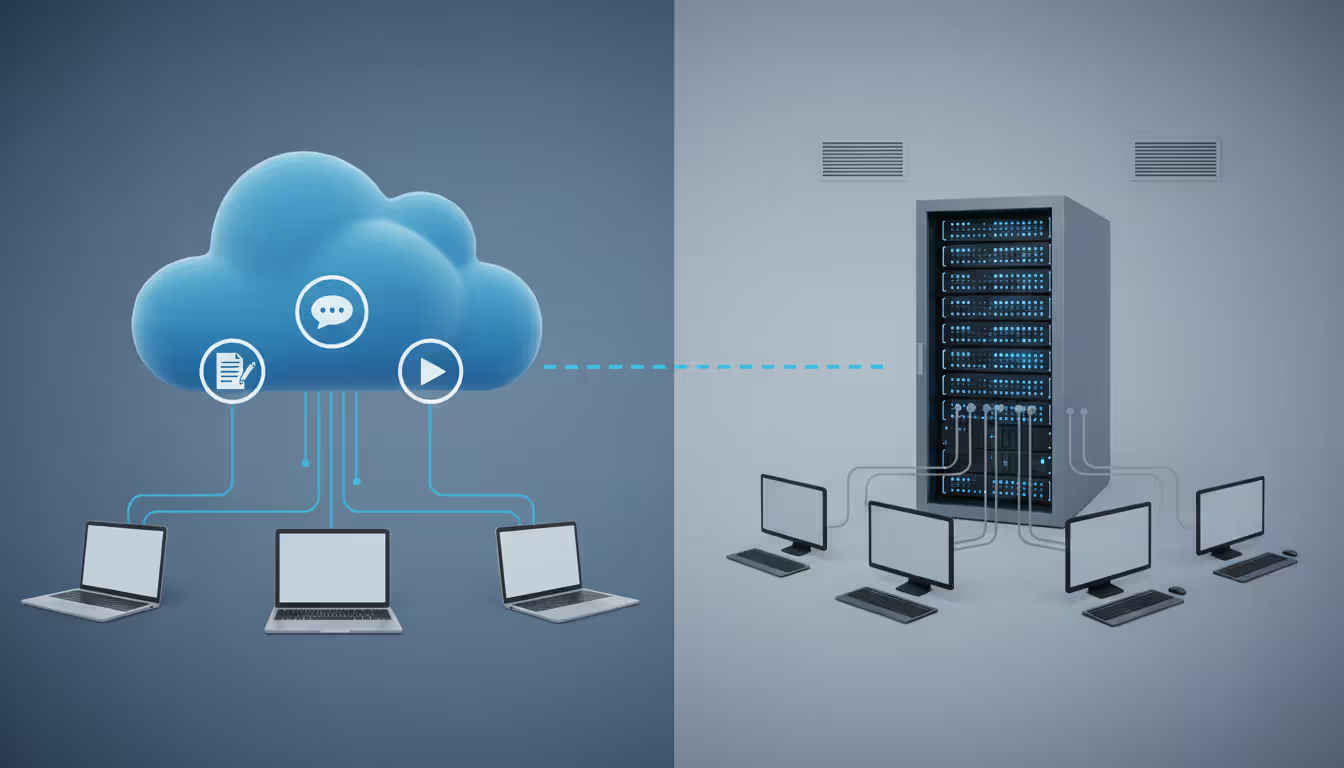
This decision shapes everything that follows. Cloud-hosted means your intranet lives on someone else's servers—Microsoft, Google, or specialized intranet providers handle the infrastructure. On-premises means you're buying servers, installing them somewhere, and maintaining everything yourself.
Feature
Cloud-Hosted
On-Premises
Upfront investment
$500-$5,000
$5,000-$25,000
Who handles maintenance
Provider manages updates and backups
Your team handles everything
Adding capacity
Instant—just upgrade your plan
Requires purchasing new hardware
Security control
Provider's baseline plus your policies
Complete control over every aspect
Technical skills needed
Minimal configuration knowledge
Requires server and networking expertise
Time to launch
1-2 weeks
4-12 weeks
Small businesses without dedicated IT staff usually fare better with cloud options. The provider handles security patches, backup management, and infrastructure scaling while you focus on actually using the thing. Most cloud platforms bundle features like document management, team messaging, and workflow tools that you'd otherwise need to install and integrate separately.
Setting up cloud infrastructure for smaller companies offers another advantage I see consistently: predictable monthly costs instead of huge capital expenditures. Your CFO probably prefers spreading $3,000 across twelve months versus writing one $15,000 check upfront.
On-premises makes sense for specific scenarios. Healthcare companies dealing with HIPAA compliance sometimes prefer total control over where patient data lives. Financial institutions with strict regulatory requirements often go this route. Defense contractors aren't getting approval for cloud hosting anytime soon.
Some organizations split the difference—core intranet services in the cloud with sensitive databases staying on-premises. This hybrid approach requires more sophisticated configuration, but it works when you've got mixed requirements.
Author: Megan Holloway;
Source: baltazor.com
Technical Requirements and Network Configuration
This is where your infrastructure either supports everything you're trying to build or becomes a constant source of frustration. Shortcuts here create exponential problems later.
Hardware and Server Specifications
Cloud-hosted solutions mostly let you skip hardware concerns. You pick a service tier based on user count and storage needs, then scale up when necessary. Simple.
On-premises deployments require more thought. For a small business supporting 25-50 employees, minimum viable hardware looks like this:
Server with 16GB RAM minimum, quad-core processor, 500GB storage (though honestly, jump to 1TB)
Gigabit network switches that can handle your user count
UPS system to prevent data corruption during power blips
Backup storage—either a NAS device or secondary server
Larger companies need redundancy built in. If your intranet crash means 200 people sitting idle, each hour of downtime costs thousands in lost productivity. Redundant servers might seem expensive until you calculate the cost of your first major outage.
Network bandwidth affects daily experience more than people realize. An office with 50 employees regularly accessing video training content or large CAD files needs at least 100 Mbps dedicated to internal traffic. Insufficient bandwidth creates those annoying delays that make people give up and go back to email.
Storage estimates start around 5-10GB per user, but that varies wildly based on your industry. Architecture firms sharing rendering files need way more than consulting companies primarily sharing documents. Calculate based on your specific content types, then add 30% headroom.
Author: Megan Holloway;
Source: baltazor.com
Setting Up Secure Remote Access
Remote access transforms your intranet from an office tool into something that supports distributed work. But the second you open network access beyond your physical location, security becomes critical.
VPNs create encrypted tunnels between remote devices and your internal network. When someone connects through the VPN, their traffic stays protected from interception and they access intranet resources exactly as if they'd walked into the office.
Setting up VPN infrastructure involves several moving parts:
Server software handles incoming connections. OpenVPN and WireGuard offer solid open-source options if you've got technical chops. Cisco AnyConnect and similar commercial products cost more but include support and easier management interfaces. Open-source cuts licensing costs but requires someone comfortable with command-line configuration.
Authentication verifies users before granting access. Multi-factor authentication isn't optional anymore—require it for all remote connections. Username and password alone won't cut it in 2026. Too many credential breaches happen for single-factor authentication to provide adequate protection.
Client setup determines whether employees actually use your VPN correctly or find workarounds. Pre-configured profiles eliminate manual entry of server addresses, certificates, and protocol settings. Make it dead simple, or people will take security shortcuts.
Firewall configuration needs to allow VPN traffic while blocking everything else. If your workforce doesn't span the globe, configure your firewall to only accept VPN connections from expected geographic regions. This single rule blocks enormous volumes of automated attack attempts.
Split tunneling creates an interesting trade-off. Full tunneling routes all device traffic through your network—maximum security but potentially slower personal internet use for remote workers. Split tunneling only routes intranet-bound traffic through the VPN—better performance but requiring more sophisticated security policies. Most companies I work with use split tunneling for general employees and full tunneling for high-privilege admin accounts.
Companies that treat remote access as an afterthought end up scrambling when they suddenly need it. I've seen businesses try to retrofit VPN infrastructure in a week when COVID hit or a major snowstorm forced office closures. Plan your remote access architecture from day one, even if everyone currently works in-office. That flexibility becomes invaluable when circumstances change
— Michael Chen
Step-by-Step Intranet Setup Process
Once planning wraps up and infrastructure decisions get made, implementation follows a specific sequence. Jump around or skip steps, and you'll create unnecessary complications.
Installing and Configuring Intranet Software
Platform choice depends heavily on your requirements and technical capabilities. Popular options each have distinct personalities:
SharePoint from Microsoft integrates beautifully with Microsoft 365 environments and offers extensive capabilities—but configuring it properly requires real expertise. Don't let anyone tell you it's simple.
Confluence from Atlassian excels at documentation and knowledge management. Tech companies and engineering teams particularly love it.
WordPress with intranet plugins gives you familiar interfaces if you already use WordPress externally. Security configuration needs careful attention though—WordPress's popularity makes it a frequent attack target.
Purpose-built platforms like Simpplr, Staffbase, or LumApps reduce customization needs since they're designed specifically for internal communication.
Cloud-hosted deployment typically follows this sequence:
Sign up with your chosen provider
Configure basics like organization name, domain, and branding
Set up user authentication—ideally via single sign-on with existing email
Import or build your initial content structure
Connect integrations with other business tools
On-premises installations involve more technical depth:
Prepare the server—install operating system, apply security patches
Install database software (MySQL, PostgreSQL, SQL Server depending on platform)
Install web server software (Apache or Nginx for most platforms)
Install the actual intranet application
Configure SSL certificates for encrypted connections
Set up automated backups
Configure monitoring to alert on performance issues
Documentation matters enormously for self-hosted installations. Record every configuration choice and why you made it. Six months from now when something breaks, you'll thank yourself for keeping notes. Future administrators definitely will.
Creating User Access Controls and Permissions
Permission structures require granular control over who can view, edit, and delete different content areas. Get this wrong and you'll either create information silos where nobody can find anything, or security gaps where everyone can access everything.
Define user groups matching your organizational structure:
Company-wide access covers announcements, policies, and general resources everyone needs
Department groups control access to marketing materials, engineering docs, sales resources
Project teams get temporary access to shared workspaces for cross-functional work
Administrators maintain full system access for configuration and troubleshooting
Implement least privilege—users get only what they need for their specific roles. Why would an engineer need edit rights to HR policy documents? Why would sales access engineering specifications unless actively working on a technical proposal?
Role-based access control makes permission management sustainable. Instead of assigning permissions to individual users (imagine managing 200 individual permission sets), you assign them to roles, then add users to roles. When someone switches positions, you update their role membership rather than reconfiguring dozens of individual permissions.
Document approval workflows benefit from layered permissions. Junior staff create drafts, managers review and approve, administrators publish to the wider organization. This prevents incorrect or premature information from spreading.
Testing Connectivity and Security
Thorough testing before full rollout catches problems while they're still easy to fix.
Connectivity checks verify access from all expected locations:
Office workstations on local network
Remote locations via VPN
Mobile devices on cellular networks
Different operating systems—Windows, macOS, iOS, Android
Have test users attempt accessing both permitted and restricted content. Confirm permissions work correctly—users should see what they're supposed to see and get clear "access denied" messages for restricted areas.
Performance testing identifies bottlenecks before they affect daily work. Simulate realistic usage: multiple users uploading documents simultaneously, several watching training videos, teams running searches across large document repositories. Response times should stay under two seconds for most operations.
Security validation tests your protective measures:
Try accessing the intranet without VPN from outside the office—should fail
Attempt logins with wrong credentials—should block after a few attempts
Upload potentially malicious files—should be scanned and blocked
Confirm backups are actually capturing data correctly
Penetration testing by qualified security professionals adds another layer of assurance for organizations handling sensitive information. This typically costs $2,000-$10,000 depending on scope, but identifies vulnerabilities before actual attackers do.
Author: Megan Holloway;
Source: baltazor.com
Security Best Practices for Your Intranet
Security isn't something you configure once and forget. It evolves continuously alongside emerging threats and organizational changes.
Encryption protects data during transmission and storage. SSL/TLS certificates encrypt connections between users and your intranet server, preventing credential or document interception. On-premises deployments should enable database encryption protecting stored information even if someone gains physical server access.
Access management requires regular review cycles. Quarterly audits of user permissions catch orphaned accounts from departed employees and permission creep where users accumulate unnecessary access over time. Automated systems disabling accounts when employees leave prevent common security gaps.
Multi-factor authentication should be mandatory for everyone, not just administrators. Password breaches happen constantly—single-factor authentication provides inadequate protection for business resources. MFA adds minimal friction while substantially improving security.
Backup strategies protect against both technical failures and security incidents like ransomware. Use the 3-2-1 approach: keep three data copies on two different media types with one copy stored off-site. Test backup restoration quarterly—untested backups frequently fail when you actually need them.
Logging and monitoring provide visibility into system health and security events. Configure alerts for:
Multiple failed login attempts from the same account suggesting credential stuffing
Sensitive document access outside normal business hours
Unusual data download volumes indicating potential data theft
Performance degradation suggesting denial-of-service attacks or hardware problems
Patch management keeps software current against known vulnerabilities. Cloud-hosted solutions handle this automatically. On-premises deployments require disciplined schedules—monthly at minimum, with critical security patches applied within 48 hours of release.
Compliance requirements vary by industry and location. Healthcare organizations must address HIPAA. Financial services face SEC and FINRA regulations. Companies handling EU citizen data must comply with GDPR regardless of company location. Understanding applicable regulations during planning prevents expensive retrofitting later.
Common Intranet Setup Mistakes to Avoid
Learning from others' mistakes costs significantly less than making them yourself.
Poor scalability planning creates expensive problems fast. An intranet designed for 20 users struggles when the company reaches 50. Storage capacity that seemed adequate fills up faster than expected. Build for at least double your current requirements to accommodate growth without immediate reinvestment.
Inadequate security often stems from prioritizing convenience over protection. Password-only authentication, skipping VPN requirements for remote access, or granting overly broad permissions might seem easier initially but creates vulnerabilities that eventually get exploited.
Ignoring user experience results in low adoption rates. If employees find the intranet confusing, slow, or harder than email and shared drives, they'll avoid it. Conduct usability testing with actual employees before full deployment. Beautiful designs that confuse users waste your investment.
Missing documentation hampers maintenance and knowledge transfer. When the person who configured everything leaves the company, undocumented systems become mysterious black boxes nobody fully understands. Document architecture decisions, configuration settings, and troubleshooting procedures while building.
Insufficient training leaves employees unsure how to use available tools. Budget time for training sessions, create video tutorials for common tasks, and designate "intranet champions" in each department who can answer colleagues' questions.
Neglecting mobile access ignores modern work reality. Field employees, traveling executives, and remote workers need functional mobile interfaces. Test thoroughly on smartphones and tablets, not just desktop browsers.
Over-customization creates maintenance nightmares. Heavily customized installations become difficult to upgrade because updates break custom code. Use standard features and configurations whenever possible, reserving customization for truly unique requirements justifying the ongoing maintenance burden.
Frequently Asked Questions
How much does it cost to set up an intranet?
Budget anywhere from $500 to $25,000+ for initial setup depending on your chosen approach. Cloud-hosted solutions for small businesses start around $500-$2,000 for setup and configuration, plus $10-$50 monthly per user. On-premises deployments cost $5,000-$25,000 initially for hardware and software, with annual maintenance running $1,200-$6,000. Don't forget hidden costs including training time, content creation, and integration with existing systems.
Can I set up an intranet without an IT department?
Absolutely, especially with cloud-hosted platforms designed for non-technical users. Services like Microsoft SharePoint Online, Google Workspace, or specialized intranet platforms provide guided setup wizards and templates requiring minimal technical knowledge. You'll still need someone comfortable with basic computer administration to manage user accounts, permissions, and troubleshooting. On-premises installations definitely require either in-house technical expertise or hiring a consultant to handle server configuration and ongoing maintenance.
How do VPNs and intranets work together?
Your intranet represents the destination—the private network and resources your organization uses for collaboration and information sharing. A VPN provides the secure tunnel enabling remote access to that intranet. Think of the intranet as your office building and the VPN as secure transportation bringing remote employees safely to that building. You can run an intranet without a VPN if everyone works on-site, but remote access requires VPN or similar secure connection technology.
How long does intranet setup typically take?
Cloud-hosted intranets can be operational within 1-3 weeks, with basic configuration taking just days and remaining time spent populating content and training users. On-premises installations require 4-12 weeks depending on complexity—hardware procurement and installation take 2-4 weeks, software configuration takes 1-3 weeks, and testing plus training add another 1-5 weeks. These timelines assume clear requirements and available resources. Projects without dedicated time or clear goals often stretch considerably longer.
Do I need special software to create an intranet?
You need intranet platform software like SharePoint, Confluence, WordPress with intranet plugins, or dedicated intranet solutions, but most modern options work through standard web browsers without requiring special client software. Remote access typically requires VPN client software installed on user devices. Additional integrations might need specific tools—for example, connecting your intranet to accounting systems might require middleware or API connections. Cloud-hosted platforms generally minimize additional software requirements.
Can employees access the intranet remotely?
Yes, with proper configuration. Cloud-hosted intranets typically allow remote access through standard internet connections with username/password or single sign-on authentication. On-premises intranets require VPN connections or reverse proxy configurations enabling secure remote access. Multi-factor authentication should be mandatory for all remote connections regardless of approach. Mobile apps provided by some intranet platforms offer convenient smartphone and tablet access without browser limitations.
Building an intranet represents a substantial investment of time, money, and organizational energy. The returns in improved communication, streamlined workflows, and centralized knowledge justify that investment for most organizations—but only when done thoughtfully.
Success hinges on thorough planning before implementation begins. Understand your specific requirements, choose appropriate infrastructure, and design security measures that protect without creating unnecessary friction.
Whether you select a cloud-hosted solution for simplicity and lower initial costs or an on-premises deployment for maximum control and customization, the structured approach outlined here helps you avoid common pitfalls and build an intranet serving your organization effectively for years ahead. Start with clear objectives, involve users in the design process, prioritize security from day one, and plan for growth beyond immediate needs.
The technical aspects of setting up private cloud infrastructure or configuring VPN access might seem intimidating initially. Breaking the project into manageable phases makes even complex deployments achievable. Your intranet will evolve over time—what you launch initially doesn't need every possible feature. Focus on core functionality addressing your most pressing needs, then expand capabilities based on user feedback and changing requirements.
Software-defined WAN transforms network architecture by enabling intelligent traffic routing across multiple connection types. Learn how SD-WAN works, security considerations, deployment options, and when your business should adopt this technology for improved performance and cost savings
Remote work has made remote access essential for millions. This comprehensive guide explains remote access meaning, compares VPN solutions against remote desktop programs, covers security risks, and helps you choose the right remote access program for your needs
Multi cloud architectures now power 87% of enterprise infrastructure strategies. This comprehensive guide examines how multi cloud works, why businesses adopt it, key components including platforms, storage, data architecture, and IAM, plus practical strategies for implementation and management
Hybrid cloud combines on-premises infrastructure with public cloud services through secure, orchestrated connections. This comprehensive guide covers hybrid cloud architecture, common deployment models, security best practices, implementation challenges, and when organizations should choose a hybrid cloud environmen
The content on this website is provided for general informational and educational purposes only. It is intended to explain concepts related to cloud computing, computer networking, infrastructure, and modern IT systems.
All information on this website, including articles, guides, and examples, is presented for general educational purposes. Technology implementations may vary depending on specific environments, business needs, infrastructure design, and technical requirements.
This website does not provide professional IT, engineering, or technical advice, and the information presented should not be used as a substitute for consultation with qualified IT professionals.
The website and its authors are not responsible for any errors or omissions, or for any outcomes resulting from decisions made based on the information provided on this website.