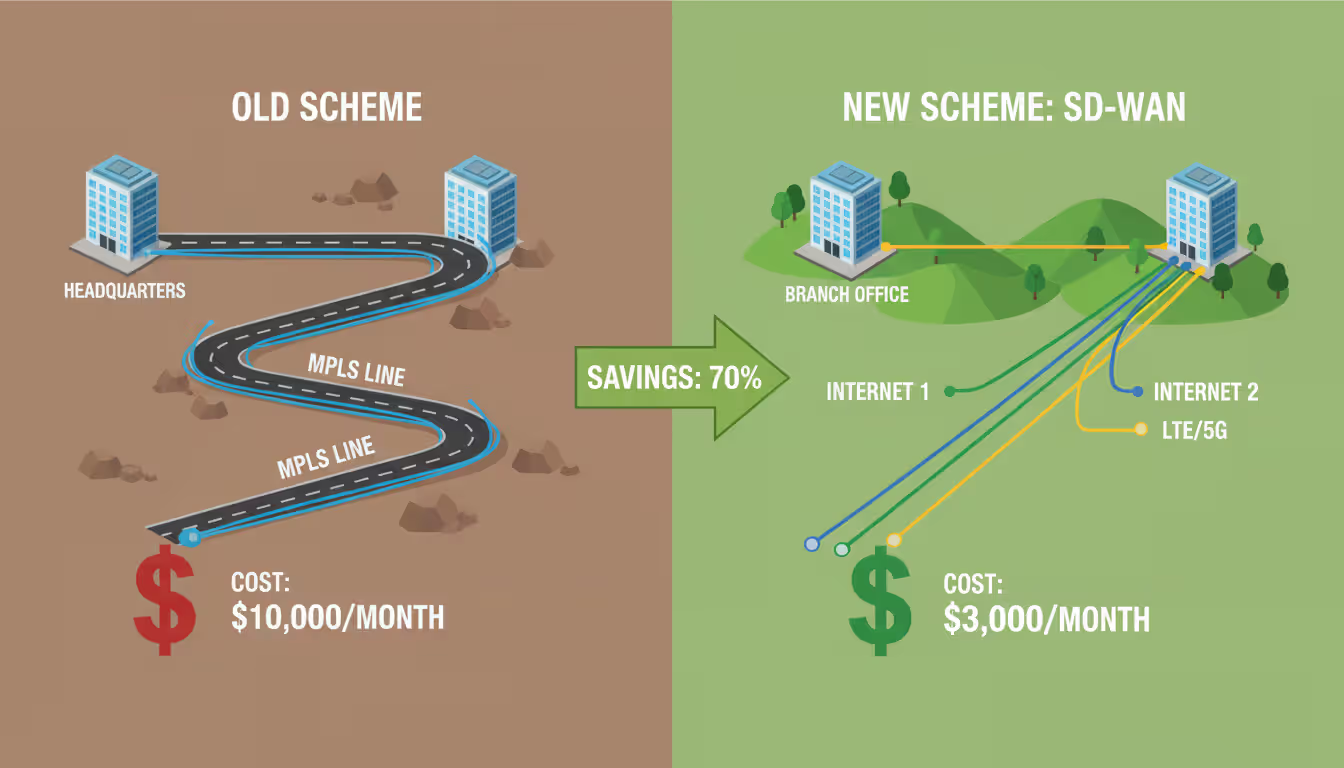
Over the last ten years, network architecture has undergone a massive transformation. Cloud computing took off. Remote work became standard. Companies needed faster, more flexible connectivity—but legacy wide area networks couldn't keep up. Those old systems, built around MPLS circuits and physical routers at every location, cost too much and moved too slowly. Software-defined wide area networking emerged as the solution, separating network intelligence from the hardware underneath and giving IT teams one central place to manage everything.
Understanding SD-WAN Technology
Think of SD-WAN as a smart overlay that sits on top of whatever internet connections you already have. You might use MPLS at some locations, cable internet at others, maybe cellular backup links, perhaps even satellite. Doesn't matter. The software layer treats all these different connection types as a pool of bandwidth it can tap into based on what your applications need right now.
Here's what makes this different from older WAN setups: conventional networks require dedicated, expensive circuits between locations. Every branch office connects back to headquarters through a private MPLS line that could cost $800 to $2,000 monthly. Your network team has to configure each router individually, logging into command-line interfaces and typing in settings by hand. One typo? The whole site goes down.
With SD-WAN, you get what's called "transport independence." The system doesn't care whether packets travel over fiber, copper, wireless, or tin cans connected by string. It just needs working internet connections. Most companies blend cheap commodity broadband (cable or fiber running $50-150/month) with maybe one MPLS circuit for applications that absolutely need guaranteed delivery.
The control plane—that's the brains of the operation—lives in a centralized controller instead of being scattered across individual routers. Picture a traffic cop who can see every road in the city simultaneously and reroute cars around accidents in real time. That's what the SD-WAN orchestrator does for your network traffic.
Let's say you run a regional grocery chain with 35 stores. Before SD-WAN, each store had one MPLS connection. Total monthly cost: $42,000. Someone uploads a big file? Your point-of-sale systems slow down because everything shares that single pipe. After deploying SD-WAN, you keep smaller MPLS circuits for credit card processing ($300/month each) and add two cable internet connections per store ($120 each). Now you've got three paths instead of one, total cost drops to $18,600 monthly, and the system automatically keeps transaction traffic on the reliable path while file uploads use the cheaper links.
Author: Megan Holloway;
Source: baltazor.com
How SD-WAN Works in Practice
The system constantly measures what's happening on every connection. Packet loss. Latency. Jitter. Available bandwidth. These measurements happen every second, sometimes multiple times per second. When you send data, the SD-WAN edge device looks at what application generated that traffic, checks current conditions on all available paths, and picks the best route right then.
Application awareness is where things get interesting. The system uses deep packet inspection to identify what's running. It recognizes Zoom meetings, Salesforce queries, Office 365 email, YouTube videos, whatever. Most platforms know 3,000+ applications out of the box. You tell it which apps matter most to your business. ERP transactions? Critical. Software updates? Low priority. A VP starts a video call and the system immediately shifts that traffic to your highest-quality link, even if it costs more per megabit.
Here's something that catches people off guard: SD-WAN can make forwarding decisions packet by packet. Two employees sitting next to each other, both browsing the web, might have their traffic take completely different routes because one hit a news site that loads fast over cable while the other accessed a company application that performs better over MPLS. The system splits and steers traffic that granularly.
Key Components of SD-WAN Architecture
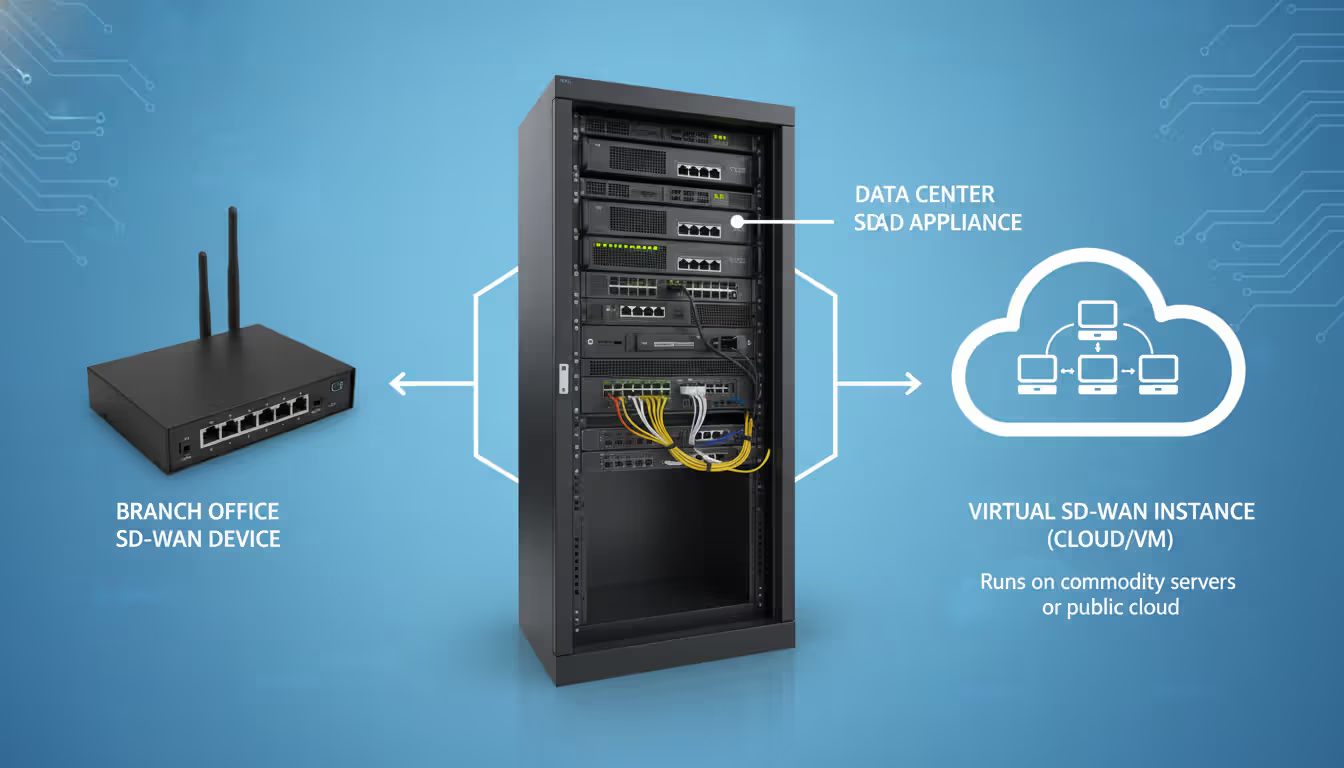
You need hardware (or virtual machines) at every site—these are your edge devices. Small offices might use a tiny fanless box about the size of a paperback novel. Large campus environments might deploy rack-mounted units handling 10,000+ simultaneous connections. Cloud data centers run virtual instances that look like physical devices to the management system.
When you power up a new edge device, it doesn't need a technician to configure it. The unit has a digital certificate baked in. It phones home to your orchestrator, says "hey, I'm device #47," downloads its entire configuration, and starts building encrypted tunnels to other locations. This zero-touch provisioning cuts deployment time from weeks (waiting for a network engineer to drive out and configure things manually) to hours.
The orchestrator—sometimes called a controller—gives you a dashboard showing your entire network. Real-time traffic flows. Which applications are running where. Link quality across all sites. You want to change how the system handles Dropbox traffic? Click, drag, save. The new policy pushes to every edge device within seconds.
Some architectures include regional gateways. These sit in major metro areas or cloud regions and provide secure on-ramps to the internet and SaaS platforms. A branch in rural Montana doesn't backhaul its Microsoft 365 traffic to Dallas headquarters anymore. Instead, it connects to a gateway in Seattle that's 200 miles away instead of 1,800 miles away. Latency drops from 85ms to 18ms and everything feels snappier.
The Role of Centralized Management
IT teams used to manage networks by logging into each router individually via SSH. You'd have a spreadsheet tracking which IP addresses went where, what VLANs existed at each site, which ACLs were applied to which interfaces. Changing a firewall rule across 50 locations meant 50 separate configuration sessions. Mistakes were inevitable.
The centralized console flips this model. One interface controls everything. You see traffic flows as animated diagrams—literally watch data moving between sites. Performance graphs show you that the Denver office experiences degraded connectivity every Tuesday evening (turns out the local ISP runs maintenance then). When someone calls the help desk saying "the network is slow," you can see within 10 seconds exactly which application is running slow and over which link.
Policy automation matters more than people expect. You define once how guest Wi-Fi traffic should be handled. The system applies that policy everywhere, forever, until you change it. New store opens? Plug in the edge device. It gets the guest Wi-Fi policy (plus everything else) automatically. No chance of accidentally leaving a security hole because someone forgot to configure something.
Alerts arrive before users notice problems. Link quality drops below your threshold? The system sends a notification and may already have shifted traffic to backup connections. An application that usually responds in 50ms is suddenly taking 300ms? You get an alert with historical graphs showing exactly when degradation started.
Author: Megan Holloway;
Source: baltazor.com
SD-WAN Security Features and Considerations
Security approaches vary wildly between vendors, and this is where you really need to pay attention. Some companies build everything into the edge device—firewall, intrusion prevention, anti-malware, the works. Others focus purely on routing and expect you to layer in separate security gear or cloud security services. Neither approach is automatically better, but they have different implications for your network design and budget.
All SD-WAN platforms encrypt traffic moving across public internet. They build IPsec or TLS tunnels between sites. Your data stays confidential even though it's crossing networks you don't control. Keys rotate automatically. Certificates get renewed before they expire. That's table stakes—every vendor does this.
What differs is threat inspection. Integrated security platforms examine the actual content of your traffic, not just the wrapper. They block malware downloads, stop command-and-control communications to botnets, prevent sensitive data from leaving your network. The edge device becomes a next-gen firewall plus SD-WAN router in one box. Fewer devices to manage, smaller equipment footprint, one vendor relationship.
The catch? You're betting that the security features bundled into your SD-WAN platform match the sophistication of dedicated security vendors. Some do. Many don't. A regional bank might find that their compliance team insists on best-of-breed security appliances regardless of what the SD-WAN vendor offers.
Zero-trust principles are creeping into SD-WAN designs. Old-school networking assumed anything inside your network was trustworthy. Connect to the corporate LAN and you could access whatever you wanted. Zero-trust throws that out. Every connection request gets verified. Users and devices must authenticate. Access gets limited to specific applications rather than the whole network. Modern SD-WAN platforms with ZTNA capabilities can enforce these granular controls across all your sites.
Segmentation acts like watertight compartments on a ship. You separate POS systems from corporate laptops from IoT sensors. A hotel chain might run separate segments for guest Wi-Fi, reservation systems, door lock controllers, and accounting software. If hackers compromise the guest network, they can't pivot to the credit card processing segment. SD-WAN enforces these boundaries through policy, and you can see the separation visually in your management console.
We're watching networking and security converge into unified platforms. Five years ago, companies bought separate boxes for routing, firewalls, and WAN optimization. Today, branches need single devices that do everything while being managed from the cloud. This shift is permanent
— Sarah Chen
Types of SD-WAN Solutions Available
How you deploy SD-WAN affects what you'll spend upfront, who manages day-to-day operations, and how much control you retain.
Approach
What You'll Pay Initially
How Hard to Manage
Room to Grow
Who Controls Security
Works Best For
Own your hardware
$3K-8K per site up front
Need skilled network engineers
Must plan capacity carefully
You decide every detail
Banks, hospitals, big companies with IT staff already
Vendor runs it for you
Small monthly fee per location
Vendor handles the complex stuff
Add sites anytime easily
You and vendor share duties
Fast-growing firms, small IT teams, lots of cloud apps
Mix of both
Some upfront, some monthly
Splits between you and vendor
Expand however makes sense
You pick what to control
Transitioning from old WAN, weird compliance rules
Owning everything yourself means buying appliances, installing them at each location, and managing the infrastructure with your own people. You control every setting and keep all data on equipment you physically possess. This appeals to regulated industries—think healthcare organizations that must comply with HIPAA or financial firms under SEC oversight. The flip side? Big capital expense. Longer time to deploy. You're responsible when things break.
Cloud-delivered SD-WAN works like Netflix—pay a subscription, use the service. The vendor hosts the management platform. They might even own the edge devices and ship them to you pre-configured. You pay monthly based on how many sites you connect or how much bandwidth you consume. Companies with lean IT departments love this model. You skip the upfront investment and the vendor's experts handle the complicated bits. But you're trusting someone else with visibility into your network and some level of control over your traffic.
Hybrid deployments try to grab the best of both worlds. Maybe you own physical appliances at headquarters and major regional offices but run virtual instances in AWS and Azure. The management console lives in the vendor's cloud but you maintain control over security policies and traffic flows. A manufacturing company might go this route, keeping tight control over factory networks while using cloud-managed SD-WAN for sales offices.
Don't ignore the vendor ecosystem. Does the platform integrate smoothly with your cloud providers? Some SD-WAN vendors have special relationships with AWS or Microsoft that optimize routing to those clouds. Others partner with security companies, bundling threat intelligence feeds or SIEM connections. Open platforms with strong APIs let you build custom integrations, though that requires developer time.
Benefits and Limitations of SD-WAN
Money talks. Most organizations see WAN costs drop by 40-70% after moving to SD-WAN. You're replacing $1,000+ MPLS circuits with $100 broadband connections. A pharmaceutical company with 60 research facilities was spending $78,000 monthly on MPLS. They switched to SD-WAN using broadband plus small MPLS circuits for critical apps. New monthly cost: $28,000. Same performance, better actually, for about a third of the price.
Performance gets better because of intelligent routing. Cloud apps respond faster when traffic doesn't hairpin through headquarters. Zoom calls come through clearer when the system automatically fails over from a congested link to one with available capacity. Your Salesforce dashboard loads quicker because the SD-WAN controller knows exactly which path to that particular cloud region has the lowest latency right now.
Flexibility means business agility. Need to open a pop-up retail location for three months? Drop in an edge device, connect it to cellular and cable internet, and you're operational that afternoon. Acquiring another company? Integrate their 15 offices into your network in days, not quarters. Launch a new cloud initiative? Direct internet breakout starts routing traffic efficiently without redesigning your WAN.
But let's talk about complexity. Migration from traditional WAN to SD-WAN isn't plug-and-play, despite what sales brochures suggest. You must document every application your business uses. Figure out which apps need guaranteed delivery versus which can tolerate best-effort service. Decide whether to keep MPLS as backup, for specific use cases, or eliminate it entirely. Map out failover scenarios. A logistics company we know spent four months planning their SD-WAN rollout before they touched a single production site.
Vendor lock-in sneaks up on you. Sure, SD-WAN claims vendor neutrality—you can switch providers anytime, right? In practice, every vendor uses proprietary elements. Maybe their policy language is unique. Perhaps they bundle features you now depend on that competitors don't offer. Switching SD-WAN platforms three years down the road often means essentially starting over. Evaluate vendors like you're picking a long-term partner, because you probably are.
Troubleshooting gets weird. Problems now span multiple vendors and technologies. Is that performance issue caused by your SD-WAN configuration? The local cable ISP having a bad day? The SaaS application's servers struggling? All three interacting in unexpected ways? Your network team needs new diagnostic skills and better visibility tools. Budget for training and maybe hiring someone who's done this before.
Author: Megan Holloway;
Source: baltazor.com
When Your Business Should Consider SD-WAN
Multiple locations make SD-WAN economics work. Got 15+ branch offices? SD-WAN probably makes sense. Retail chains save bundles—imagine 200 stores, each cutting WAN costs by $600 monthly. That's $120,000 saved every month. Healthcare systems with clinics scattered across a metro area gain both cost savings and better performance for transmitting medical images. Manufacturers with plants in different regions appreciate centralized management when they're running lean IT teams.
Cloud adoption almost demands SD-WAN. If you're moving applications to AWS, Azure, or Google Cloud, the old model of backhauling traffic through headquarters becomes ridiculous. Your Chicago branch users accessing a Salesforce instance hosted in Chicago shouldn't have their traffic route to Atlanta headquarters first. That's adding 50ms of latency for no reason. Organizations running lots of SaaS—think Microsoft 365, Workday, ServiceNow, Slack—immediately feel the benefit when traffic routes directly to those services.
Remote workforce scenarios extend beyond basic VPN. SD-WAN platforms with integrated ZTNA let home workers securely access specific applications without tunneling into the corporate network and getting access to everything. A sales rep working from a coffee shop connects directly to CRM through the SD-WAN fabric. They can't pivot to HR systems or finance applications because policy explicitly prevents it. This improves security and simplifies the user experience (no VPN client to fidget with).
Healthcare organizations face particular pressures. HIPAA compliance requires protecting patient data, which SD-WAN handles through encryption and segmentation. Medical imaging files are huge—a single CT scan might be 500MB—and must transfer reliably between facilities. SD-WAN prioritizes this traffic and can even accelerate transfers through WAN optimization features. A four-hospital system might use SD-WAN to share radiologist resources across facilities, routing images to wherever specialists are available rather than maintaining full staff at each location.
Retail operations need rock-solid point-of-sale connectivity. Credit card transactions can't fail during the lunch rush. SD-WAN gives a restaurant chain the ability to say "this traffic always uses the MPLS connection, period" while guest Wi-Fi and Spotify streaming use cheap broadband. Black Friday hits? The system automatically prioritizes payment processing over everything else.
Signs you're ready for SD-WAN: Your CFO complains about telecom bills every quarter. Your teams complain that cloud apps feel sluggish. Opening new locations takes so long you're losing business opportunities. Your network engineers spend half their time manually configuring routers. Any of these sound familiar? Time to seriously evaluate SD-WAN.
Conversely, don't rush into this if you're a five-person company operating from one office. The technology solves problems you don't have. If your current network works fine and costs aren't painful, maybe defer this until your situation changes.
Frequently Asked Questions About SD-WAN
Is SD-WAN the same as a VPN?
They're cousins, not twins. VPN typically means remote access—individual employees connecting to company resources from wherever. SD-WAN connects entire sites together and links branch offices to cloud services. Yes, both use encryption and tunnels, but SD-WAN adds sophisticated traffic steering, application recognition, and centralized orchestration that basic VPN lacks. Some newer SD-WAN platforms incorporate remote access VPN features, blurring the lines a bit, but the core use cases differ.
How much does SD-WAN cost for a small business?
Budget differently depending on your approach. Cloud-managed services aimed at smaller companies start around $75-150 monthly per location for basic functionality. Want integrated security, guaranteed uptime, and 24/7 support? Prices climb to $200-400 per site monthly. Buying your own hardware means $1,200-4,000 up front per location, plus yearly software subscriptions (typically 15-20% of hardware cost). Don't forget you still pay for internet circuits—SD-WAN doesn't make those free. Get quotes from three vendors and read the fine print about what's included.
Can SD-WAN improve application performance?
Absolutely, though how much depends on your starting point. Intelligent path selection routes around congestion and failures instantly. Direct internet breakout cuts latency for cloud apps—we've seen Salesforce response times improve from 180ms to 45ms after eliminating backhaul. Priority queuing ensures critical applications get bandwidth during peak usage. That said, SD-WAN can't fix problems like insufficient total bandwidth across all links or slow application servers on the other end. Typical improvement range: anywhere from barely noticeable to "wow, everything's faster."
Does SD-WAN replace MPLS completely?
Lots of companies keep some MPLS. They just use less of it. Maybe you maintain MPLS for voice calls and video conferencing—applications where consistent latency matters—while shifting web browsing and SaaS to broadband. MPLS offers guaranteed service levels that commodity internet can't match, though you pay dearly for that assurance. We've seen organizations cut MPLS from 100% of connectivity to 20%, reducing costs dramatically while keeping the premium connection for specific needs. Full MPLS elimination works for some businesses but isn't universal.
What security risks come with SD-WAN?
Public internet exposure increases attack surface. DDoS attacks become possible when you're not hiding behind private circuits. Misconfigured policies might accidentally allow unauthorized access—imagine forgetting to block something and creating an open door. Cloud-managed solutions mean trusting a vendor with visibility into your traffic and some control over your network, which makes security teams nervous. Integrated security features might lack the depth of standalone security platforms, potentially leaving gaps. Mitigate these through proper implementation: strong encryption, network segmentation, continuous monitoring, and maybe layering in dedicated security tools for critical segments.
How long does SD-WAN deployment take?
Small pilots at 2-3 sites? Figure six to eight weeks including planning, installation, testing, and tweaking policies. Full enterprise rollout across dozens of locations unfolds over half a year to a year, typically phased to control risk and manage change. Cloud-managed platforms with zero-touch provisioning move faster than on-premises builds requiring detailed design work. The calendar bottleneck usually isn't SD-WAN technology itself—it's defining policies, classifying applications, and coordinating with ISPs to install circuits. Some organizations run old and new networks in parallel during transition, which extends timelines but reduces risk.
Network infrastructure choices stick with you for years. SD-WAN isn't a minor upgrade—it's a fundamental rethinking of how your WAN operates. The benefits are real for distributed organizations dependent on cloud services, but success requires honest assessment of your situation, capabilities, and goals.
Start by identifying specific pain points SD-WAN would address. Don't chase technology for technology's sake. What problems are you trying to solve? High costs? Poor cloud performance? Slow deployment of new sites? Difficulty managing distributed infrastructure? Clear use cases guide vendor selection and implementation decisions.
Run a pilot before going all-in. Pick two or three representative sites—maybe one large branch, one small office, one with challenging connectivity. Deploy SD-WAN and actually use it for 30-60 days. Do the promised benefits materialize? What unexpected issues crop up? How does your team react to new management tools? Pilots reveal practical challenges that look different from vendor demos.
Vendor selection deserves serious attention. Look beyond feature checklists to product roadmaps, company financial health, support quality, and ecosystem partnerships. Talk to reference customers, specifically ones in your industry facing similar challenges. Request hands-on demos using your applications and traffic patterns. The right platform aligns with your technical sophistication, budget, and growth plans.
Plan the implementation carefully. Document current application flows and dependencies before changing anything. Define explicit policies for traffic routing, failover behavior, and security. Train your IT team on new tools and troubleshooting approaches. Communicate changes to end users and create feedback channels for quickly identifying problems. Balance technical execution with change management—both matter equally.
SD-WAN positions your organization for where networking is headed: software-defined, cloud-centric, managed from anywhere. Whether you're chasing cost reduction, performance improvement, or business agility, the technology delivers measurable value when properly matched to real needs.
Remote work has made remote access essential for millions. This comprehensive guide explains remote access meaning, compares VPN solutions against remote desktop programs, covers security risks, and helps you choose the right remote access program for your needs
Multi cloud architectures now power 87% of enterprise infrastructure strategies. This comprehensive guide examines how multi cloud works, why businesses adopt it, key components including platforms, storage, data architecture, and IAM, plus practical strategies for implementation and management
Hybrid cloud combines on-premises infrastructure with public cloud services through secure, orchestrated connections. This comprehensive guide covers hybrid cloud architecture, common deployment models, security best practices, implementation challenges, and when organizations should choose a hybrid cloud environmen
Building an intranet from scratch might sound intimidating, but with the right approach and planning, even small organizations can deploy a secure internal network that transforms how teams collaborate. This comprehensive guide walks through every step from planning to implementation
The content on this website is provided for general informational and educational purposes only. It is intended to explain concepts related to cloud computing, computer networking, infrastructure, and modern IT systems.
All information on this website, including articles, guides, and examples, is presented for general educational purposes. Technology implementations may vary depending on specific environments, business needs, infrastructure design, and technical requirements.
This website does not provide professional IT, engineering, or technical advice, and the information presented should not be used as a substitute for consultation with qualified IT professionals.
The website and its authors are not responsible for any errors or omissions, or for any outcomes resulting from decisions made based on the information provided on this website.