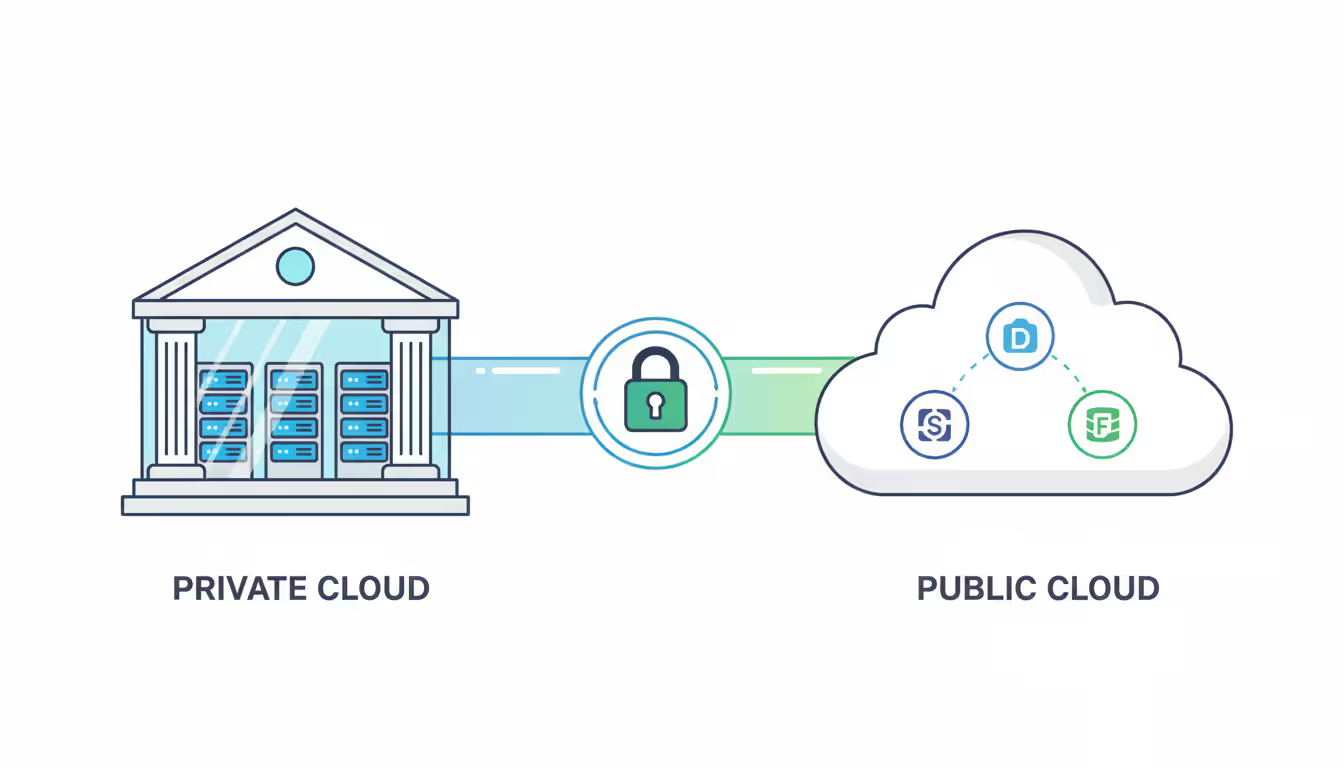
Here's the reality: hybrid cloud isn't just "mixing stuff together." It's about running your own servers (maybe in a basement server room, maybe in a proper data center) while also using AWS, Azure, or Google Cloud—and making these systems actually talk to each other through secure connections and management software that coordinates everything.
Why do companies bother? Picture this: you've got customer financial records that legally can't leave your building. But you also need to crunch massive datasets for quarterly reports, and you don't want to buy servers that'll sit idle 11 months a year. That's where hybrid setups shine.
The numbers back this up. A 2026 Flexera survey showed 87% of enterprises now run some combination of on-premises gear and cloud services. It's not hype anymore—it's how infrastructure actually works for most organizations dealing with compliance headaches, legacy applications that won't budge, or workloads that swing wildly between quiet and crazy-busy.
Understanding Hybrid Cloud Technology
Think of hybrid cloud as three types of infrastructure working together: your private cloud (servers you own and control, sitting behind your firewall), public cloud platforms (rented compute power from the big providers), and traditional data centers (physical servers you can walk up to and touch). The magic ingredient? Orchestration software that lets applications move between these environments without you manually copying files around.
Now, don't confuse this with multi-cloud. Multi-cloud just means you've signed up for several different cloud providers—maybe AWS for some projects, Azure for others—but they're not really connected. You're just managing multiple accounts. Hybrid cloud actually integrates everything. Your monitoring dashboard shows what's happening everywhere. Your identity system works across all locations. Applications can shift workloads based on rules you've set.
Take a retail bank. Their core banking system runs on servers in their secure facility—regulators demand it, and they need millisecond response times. But their customer analytics platform? That's in AWS, crunching terabytes of transaction data to spot spending patterns. The hybrid architecture links these systems so analysts can query both without knowing (or caring) where the data physically lives.
Author: Ethan Norwood;
Source: baltazor.com
Public cloud gives you nearly unlimited scale and you only pay for what you use. The trade-off? You're trusting someone else's infrastructure. Private cloud offers maximum control and security customization, but you're writing checks for equipment whether you use it or not. Traditional data centers provide complete ownership but scaling up means ordering hardware and waiting weeks for delivery. Hybrid cloud cherry-picks advantages from each while dodging their worst drawbacks.
What makes this different from just "having some stuff in the cloud"? Portability. Technologies like Kubernetes containers and virtualization abstraction layers let applications run identically regardless of location. Your developers shouldn't need to rewrite code when moving an app from your test servers to production in the cloud. If they do, your hybrid setup isn't really hybrid—it's just maintaining separate environments.
How Hybrid Cloud Architecture Works
Hybrid cloud architecture stacks up in layers: you've got the foundation (physical and virtual servers, storage, networking), the middleware (integration tools and automation platforms), and the workload layer (your actual business applications). Connecting these environments requires serious networking—typically leased MPLS circuits, encrypted VPN tunnels, or dedicated connections like AWS Direct Connect (starts around $0.02/GB transferred) or Azure ExpressRoute (circuits from 50 Mbps to 100 Gbps).
Orchestration platforms act as air traffic control for your infrastructure. VMware Cloud Foundation, Red Hat OpenShift, or cloud-native management consoles handle application deployment, enforce security policies, and allocate resources. When your e-commerce site gets slammed with traffic, the orchestration system can automatically spin up additional cloud capacity without anyone touching a keyboard.
Key Components of Hybrid Cloud Infrastructure
Identity and access management spans all environments through federation protocols like SAML 2.0 or OAuth. One set of credentials gets you into both your internal file server and your cloud-hosted analytics tools—no juggling five different passwords.
Network fabric connects disparate environments using software-defined networking (SDN). You can stretch a virtual network from your data center into AWS or Azure, maintaining consistent IP addressing and firewall rules. Load balancers distribute traffic across hybrid locations, treating on-premises and cloud resources as one pool.
Storage systems synchronize data through replication mechanisms. Your cloud object storage might mirror critical datasets from on-premises file servers. Database systems maintain synchronized replicas across locations. Data abstraction layers track where information physically resides while presenting applications with a single, unified storage view.
Monitoring platforms aggregate performance data from every infrastructure component. A single dashboard shows latency metrics, security alerts, and cost data regardless of where resources run. Automation engines execute policies like "move batch processing jobs to the cheapest available cloud region during off-peak hours."
Data Flow and Workload Distribution
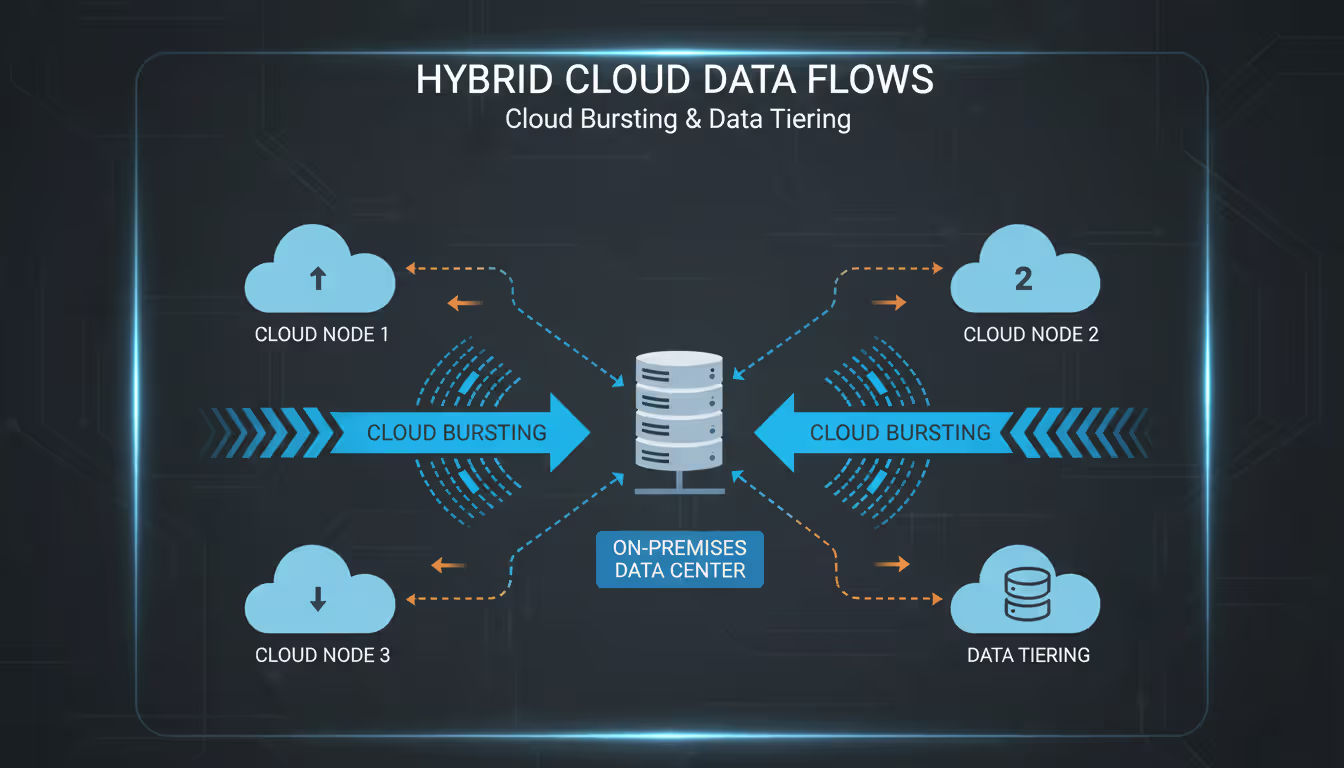
Data moves between locations through several patterns. In cloud-bursting scenarios, applications handle normal traffic using private infrastructure but overflow to cloud capacity during spikes. An online retailer might serve regular shoppers from on-premises servers but spin up cloud instances during Black Friday when traffic jumps 10x.
Data tiering keeps frequently accessed information on fast local storage while moving cold data to cheaper cloud archives. Automated retrieval systems fetch archived files when needed, making the entire storage hierarchy appear seamless to users.
Workload placement follows policies based on factors like data sensitivity, latency requirements, and cost targets. A stock trading platform stays on-premises for sub-millisecond response times. Monthly financial reports? Those generate in the cloud using spot instances at 70% discounts.
Synchronization mechanisms vary by business needs. Databases might replicate changes in real-time for high availability, while bulk data transfers run nightly for analytics workloads. Event-driven architectures trigger cloud functions when on-premises systems detect specific conditions, processing data wherever it makes sense.
Author: Ethan Norwood;
Source: baltazor.com
Common Hybrid Cloud Deployment Models
Cloud-bursting keeps applications running primarily on-premises but taps public cloud when demand spikes. H&R Block runs on internal servers most of the year but scales massively into Microsoft Azure during tax season (January through April), avoiding the cost of maintaining idle capacity for eight months.
Disaster recovery replicates production systems to cloud standby environments. When your primary data center loses power, automated failover activates cloud replicas within minutes. This approach costs 60-70% less than building a second physical facility while delivering similar protection.
Data sovereignty patterns keep regulated data on-premises while processing anonymized insights in public clouds. Healthcare providers store patient records in private infrastructure meeting HIPAA requirements but run machine learning algorithms in AWS or Google Cloud against de-identified datasets.
Dev/test environments often run entirely in cloud platforms for flexibility and cost control, while production systems stay on-premises for stability. Development teams provision cloud resources on demand, test changes, then deploy approved updates to internal production—avoiding the expense of dedicated physical test infrastructure.
Geographic distribution places applications near end users for performance. A global manufacturer might run ERP systems in regional data centers while using cloud edge locations for content delivery and IoT sensor data collection, optimizing latency for each application type.
Application modernization migrates legacy systems incrementally. Companies refactor one module at a time into cloud-native microservices while the remaining monolithic application stays on-premises. The hybrid architecture bridges old and new during multi-year transformation projects.
Author: Ethan Norwood;
Source: baltazor.com
Hybrid Cloud Security Best Practices
Centralized identity extends a single authoritative user directory, typically federating on-premises Active Directory into cloud platforms through SAML or OAuth protocols. Multi-factor authentication adds extra verification steps wherever staff access systems. Role-based access control (RBAC) defines permissions centrally, preventing security gaps that emerge when departments manage authorization independently across environments.
Encryption protects data in three states: at rest (written to disk), in transit (crossing networks), and in use (loaded into memory). Cloud providers offer encryption by default, but you should control your own key management systems rather than relying solely on vendor-managed keys. Hardware security modules (HSMs) store encryption keys in tamper-resistant devices, maintaining control even when data resides in public clouds.
Network segmentation divides environments through micro-segmentation policies. Zero-trust security models require verification for every connection, even between hybrid components. Private connectivity options like AWS Direct Connect or Azure ExpressRoute avoid exposing data to public internet paths, reducing attack surface.
Compliance frameworks like SOC 2, ISO 27001, and industry-specific regulations (GDPR for EU data, HIPAA for healthcare, PCI-DSS for payment cards) require consistent controls across infrastructure. Automated compliance scanning tools check configurations against policy baselines, flagging violations like unencrypted storage volumes or overly permissive access rules. Audit trails log every administrative action and data access event to immutable storage.
Security monitoring consolidates threat intelligence from hybrid infrastructure into SIEM (Security Information and Event Management) platforms. Behavioral analytics establish normal activity baselines, then alert on anomalies like unusual data transfers or permission changes. Incident response playbooks define procedures for addressing threats spanning multiple locations.
Common security mistakes include inconsistent patching (cloud resources stay updated while on-premises systems lag behind), shadow IT (departments spinning up cloud services outside approved channels), and misconfigured storage (publicly accessible S3 buckets containing sensitive files). Regular security audits and automated policy enforcement prevent these vulnerabilities.
When to Choose a Hybrid Cloud Environment
Regulatory compliance forces hybrid cloud when laws mandate specific data residency. German banks can't store customer financial data outside Germany under BaFin regulations, requiring domestic infrastructure even while using cloud for other workloads. HIPAA doesn't explicitly forbid cloud storage, but it's complex enough that many healthcare providers keep protected health information on-premises for peace of mind.
Legacy application constraints prevent full cloud migration when systems depend on specific hardware (that mainframe that's been running payroll since 1987), unsupported operating systems (Windows Server 2003, anyone?), or undocumented customizations. Hybrid architecture lets companies modernize gradually rather than attempting risky big-bang migrations.
Latency-sensitive applications need proximity to users or data sources. Manufacturing plants running robotic assembly lines can't tolerate network delays to distant cloud regions. Keeping industrial control systems on-site while using cloud for predictive maintenance analytics delivers optimal performance.
Cost optimization drives hybrid adoption when you've got existing data center equipment with remaining useful life. Rather than scrapping functional hardware prematurely, companies maximize depreciation while adding cloud capacity for growth. If your servers have three years left on their five-year refresh cycle, hybrid makes financial sense.
Workload variability fits hybrid architectures perfectly. The New York Times faces massive traffic surges during breaking news but normal loads otherwise. Handling baseline traffic using on-premises capacity while cloud-bursting for spikes costs less than provisioning for peak demand exclusively in either location.
Varied application requirements enable smart placement. Batch processing jobs with flexible timing run in cloud environments using spot instances at 90% discounts, while customer-facing applications stay on-premises for predictable performance and SLA guarantees.
The organizations getting the most value from hybrid cloud aren't chasing technology trends—they're solving specific operational problems. Successful implementations start with application assessment, figuring out which systems benefit from cloud economics versus which need on-premises control, then building integration patterns around those requirements rather than forcing every application into the same model
— Sarah Chen
Hybrid Cloud Implementation Challenges and Solutions
Integration complexity hits hard when connecting systems never designed to work together. Legacy applications expect static infrastructure. Cloud-native services assume elastic, ephemeral resources. API gateways and middleware platforms translate between paradigms, but they require thoughtful design. Companies routinely underestimate the effort needed to establish reliable connectivity, synchronize data, and maintain consistent security policies.
How to fix it: Start with well-defined integration points rather than attempting complete interconnectivity. Identify specific data flows and API interactions that must cross environment boundaries, then implement those connections methodically. Use managed integration services from cloud vendors or third-party platforms (MuleSoft, Dell Boomi) rather than building custom integration from scratch.
Cost management gets messy when expenses span capital equipment purchases (on-premises hardware), operational costs (cloud consumption), and hybrid-specific charges (network circuits, management platforms). Cloud bills fluctuate monthly based on usage, making budget forecasting tricky. Organizations frequently discover surprise charges from data egress between environments or redundant storage.
How to fix it: Implement cost allocation tags from day one, tracking spending by project, department, or application regardless of where resources run. Set up automated alerts when costs exceed thresholds. Use cloud cost optimization tools (CloudHealth, Apptio Cloudability) to identify waste like oversized VMs or orphaned storage volumes. Calculate total cost of ownership including often-overlooked factors like power, cooling, and administrative overhead for on-premises infrastructure.
Skills gaps slow hybrid projects because staff needs expertise spanning traditional IT operations and cloud-native development. Infrastructure engineers must understand software-defined technologies. Security professionals need cloud-specific certifications (AWS Security Specialty, Azure Security Engineer). Developers require infrastructure-as-code capabilities. Few individuals master the full range.
Author: Ethan Norwood;
Source: baltazor.com
How to fix it: Build cross-functional teams pairing infrastructure veterans with cloud specialists rather than expecting individuals to know everything. Invest in training programs and professional certifications for existing staff. Consider managed services for specialized capabilities like network connectivity or security monitoring, letting internal teams focus on application-specific requirements.
Vendor lock-in concerns arise from proprietary management tools, cloud-specific services, and data gravity (the tendency for applications to cluster near large datasets). Companies worry about losing negotiation leverage or facing expensive migrations if they need to switch providers.
How to fix it: Adopt open standards and portable technologies where practical—Kubernetes for container orchestration, Terraform for infrastructure automation, PostgreSQL instead of proprietary databases. Avoid architectural dependencies on vendor-specific services for core functionality. Design data architectures with portability in mind, maintaining ability to export datasets in standard formats. Balance portability against velocity—sometimes proprietary services deliver enough business value to justify the trade-off.
Performance unpredictability frustrates users when application behavior varies based on component location. Network latency between environments creates inconsistent response times. Resource contention in multi-tenant cloud infrastructure occasionally causes performance degradation.
How to fix it: Implement comprehensive monitoring measuring actual user experience, not just infrastructure metrics. Establish performance baselines and alert when measurements deviate significantly. Build applications with resilience patterns like circuit breakers and graceful degradation to handle transient issues smoothly. Use CDNs and edge caching to minimize latency impact.
Feature
Hybrid Cloud
Public Cloud
Private Cloud
Control
Strong control over on-premises components, shared responsibility in cloud portions
What is the difference between hybrid cloud and multi-cloud?
Hybrid cloud connects your on-premises infrastructure with public cloud platforms through unified management, letting applications move between locations. Multi-cloud means using multiple public cloud providers (AWS, Azure, Google Cloud) but managing them as separate platforms. Example: a company using AWS for compute and Azure for AI services without connecting them—that's multi-cloud. When they also link both to their internal systems with centralized management, it becomes hybrid multi-cloud architecture.
How much does hybrid cloud cost compared to public cloud?
Hybrid cloud typically costs 15-30% more than pure public cloud for equivalent workloads due to integration investments, network connectivity fees, and management platform expenses. However, companies often achieve total savings by strategically placing workloads—running steady-state applications on already-purchased on-premises equipment while using cloud only for variable demand. The financial equation depends heavily on existing infrastructure investments and workload characteristics. Organizations with recent data center purchases see better hybrid economics than those running aging equipment.
Can small businesses benefit from hybrid cloud?
Small businesses benefit from hybrid cloud when facing specific requirements like regulatory compliance, legacy systems, or existing infrastructure investments. But most small companies find pure public cloud simpler and cheaper. The management complexity and integration costs of hybrid architecture make business sense mainly when you've got compelling reasons to maintain on-premises infrastructure. A dental practice needing HIPAA-compliant patient record storage might keep that data on-premises while using cloud for appointment scheduling and payment processing.
What are the main security risks in hybrid cloud?
Top security risks include inconsistent policy enforcement across locations, misconfigured network connections exposing data, compromised credentials granting access to multiple systems, and visibility gaps where security teams can't see all infrastructure. Data moving between environments faces interception risks without proper encryption. The expanded attack surface—more connection points and management interfaces—increases exposure. Insider threats become more dangerous when employees access multiple environments. Mitigation requires centralized identity management, comprehensive monitoring, encrypted connections, and automated compliance verification.
How long does hybrid cloud deployment take?
Basic hybrid cloud connectivity establishes in 4-8 weeks for simple scenarios like cloud backup or disaster recovery. Comprehensive implementations connecting multiple applications with data synchronization, unified management, and security integration typically require 6-12 months. Complex migrations involving legacy application refactoring or extensive compliance requirements can span 18-24 months. Timeline depends on existing infrastructure maturity, organizational readiness, application complexity, and project scope. Companies often implement in phases, starting with lower-risk applications to build experience before migrating mission-critical systems.
Do I need special skills to manage a hybrid cloud?
Yes—hybrid cloud management requires skills covering traditional IT operations (networking, storage, virtualization) and cloud-native practices (APIs, containers, infrastructure-as-code). Staff needs security expertise spanning multiple environments, cost optimization across different billing models, and automation tools for orchestration. That said, hiring entirely new teams isn't necessary—upskilling existing staff through training and certifications works for most organizations. Managed service providers can supplement internal teams for specialized capabilities. Cloud vendor professional services often assist with initial implementations, transferring knowledge to company staff during the engagement.
Hybrid cloud architecture offers practical solutions for organizations balancing competing demands: regulatory compliance alongside innovation speed, cost optimization alongside performance requirements, legacy system preservation alongside modernization goals. Success comes from deliberate implementation—assessing application characteristics, building intentional integration points, and establishing unified management from the start.
The technical challenges are real but manageable with proper planning. Companies should begin with clear business objectives rather than technology preferences, determining which applications truly benefit from on-premises deployment versus cloud hosting. Starting small with well-scoped pilots builds competency before attempting enterprise-wide transformations.
Security controls, cost governance, and skills development need ongoing attention rather than one-time setup. The best hybrid implementations treat infrastructure as continuously evolving, regularly reassessing workload placement as business needs and technology capabilities change.
For organizations with existing data center investments, regulatory constraints, or applications unsuitable for full cloud migration, hybrid cloud provides a pragmatic path forward. The key is approaching implementation as an architectural strategy addressing specific operational challenges rather than adopting technology because it's trendy.
Software-defined WAN transforms network architecture by enabling intelligent traffic routing across multiple connection types. Learn how SD-WAN works, security considerations, deployment options, and when your business should adopt this technology for improved performance and cost savings
Remote work has made remote access essential for millions. This comprehensive guide explains remote access meaning, compares VPN solutions against remote desktop programs, covers security risks, and helps you choose the right remote access program for your needs
Multi cloud architectures now power 87% of enterprise infrastructure strategies. This comprehensive guide examines how multi cloud works, why businesses adopt it, key components including platforms, storage, data architecture, and IAM, plus practical strategies for implementation and management
Building an intranet from scratch might sound intimidating, but with the right approach and planning, even small organizations can deploy a secure internal network that transforms how teams collaborate. This comprehensive guide walks through every step from planning to implementation
The content on this website is provided for general informational and educational purposes only. It is intended to explain concepts related to cloud computing, computer networking, infrastructure, and modern IT systems.
All information on this website, including articles, guides, and examples, is presented for general educational purposes. Technology implementations may vary depending on specific environments, business needs, infrastructure design, and technical requirements.
This website does not provide professional IT, engineering, or technical advice, and the information presented should not be used as a substitute for consultation with qualified IT professionals.
The website and its authors are not responsible for any errors or omissions, or for any outcomes resulting from decisions made based on the information provided on this website.