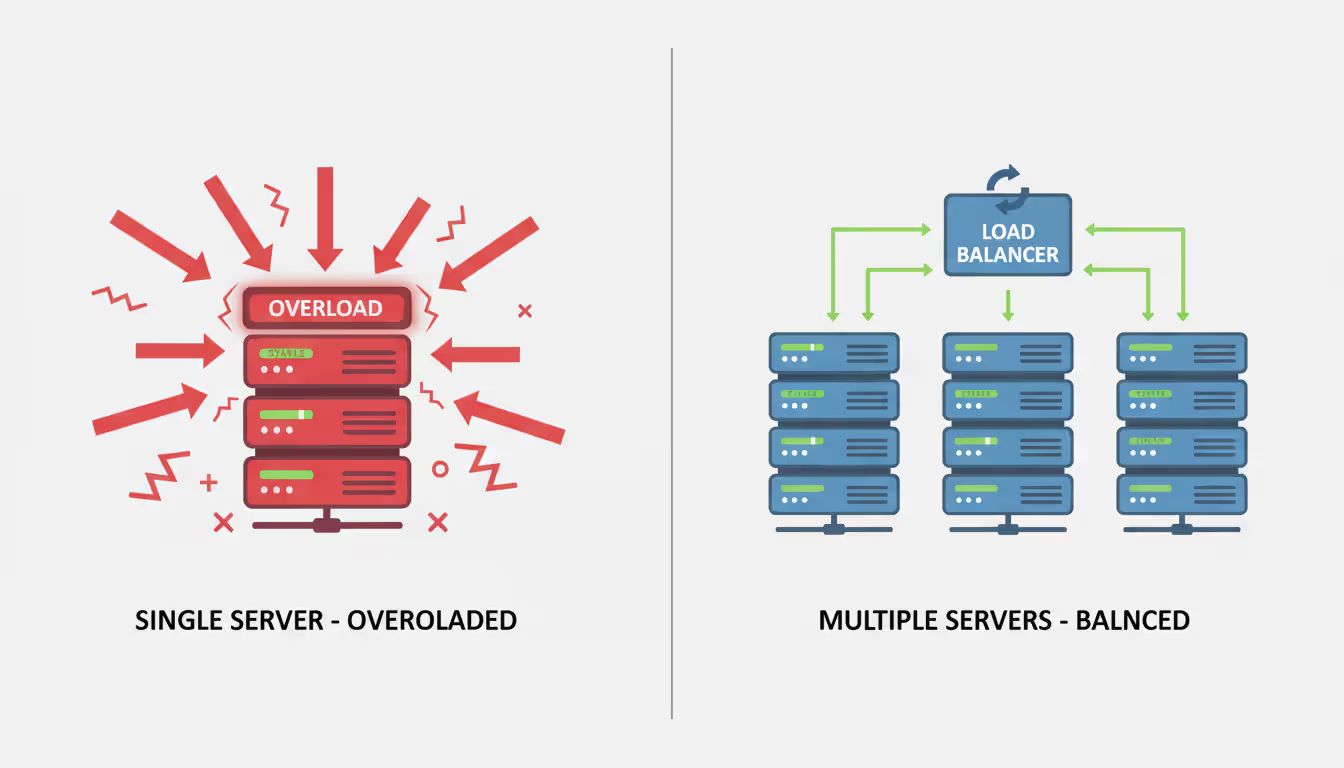
Load balancing is the practice of distributing incoming network traffic across multiple servers to prevent any single machine from becoming overwhelmed. Think of it as a traffic controller at a busy intersection—directing each vehicle down the least congested route to keep everything moving smoothly.
At its core, a load balancer sits between client devices and backend servers, intercepting requests and routing them based on predefined rules. When a user accesses your website or application, their request hits the load balancer first. The load balancer then evaluates which server in the pool is best positioned to handle that request, considering factors like current load, response time, and server health.
The process happens in milliseconds. The load balancer maintains constant communication with backend servers through health checks—periodic pings that verify each server is responsive and functioning properly. If a server fails a health check, the load balancer automatically stops routing traffic to it until it recovers. This creates a self-healing infrastructure where users never encounter a dead endpoint.
Modern load balancers operate at different layers of the OSI model. Layer 4 (transport layer) load balancers make routing decisions based on IP addresses and TCP/UDP ports, offering fast performance with minimal overhead. Layer 7 (application layer) load balancers examine the actual content of requests—HTTP headers, cookies, URL paths—enabling sophisticated routing based on application-specific criteria. A Layer 7 balancer might send image requests to servers optimized for static content while routing API calls to application servers.
The distribution mechanism can be stateless or stateful. Stateless load balancing treats each request independently, which works well for simple web traffic. Stateful load balancing (also called session persistence or sticky sessions) ensures that a user's subsequent requests return to the same server, necessary for applications that maintain session data locally rather than in a shared cache.
Why Load Balancing Matters for Modern Applications
Server failure is inevitable. Hard drives crash, network cards malfunction, and software bugs cause crashes. Without load balancing, a single server failure means complete service disruption. With load balancing, that same failure becomes invisible to users—traffic simply flows to healthy servers while administrators address the problem.
The performance impact extends beyond redundancy. A single server handling all traffic creates a bottleneck that degrades response times as user numbers grow. Distributing requests across multiple servers keeps response times consistent even during traffic spikes. An e-commerce site that loads in two seconds converts at significantly higher rates than one taking five seconds. That performance difference directly affects revenue.
Load balancing isn't optional infrastructure anymore—it's the foundation that prevents a successful marketing campaign from becoming a site outage.We've seen companies lose six-figure revenue opportunities because their single-server architecture couldn't handle the traffic surge from a viral social media post
— Sarah Chen
Scalability becomes straightforward with load balancing. Need more capacity? Add servers to the pool. The load balancer automatically includes them in rotation without configuration changes on the client side. This horizontal scaling approach is more cost-effective than vertical scaling (buying bigger, more expensive servers) and provides better redundancy.
Load balancing applications extend to geographic distribution as well. Global server load balancing (GSLB) routes users to data centers closest to their physical location, reducing latency. A user in Tokyo connects to Asian servers while a user in Frankfurt connects to European infrastructure, both accessing the same application with optimal performance.
Security benefits often get overlooked. Load balancers can absorb certain types of DDoS attacks by distributing malicious traffic across multiple servers rather than overwhelming a single target. They also provide a single point for implementing SSL/TLS termination, centralizing certificate management and reducing the computational burden on application servers.
Author: Megan Holloway;
Source: baltazor.com
Types of Load Balancing Methods and Algorithms
Different algorithms suit different scenarios. Understanding when to apply each method prevents performance problems down the line.
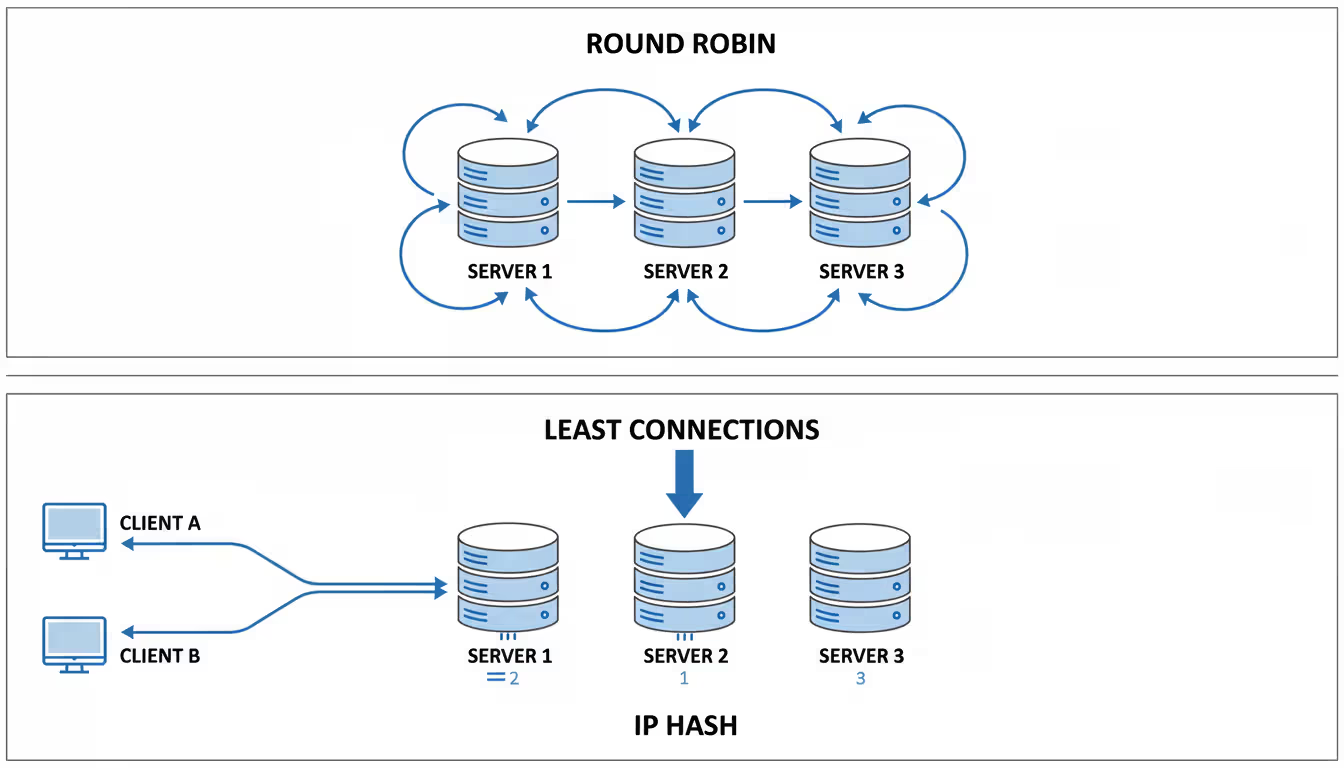
Round Robin cycles through servers in sequential order. Request one goes to Server A, request two to Server B, request three to Server C, then back to Server A. This works well when all servers have identical specifications and all requests require similar processing. The simplicity means minimal overhead, but it doesn't account for varying server loads or request complexity. If one request takes ten times longer than others, round robin will keep sending traffic to that busy server at the same rate.
Weighted Round Robin adds intelligence by assigning each server a weight value. A server with weight 3 receives three times more traffic than a server with weight 1. Use this when servers have different capacities—perhaps older hardware mixed with newer, more powerful machines. The challenge lies in determining appropriate weights, which requires monitoring actual performance under load rather than relying on specifications alone.
Least Connections routes new requests to whichever server currently handles the fewest active connections. This adapts automatically to varying request durations. If Server A is processing five long-running database queries while Server B finished its ten quick static file requests, the next request goes to Server B despite it having handled more total requests. This algorithm excels for applications with unpredictable request processing times, like API endpoints that sometimes return cached data instantly and sometimes perform complex calculations.
Weighted Least Connections combines capacity awareness with connection counting. A powerful server with weight 2 and ten connections might still receive the next request over a weaker server with weight 1 and three connections, because the ratio of connections to capacity is lower.
IP Hash creates consistency by routing all requests from a specific client IP address to the same server. The load balancer runs the client IP through a hash function that deterministically outputs the same server each time. This provides session persistence without requiring the load balancer to maintain session state, reducing memory overhead. The drawback: uneven distribution if a small number of IP addresses generate most traffic, like requests from a corporate proxy or NAT gateway.
Least Response Time factors in both connection count and server response speed, routing to the server that will likely handle the request fastest. This requires the load balancer to actively measure response times, adding overhead but providing optimal performance for users. Particularly valuable when backend servers have varying performance characteristics due to different workloads, database connections, or resource contention.
Author: Megan Holloway;
Source: baltazor.com
Random selection sounds unsophisticated but works surprisingly well at scale. With enough requests, random distribution approximates even distribution while requiring zero state tracking. Some high-performance systems use randomness with periodic health checks rather than complex algorithms, accepting slight imbalances in exchange for reduced load balancer CPU usage.
Load Balancing Solutions: Hardware vs Software vs Cloud
Three fundamental approaches exist for implementing load balancing, each with distinct trade-offs.
Feature
Hardware Load Balancers
Software Load Balancers
Cloud-Based Load Balancers
Cost
$10,000–$100,000+ upfront
Free to $5,000/year licensing
Pay-per-use, typically $20–$500/month
Scalability
Limited by hardware capacity
Limited by host resources
Virtually unlimited, auto-scaling
Maintenance
Firmware updates, hardware replacement
Software updates, OS patching
Fully managed by provider
Performance
Dedicated hardware, highest throughput
Depends on host resources
Varies by tier, generally excellent
Best For
Enterprise data centers, predictable high traffic
Flexible environments, custom requirements
Dynamic workloads, rapid deployment
Popular Examples
F5 BIG-IP, Citrix ADC, A10 Thunder
NGINX, HAProxy, Traefik
AWS ELB/ALB, Azure Load Balancer, Google Cloud Load Balancing
Hardware load balancers are physical appliances designed specifically for traffic distribution. They offer the highest performance—some models handle millions of concurrent connections with microsecond latency. The specialized ASICs (application-specific integrated circuits) process packets faster than general-purpose CPUs. Financial institutions and large enterprises with predictable, sustained high traffic volumes favor hardware solutions. The downside: significant capital expenditure, lead times for procurement, and the need for redundant units to avoid single points of failure. Scaling up means buying additional hardware, which can't happen instantly when traffic spikes unexpectedly.
Software load balancers run on standard servers or virtual machines. NGINX and HAProxy dominate this space, offering robust feature sets at zero or low licensing costs. Software solutions provide maximum flexibility—you control the entire stack and can customize behavior through configuration files or even source code modifications. They integrate naturally into infrastructure-as-code workflows and containerized environments. Performance depends on the underlying hardware; a software load balancer on a modest VM won't match a dedicated hardware appliance, but one running on modern server hardware with proper tuning comes remarkably close. The operational burden is higher—you're responsible for OS security, software updates, and capacity planning.
Cloud-based load balancers are managed services from providers like AWS, Azure, and Google Cloud. You configure routing rules through a web console or API; the provider handles everything else. Scaling is automatic—the load balancer grows or shrinks based on traffic without manual intervention. No hardware to purchase, no software to patch, no capacity planning beyond choosing a service tier. Pricing follows usage, so costs scale with your business rather than requiring large upfront investment. The limitation: you're constrained by the provider's feature set and regional availability. Complex routing requirements might exceed what the managed service offers, forcing you toward software solutions. Vendor lock-in is another consideration, though most cloud load balancers support standard protocols that ease migration.
Hybrid approaches are increasingly common. A company might use cloud load balancers for web traffic while maintaining hardware load balancers for internal data center traffic. Or run software load balancers on cloud VMs for features not available in the managed service. The key is matching the solution to specific requirements rather than assuming one approach fits all scenarios.
Author: Megan Holloway;
Source: baltazor.com
How to Choose the Right Load Balancing Tools for Your Infrastructure
Selection starts with understanding your traffic patterns. A small business website with 10,000 monthly visitors has vastly different needs than a SaaS platform serving 100,000 concurrent users. Measure your current peak traffic and project growth over the next 12–24 months. Most organizations underestimate growth, then face emergency scaling when reality exceeds expectations.
Traffic volume determines the required throughput capacity. Check specifications carefully—vendors often cite maximum theoretical throughput under ideal conditions. Real-world performance with SSL termination, Layer 7 inspection, and logging enabled is typically 40–60% of headline numbers. If you need to handle 10 Gbps of actual traffic, look for solutions rated at 15–20 Gbps.
Application architecture constrains your options. Stateless microservices work with any algorithm and don't require session persistence. Monolithic applications that store session data in server memory need sticky sessions, which not all load balancers handle well at scale. WebSocket connections require load balancers that understand connection upgrades and maintain long-lived TCP connections. gRPC and HTTP/2 require Layer 7 capabilities with protocol-specific support.
Budget encompasses more than licensing costs. Factor in operational overhead—the staff time required for deployment, configuration, monitoring, and maintenance. A free software load balancer that requires 20 hours monthly to maintain might cost more in labor than a managed service with a monthly fee. Calculate total cost of ownership over three years, including hardware depreciation, power and cooling for on-premise solutions, and opportunity cost of staff time.
Technical requirements include specific features your applications need. Do you require SSL/TLS offloading to reduce backend server CPU usage? Content-based routing to direct requests to specialized server pools? Rate limiting to prevent abuse? Header manipulation for security or compatibility? Make a checklist of must-have features versus nice-to-have features, then evaluate solutions against it. Avoid paying for enterprise features you'll never use, but ensure your chosen solution can grow with your needs.
Integration needs determine how easily the load balancer fits into your existing infrastructure. Does it support your monitoring stack's metrics format? Can it integrate with your service discovery system (Consul, etcd, Kubernetes) to automatically update server pools? Does it work with your infrastructure-as-code tools (Terraform, CloudFormation, Ansible)? Poor integration creates manual work and increases the chance of configuration drift.
Compliance requirements matter for regulated industries. Healthcare applications need load balancers that support HIPAA compliance. Financial services require solutions that meet PCI DSS standards. Government contractors need FedRAMP-authorized options. Check whether your solution provider has relevant certifications rather than assuming compliance is solely your responsibility.
A common mistake: choosing based on familiarity rather than fit. Just because your team knows a particular tool doesn't make it the right choice if it lacks critical features. Conversely, selecting an unfamiliar tool with perfect features on paper creates risk if your team lacks expertise to implement and troubleshoot it. Balance capability with operational readiness.
Common Load Balancing Applications Across Industries
Real-world implementations demonstrate how different sectors leverage load balancing to solve specific challenges.
E-commerce platforms face extreme traffic variability. Normal days might see 5,000 concurrent users, but Black Friday traffic can spike to 100,000. Load balancing enables auto-scaling that adds servers during peak periods and removes them during quiet times, controlling costs while maintaining performance. Product page requests often route to cache-heavy servers with fast SSDs, while checkout flows route to servers with secure connections to payment processors. Geographic load balancing reduces latency—European customers connect to EU data centers for GDPR compliance while US customers access domestic infrastructure.
SaaS platforms serving thousands of tenant organizations use load balancing for multi-tenancy isolation. Large enterprise customers might get dedicated server pools accessed through weighted routing, ensuring their traffic doesn't impact smaller customers. API rate limiting at the load balancer prevents any single tenant from overwhelming shared resources. Health checks detect when application servers crash or become unresponsive, automatically removing them from rotation while alerting operations teams. This creates the high availability SLAs (99.9% or 99.99% uptime) that enterprise customers demand.
Financial services deploy load balancing for transaction processing systems that cannot tolerate downtime. Trading platforms use active-active configurations where multiple data centers simultaneously handle traffic, with load balancers distributing requests based on current capacity and latency. Disaster recovery scenarios leverage load balancing to fail over to backup data centers within seconds when primary sites experience outages. Regulatory requirements for transaction logging are met through load balancer access logs that capture every request for audit trails.
Healthcare systems balance HIPAA compliance with performance needs. Load balancers with SSL/TLS termination centralize certificate management and ensure all traffic is encrypted. Patient portals route to servers based on the type of request—appointment scheduling goes to one pool, medical record access to another with additional security controls. Integration with identity providers (SAML, OAuth) happens at the load balancer layer, simplifying backend application security. Geographic routing keeps patient data within specific regions to meet data residency requirements.
Streaming services handle massive traffic volumes with highly variable bandwidth requirements. Load balancing routes video chunk requests to edge servers closest to users, reducing CDN costs and improving playback quality. Adaptive bitrate streaming benefits from load balancers that inspect HTTP range requests and route them to servers with cached content at the requested quality level. Live streaming events use load balancing to distribute encoder output to multiple origin servers, which then feed CDN networks. This prevents any single server failure from disrupting live broadcasts.
Author: Megan Holloway;
Source: baltazor.com
Load Balancing Services: Managed vs Self-Hosted Options
The managed versus self-hosted decision fundamentally trades control for convenience.
Managed load balancing services from major cloud providers offer the fastest path to implementation. AWS Elastic Load Balancing includes Application Load Balancers (Layer 7, HTTP/HTTPS), Network Load Balancers (Layer 4, TCP/UDP), and Gateway Load Balancers (for network appliances). Azure Load Balancer provides similar capabilities with tight integration into Azure networking. Google Cloud Load Balancing offers global load balancing that routes users to the nearest healthy backend across regions automatically.
These services handle provisioning, scaling, patching, and monitoring without requiring dedicated infrastructure staff. Deployment takes minutes—create a load balancer, define target groups, configure health checks, and route traffic. Auto-scaling adjusts capacity based on demand without manual intervention. High availability is built-in; the provider manages redundancy across availability zones. Pricing is straightforward: a small hourly charge plus data processing fees, typically $20–$100 monthly for small applications and $500–$5,000 for high-traffic sites.
The limitations: less flexibility in configuration, dependence on provider feature roadmaps, and potential vendor lock-in. Complex routing rules might not be possible within the managed service's constraints. Troubleshooting is harder because you can't access underlying systems—you're limited to logs and metrics the provider exposes. Multi-cloud strategies become complicated when each provider's load balancer works differently.
Self-hosted solutions provide maximum control. Installing NGINX or HAProxy on your own servers (cloud VMs or physical hardware) means you configure every aspect of behavior. Need custom routing logic? Write it. Want to integrate with proprietary monitoring tools? Full access to logs and metrics makes it possible. No vendor lock-in—your configuration files work anywhere you can run the software.
The operational burden is substantial. You're responsible for OS hardening, security patches, capacity planning, and redundancy. A single load balancer is a single point of failure, so you need at least two in high-availability configuration, which requires additional infrastructure for failover coordination (keepalived, Pacemaker). Monitoring and alerting require integration work. Scaling up during traffic spikes is manual unless you build automation.
Cost comparison isn't straightforward. Managed services have predictable monthly fees. Self-hosted solutions have server costs (which you might already be paying for other purposes) plus staff time. A rough rule: if you're already running infrastructure and have the expertise, self-hosted can be cheaper at scale. If you're starting fresh or lack dedicated operations staff, managed services typically cost less when factoring in labor.
Decision framework: Start with managed services unless you have specific requirements they can't meet. As traffic grows and requirements become more sophisticated, evaluate whether self-hosted solutions offer sufficient benefits to justify the operational complexity. Many organizations use managed load balancers for public-facing traffic and self-hosted solutions for internal service-to-service communication where they need more control.
Consider hybrid approaches. A cloud-based global load balancer might route traffic to regional data centers where self-hosted load balancers distribute requests across application servers. This combines the geographic distribution and DDoS protection of managed services with the flexibility of self-hosted solutions for application-specific routing.
Frequently Asked Questions About Load Balancing
What's the difference between load balancing and load distribution?
The terms are often used interchangeably, but subtle differences exist. Load balancing actively monitors server health and adjusts traffic distribution based on current conditions—removing failed servers, favoring less-busy servers. Load distribution is simpler, mechanically spreading traffic across servers without considering their state. All load balancers perform load distribution, but not all load distribution systems are true load balancers. In practice, when someone says "load distribution," they usually mean load balancing.
Do small businesses need load balancing?
Not initially. A single well-configured server handles thousands of concurrent users. Load balancing becomes valuable when downtime costs exceed implementation costs, or when traffic exceeds single-server capacity. A local service business with a simple website doesn't need it. An online retailer generating $50,000 monthly revenue should implement load balancing—the redundancy prevents revenue loss from server failures that could cost thousands per hour. The tipping point typically arrives around 10,000–50,000 monthly active users or when the business depends critically on constant availability.
How much does load balancing cost?
Cloud-based managed services start around $20–$30 monthly for low traffic, scaling to hundreds or thousands monthly as traffic grows. AWS ALB costs $0.0225 per hour ($16.20/month) plus $0.008 per LCU (load balancer capacity unit). Software load balancers like NGINX are free (open source) or $2,500–$5,000 annually for commercial support. Hardware appliances range from $10,000 to over $100,000 depending on capacity. Total cost of ownership includes operational labor—budget at least 10–20 hours monthly for maintenance and monitoring of self-managed solutions.
Can load balancing improve security?
Yes, in several ways. Load balancers hide backend server IP addresses, making direct attacks harder. They can terminate SSL/TLS connections, centralizing certificate management and reducing attack surface. Many load balancers include WAF (web application firewall) capabilities that filter malicious requests. Rate limiting prevents brute-force attacks and API abuse. DDoS mitigation distributes attack traffic across multiple servers rather than overwhelming a single target. However, the load balancer itself becomes a critical security component that requires hardening and monitoring.
What happens if a load balancer fails?
Single load balancer configurations create a single point of failure—if it fails, all traffic stops. Production environments use redundant load balancers in high-availability pairs. One operates as active while the other stays on standby, taking over within seconds if the primary fails. Cloud-managed load balancers handle this automatically across availability zones. Self-hosted solutions require configuration with tools like keepalived or cloud provider features like floating IPs. The redundant architecture adds cost but prevents complete outages from load balancer failures.
How do I know if I need load balancing?
Watch for these signs: server CPU or memory regularly exceeding 70% during normal traffic, response times degrading during peak periods, anxiety about what happens if your server crashes, traffic growth that will exceed single-server capacity within 6–12 months, or business requirements for specific uptime SLAs. If downtime would cost your business more than $500 per hour in lost revenue or productivity, implement load balancing. The peace of mind from knowing a server failure won't cause an outage is often worth the investment alone.
Load balancing transforms infrastructure from fragile to resilient. The distribution of traffic across multiple servers prevents any single failure from disrupting service, while simultaneously improving performance through parallel processing. Whether you choose hardware appliances, software solutions, or cloud-managed services depends on your specific requirements—traffic volume, budget, technical expertise, and control needs.
The investment in load balancing pays dividends through improved uptime, better user experience, and operational flexibility. As your application grows, the ability to scale horizontally by adding servers rather than replacing them with ever-larger machines reduces both cost and risk. Modern applications face unpredictable traffic patterns and zero tolerance for downtime; load balancing provides the foundation to meet those challenges confidently.
Deploying wireless networks without planning software risks coverage gaps and expensive rework. This guide explains how RF modeling tools predict signal behavior, recommend access point placement, and validate designs before installation—saving time and money across small business and enterprise deployments
Network topology defines how devices connect and communicate in your infrastructure. This guide covers topology types (star, mesh, ring, tree, hybrid), creating accurate network topology diagrams, choosing mapping tools, and avoiding common planning mistakes that impact performance and reliability
Network downtime costs US businesses $9,000 per minute. This comprehensive guide covers network management fundamentals, deployment models, key features, provider selection, and solutions to common challenges for modern IT infrastructure
Network diagrams map how devices connect and communicate in your infrastructure. This guide covers everything from basic diagrams to professional documentation, including tool selection, templates, and best practices that prevent costly troubleshooting delays
The content on this website is provided for general informational and educational purposes only. It is intended to explain concepts related to cloud computing, computer networking, infrastructure, and modern IT systems.
All information on this website, including articles, guides, and examples, is presented for general educational purposes. Technology implementations may vary depending on specific environments, business needs, infrastructure design, and technical requirements.
This website does not provide professional IT, engineering, or technical advice, and the information presented should not be used as a substitute for consultation with qualified IT professionals.
The website and its authors are not responsible for any errors or omissions, or for any outcomes resulting from decisions made based on the information provided on this website.