Here's something most IT teams learn the hard way: you don't realize your IP tracking is broken until the CEO's laptop won't connect during an investor call. Or the new CRM deployment stalls because nobody can find 50 available addresses in the right subnet. Or—my personal favorite—two critical servers start fighting over 10.0.12.88 and nobody knows which one was assigned first.
Modern networks span data centers, cloud platforms, branch offices, and thousands of IoT devices. Tracking all those addresses in spreadsheets? That's a recipe for weekend emergency calls. IP address management gives you a system that actually scales—discovering devices, preventing conflicts, and integrating with the DNS and DHCP services that keep your network running.
Let's dig into how IPAM works, what features matter most, and how to pick a solution that won't become obsolete six months from now.
What Is IP Address Management and Why It Matters
IP address management is the practice of organizing, tracking, and controlling every IP address in your network. Think of it as inventory control, but for the numerical identifiers that let devices talk to each other.
Here's the typical progression: small network, simple spreadsheet. Add a second office, maybe upgrade to a shared Google Sheet. Bring on more IT staff, and suddenly three people are editing the same tracking file with no coordination. Someone assigns 192.168.10.55 to a printer. Two weeks later, a different admin gives that same address to a new access point. Both devices intermittently drop offline. Users complain. You spend Tuesday afternoon with Wireshark, tracking down duplicate addresses.
That scenario plays out in thousands of companies every week.
IPAM systems replace tribal knowledge with a database of record. They show you which addresses are in use, which are available, and which are reserved for future projects. More importantly, they integrate directly with your DHCP servers and DNS infrastructure. When DHCP needs to lease an address, it asks the IPAM system for the next available IP from the correct pool. When you assign a static address, IPAM creates the corresponding DNS records automatically.
No more wondering if the documentation matches reality. No more conflicts that surface at the worst possible time.
Centralized tracking also helps with security. An unknown device appears on the network with address 10.0.8.142? Your IPAM logs will show whether that address was legitimately assigned or represents a rogue endpoint someone plugged in after hours. Every allocation ties back to a user account and timestamp—critical evidence during incident investigations or compliance audits.
Author: Logan Kessler;
Source: baltazor.com
How IP Address Management Systems Work
Most IPAM platforms handle three core jobs: finding devices, tracking assignments, and automating allocation.
Discovery means the IPAM system scans your network regularly, identifying active devices and comparing what it finds against your address database. If a device is using 172.16.9.88 but that address shows as "available" in IPAM, you get an alert. Maybe someone bypassed the official process. Maybe it's a legitimate device that wasn't properly documented. Either way, you need to investigate.
Tracking maintains current status for every single address. Is it assigned? Reserved for a specific project? Still available? The database also stores associated details: hostname, MAC address, DHCP lease expiration, the person who requested the assignment, and when they got it. This becomes your single source of truth—no more hunting through multiple spreadsheets or asking "does anyone know what 10.0.15.200 is for?"
Allocation handles the assignment process. Instead of manually picking the next available IP and hoping nobody else grabbed it five minutes ago, you request an address through the IPAM interface. The system checks for conflicts, enforces your naming standards, logs the requester's identity, and marks the address as allocated. For dynamic assignments, DHCP servers query IPAM to get addresses from the appropriate pool based on VLAN, location, or device type.
The real power comes from integration. DHCP and DNS need to stay synchronized with your IP allocations, or you end up with mismatches that break name resolution and cause mysterious connectivity failures. When IPAM assigns 10.0.6.73 to a new application server named "db-prod-03," it should automatically create the DNS A record and reverse PTR entry. When that DHCP lease expires three months later, IPAM updates the status and makes the address available again.
Conflict prevention happens automatically. Before confirming any allocation, IPAM checks existing assignments, active leases, and reserved ranges. Overlapping requests get rejected with an explanation. This gatekeeper function alone saves enough troubleshooting time to justify the software cost.
IP Address Breakdown in IPAM Tools
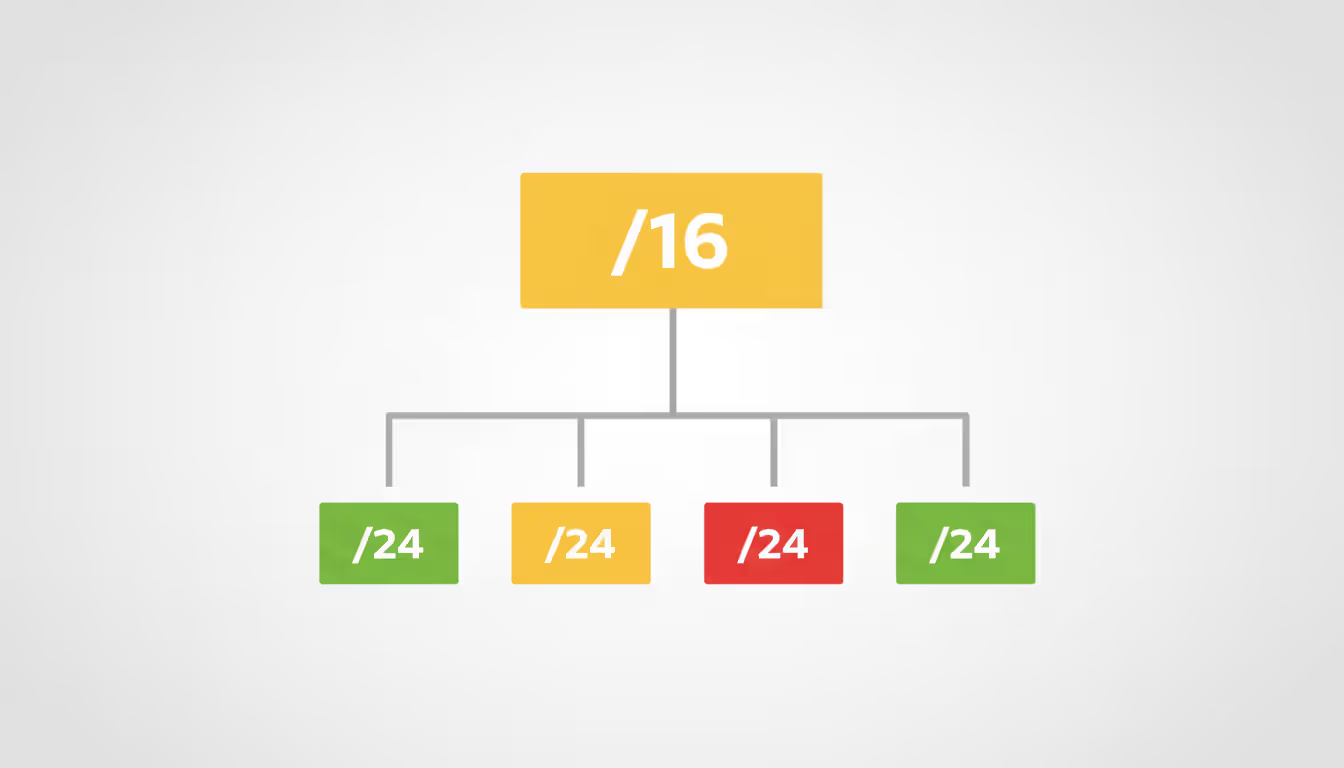
Large networks get divided into progressively smaller chunks—what we call IP address breakdown. You might start with a /16 allocation (65,536 addresses) and carve it into /24 subnets (256 addresses each) for different departments, buildings, or VLANs.
IPAM tools visualize this hierarchy like a file system. The top level shows your supernet. Click to expand, and you see the child subnets. Each one displays current utilization with color coding: green for plenty of space, yellow approaching 75%, red at 90% or higher.
That guest WiFi subnet needs attention before it runs out of addresses during the next company event. Without IPAM, you wouldn't know until devices start getting DHCP failures.
CIDR notation expresses subnet size using a slash and number. The /24 in "192.168.1.0/24" means the first 24 bits define the network portion, leaving 8 bits for host addresses—that's 256 total addresses, though you lose two (network and broadcast) for actual device use. A /25 cuts that in half to 128 addresses. A /23 doubles it to 512. IPAM systems calculate these ranges automatically, but understanding the notation helps when you're designing address schemes or troubleshooting allocation problems.
Author: Logan Kessler;
Source: baltazor.com
Key Features of an IP Address Manager
Real-time visibility matters most. Your dashboard should show current utilization percentages, recent changes, and upcoming lease expirations at a glance. Need details? Drill down into specific subnets, filter by assignment status, or search for a hostname like "printer-floor3." Without this instant access, you're back to grep-ing log files or querying three different systems to piece together the full picture.
Role-based access control prevents junior staff from accidentally nuking production subnets. A help desk technician might view allocations and request addresses for new devices, but can't delete subnets or override conflict warnings. Senior engineers get approval rights for high-risk changes like subnet renumbering. Automated processes handle routine DHCP leases without human intervention. Granular permissions satisfy compliance requirements around segregation of duties.
Audit logs capture everything: who allocated 192.168.50.10, when they did it, which device got the address, and the business justification. During incident response, these logs reconstruct timelines. That compromised server communicating with a suspicious IP? The audit trail shows when the address was assigned and to what system. Compliance auditors want proof of address allocation controls? Export a report showing all changes during Q1 with complete requester information and approval chains.
Integration capabilities extend IPAM beyond basic address tracking. APIs let orchestration tools request IP addresses programmatically when spinning up VMs. Webhooks notify your monitoring system when subnet utilization crosses 85%. Connections to vulnerability scanners correlate addresses with patch status, highlighting unpatched systems by network location.
Common Tools and Methods for Managing IP Addresses
Plenty of networks start with Excel. Column A lists addresses, column B has hostnames, column C shows assignment dates. Works fine for 50 addresses. At 200, you're constantly scrolling and searching. At 1,000, the spreadsheet becomes a liability—no conflict checking, zero integration with actual network services, and your audit trail consists of "who modified the file last week?"
Dedicated IPAM software solves these problems. Your options range from free open-source projects to enterprise platforms costing six figures:
phpIPAM is open-source and web-based, handling small to mid-size networks comfortably. You get subnet discovery, VLAN management, basic reporting, and a straightforward interface. Installation takes an afternoon if you're comfortable with Linux and MySQL. The catch? You're responsible for updates, security patches, and troubleshooting when things break.
Infoblox sells enterprise appliances that bundle IPAM, DNS, and DHCP into hardened devices. Scales to millions of addresses. Integrates with threat intelligence feeds to flag suspicious activity. Costs reflect enterprise capabilities—expect significant budget allocation and multi-year contracts.
BlueCat targets organizations with serious cloud adoption. Strong API support makes it popular with DevOps teams automating infrastructure provisioning. Handles hybrid environments spanning on-prem data centers and multiple cloud providers.
Microsoft IPAM ships with Windows Server, integrating tightly with Active Directory, Microsoft DHCP, and Microsoft DNS. If your infrastructure is already Windows-centric, it's a logical choice. Limited value for mixed environments.
Choosing between these depends on network size, budget, and infrastructure. A 150-person company with one office? phpIPAM probably covers your needs. Global enterprise with multi-cloud deployments? You'll want Infoblox or BlueCat.
An IP address generator serves a different niche entirely. These utilities create random or sequential IP addresses for testing environments, security research, or documentation. A penetration tester might use one to simulate traffic from diverse source addresses during load testing. In production, you rarely need a generator—DHCP pools and automated allocation handle most scenarios. But when building isolated test networks or populating simulation environments, generators quickly produce valid addresses that won't conflict with production space.
Author: Logan Kessler;
Source: baltazor.com
How to Choose the Right IP Address Management Solution
Start by counting your total IP addresses across all locations—branch offices, data centers, cloud tenants, everything. A network with 5,000 addresses has different requirements than one managing 500,000. Also consider growth trajectory. Planning IPv6 deployment? Expanding cloud footprint by 40% annually? You need a solution that scales beyond current state.
Author: Logan Kessler;
Source: baltazor.com
Cloud support matters more every year. Legacy IPAM systems assumed static on-premises subnets. Modern networks span AWS, Azure, Google Cloud, and private infrastructure. Your IP address manager must discover and track addresses across all these environments, ideally through native integrations rather than hacky scripts. Multi-tenancy support becomes critical if you manage networks for multiple business units or provide managed services to customers.
Security and change management features prevent unauthorized modifications. An IP address changer function—allowing bulk updates or subnet renumbering—should require multi-factor authentication and approval workflows. Audit logs must be tamper-proof and exportable for compliance reporting. Some IPAM systems forward alerts to your SIEM when high-risk changes occur or unauthorized devices appear.
Cost structures vary wildly. Open-source tools are free to license but require staff time for installation, maintenance, customization, and support. Commercial IPAM pricing might be per managed IP address, per appliance, or annual subscription. Factor in training costs, vendor support contracts, and integration effort. A $60,000 IPAM investment that prevents a single four-hour outage often pays for itself within the first year.
Vendor support and community health matter when things break. Can you get help at 2 AM when a critical bug surfaces? Open-source projects rely on community forums and volunteer developers—great when active, frustrating when questions go unanswered for days. Commercial vendors offer SLAs, phone support, and guaranteed patch timelines. Weigh cost savings against risk tolerance and internal expertise.
Reactive IP management costs way more than people realize. You're paying for unplanned downtime, emergency troubleshooting at 3 AM, and damage to your team's reputation with the business. Proactive IPAM shifts that equation—you invest in tools and processes that prevent incidents before they occur. In my experience, organizations that implement proper IPAM see mean time to resolution for network issues drop by 40% or more, simply because they have accurate data at their fingertips instead of guessing
— Marcus Chen
Frequently Asked Questions About IP Address Management
What does /24 mean in IP address management?
The /24 notation indicates a subnet mask of 255.255.255.0, which provides 256 total IP addresses (254 usable after removing network and broadcast addresses). When network engineers say "IP address 24," they're using shorthand for this common subnet size. In IPAM systems, /24 subnets often serve as the standard allocation for departmental VLANs or small branch offices. Understanding CIDR notation helps you quickly assess capacity—a /25 offers half the addresses of a /24, while a /23 provides double.
Can an IP address manager automatically detect conflicts?
Yes, and this feature alone justifies IPAM adoption for many networks. Modern platforms continuously scan the network, comparing active devices against the allocation database. When a device uses an IP address that wasn't assigned through IPAM, the system flags it as a conflict or rogue endpoint. This automated detection prevents the classic scenario where two devices fight over the same address, causing intermittent connectivity failures that are maddeningly difficult to diagnose manually.
What is the difference between an IP address generator and DHCP?
An IP address generator is a utility that creates lists of addresses for testing, documentation, or simulation purposes—it doesn't actually assign addresses to real devices. DHCP (Dynamic Host Configuration Protocol) is a network service that automatically assigns IP addresses, subnet masks, default gateways, and DNS servers to devices when they connect to the network. DHCP integrates with IPAM to ensure leased addresses come from managed pools and get tracked in your central database. Generators are planning tools; DHCP is production infrastructure.
How does an IP address changer work in IPAM systems?
An IP address changer lets administrators modify existing allocations—renumbering a subnet, moving a device to a different VLAN, or correcting a misconfigured assignment. In IPAM, this isn't simple find-and-replace. The system validates the new address against current allocations, updates related DNS records, notifies affected systems, and logs the change with full details for audit purposes. Bulk changers can renumber entire subnets during infrastructure migrations, but they typically require multi-level approval workflows to prevent accidental disruptions.
Do I need IPAM software for a small business network?
Depends on your tolerance for manual work and outage risk. A 25-device network with static assignments can survive on a spreadsheet, though you're one mistake away from problems. Once you pass 100 addresses, introduce DHCP, add a second site, or hire additional IT staff, manual tracking becomes fragile. IPAM doesn't just prevent conflicts—it documents your network, accelerates troubleshooting, and enables confident growth. Many small businesses implement lightweight IPAM (like phpIPAM) as cheap insurance, even when current pain is minimal, because a single IP conflict outage often costs more than the implementation effort.
What is IP address breakdown and why is it important?
IP address breakdown is the process of dividing large address blocks into smaller, manageable subnets that align with your organizational structure or network design. It matters because flat, unstructured address space becomes chaotic as networks grow. Proper breakdown enables security segmentation (keeping guest WiFi isolated from corporate resources), simplifies troubleshooting (all printers live in 10.0.5.x, all servers in 10.0.8.x), and optimizes routing efficiency. IPAM tools visualize this hierarchy, showing how parent blocks are subdivided and tracking utilization at each level.
You can't manage modern networks with spreadsheets and tribal knowledge anymore. The shift to hybrid cloud, the explosion of IoT devices, and the gradual migration to IPv6 all demand centralized, automated oversight. Manual tracking introduces risk, slows incident response, and obscures capacity trends until you're scrambling for addresses during critical deployments.
A well-implemented IP address manager delivers real-time visibility, enforces allocation policies, integrates with DNS and DHCP infrastructure, and maintains audit trails that satisfy compliance requirements. Whether you choose an open-source tool for a small network or an enterprise platform for global infrastructure, the core value remains consistent: transforming IP address space from a chaotic liability into a governed, auditable asset.
Take an honest look at your current approach. Have you experienced IP conflicts? Struggled to document address usage during audits? Spent hours reconciling DHCP logs with DNS records? Those are symptoms indicating you've outgrown manual methods. Start by inventorying your address space, defining subnet standards, and evaluating solutions that match your scale and budget. The upfront effort delivers returns in uptime, security, and operational efficiency for years to come
Deploying wireless networks without planning software risks coverage gaps and expensive rework. This guide explains how RF modeling tools predict signal behavior, recommend access point placement, and validate designs before installation—saving time and money across small business and enterprise deployments
Network topology defines how devices connect and communicate in your infrastructure. This guide covers topology types (star, mesh, ring, tree, hybrid), creating accurate network topology diagrams, choosing mapping tools, and avoiding common planning mistakes that impact performance and reliability
Network downtime costs US businesses $9,000 per minute. This comprehensive guide covers network management fundamentals, deployment models, key features, provider selection, and solutions to common challenges for modern IT infrastructure
Network diagrams map how devices connect and communicate in your infrastructure. This guide covers everything from basic diagrams to professional documentation, including tool selection, templates, and best practices that prevent costly troubleshooting delays
The content on this website is provided for general informational and educational purposes only. It is intended to explain concepts related to cloud computing, computer networking, infrastructure, and modern IT systems.
All information on this website, including articles, guides, and examples, is presented for general educational purposes. Technology implementations may vary depending on specific environments, business needs, infrastructure design, and technical requirements.
This website does not provide professional IT, engineering, or technical advice, and the information presented should not be used as a substitute for consultation with qualified IT professionals.
The website and its authors are not responsible for any errors or omissions, or for any outcomes resulting from decisions made based on the information provided on this website.