Back in 2018, a regional hospital system spent $2.3 million on new server hardware. By 2023, half that equipment was obsolete. Meanwhile, their competitor launched an identical patient portal in three weeks using AWS, paying just $4,000 monthly. Who made the smarter choice? That depends entirely on what happened next.
Infrastructure decisions ripple through every corner of a business—IT budgets, security protocols, compliance audits, even how fast teams can respond to market changes. Cloud services keep grabbing headlines, but plenty of companies still run critical operations on servers they own and touch. The trick isn't picking the "best" option. It's figuring out which trade-offs you can actually live with.
What Are On-Premise and Cloud Solutions?
When you run on-premise infrastructure, your servers sit in your building (or a colocation facility you rent). You buy the physical machines, rack them up, install the software, and your IT team keeps everything running. Need more capacity? Order hardware, wait for delivery, install it, configure it. Something breaks at 2 AM? Your people fix it or the system stays down.
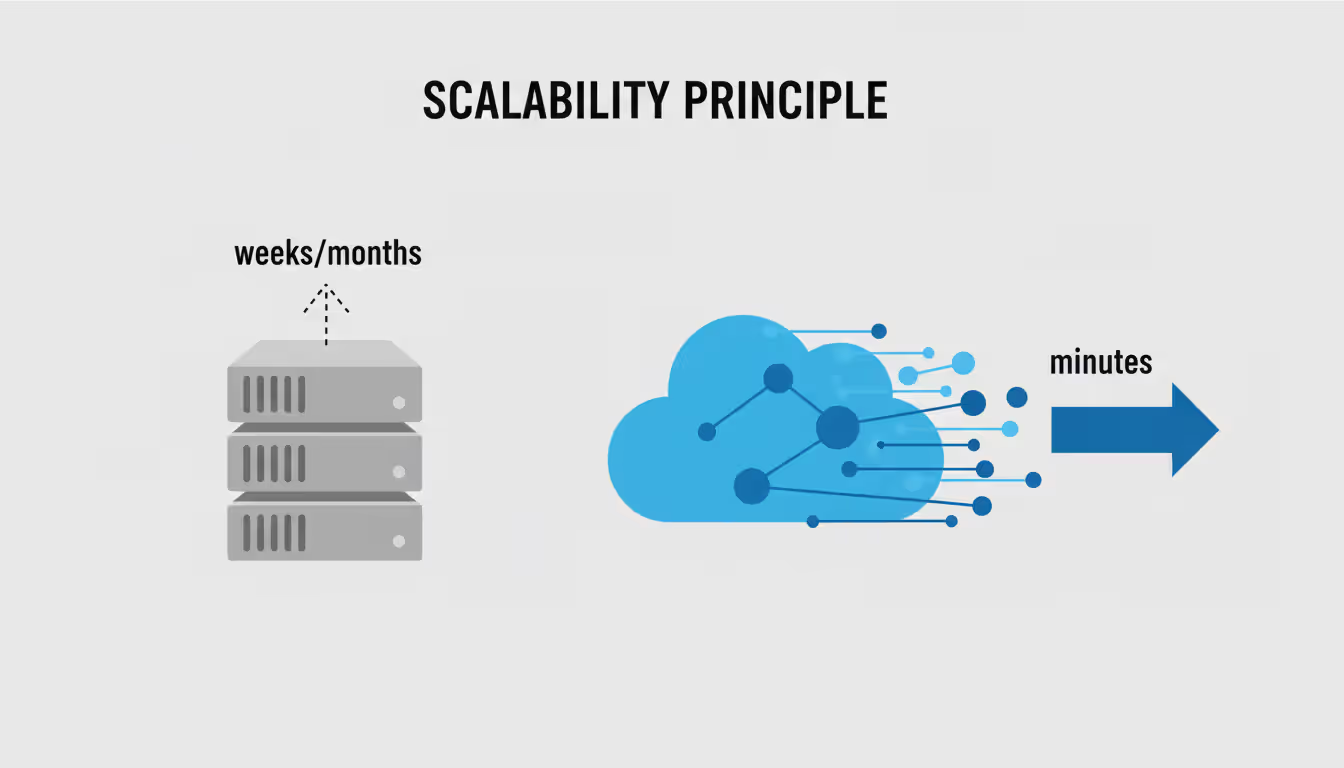
Cloud infrastructure flips this arrangement. You're essentially renting computing power from massive data centers run by Amazon, Microsoft, Google, or similar providers. Want 50 new servers? Click a button—they appear in minutes. Need them gone next week? Click again, stop paying. The provider replaces failed hardware, updates firmware, maintains cooling systems, and guards the physical facilities. You access everything through a web browser or API.
Here's what really separates these approaches: capacity planning. Traditional infrastructure forces you to guess your needs months ahead. Buy too little hardware and you can't handle peak loads. Buy too much and expensive equipment collects dust. Cloud services add or remove resources automatically based on real-time demand. Your application suddenly gets popular? Cloud scales up. Traffic drops? Cloud scales down and stops charging you for idle capacity.
Author: Ethan Norwood;
Source: baltazor.com
Some companies split the difference with hybrid setups. They'll keep customer financial records on-premise (locked down tight) while running marketing websites and development environments in the cloud (where flexibility matters more). This middle path adds complexity but lets you place each workload wherever it fits best.
Key Differences Between On-Premise and Cloud Deployments
The contrasts between these models show up everywhere, from your first day to year five:
Factor
On-Premise
Cloud
Initial Costs
Major capital expense—hardware, licenses, facility prep can hit $200K-$500K
Almost nothing upfront; start paying when you start using
Varies with usage; can balloon if you're not watching carefully
Scalability
Add capacity by purchasing and installing equipment—takes weeks or months
Instant scaling either direction; provision resources in under an hour
Maintenance Responsibility
Your team patches, repairs, and replaces everything
Provider handles physical infrastructure; you manage what runs on it
Data Location
You know exactly which building and which rack
Could be in multiple regions; requires configuration to pin down
Security Control
Complete authority over every security layer
Split responsibility—provider secures their part, you secure yours
Disaster Recovery
Build your own backup site or accept the risk
Built-in redundancy across geographic zones included
Implementation Time
3-6 months from purchase order to production
Days or weeks for initial deployment
Customization Level
Configure anything however you want
Limited to what the provider offers
Money tells an interesting story. An on-premise setup demands huge spending before you get any value. Maybe $350,000 for servers, storage arrays, switches, software licenses, plus another $50,000 upgrading your electrical panels and HVAC. You depreciate those assets over 3-5 years while paying maybe $12,000 monthly for electricity, internet, and maintenance. Annual cost after year one might drop to $175,000, but that upfront hit stings.
Cloud expenses work backwards. Start at $8,000 monthly for moderate workloads—$96,000 annually with zero down payment. Sounds great until your app takes off and that bill climbs to $15,000 monthly. Or your developers leave test environments running all weekend and you're burning $2,000 on resources nobody's using. Without active cost management, cloud bills often exceed expectations by 30-50%.
Control looks different too. Own your hardware and you can configure servers exactly how applications need them. Install any software, modify network topology however you want, implement security protocols your compliance team invented. Cloud providers give you preset configurations. Need specialized hardware not in their catalog? You're stuck. Want custom network firmware? Nope, not happening.
Remote access? Cloud wins easily. Applications built for cloud environments assume internet access from anywhere. Workers at home connect as easily as workers in the office. On-premise systems need VPN tunnels, Remote Desktop connections, or similar workarounds that often perform poorly over residential internet. That gap became painful during COVID-19 lockdowns.
The decision between on-premise and cloud is no longer binary. Organizations must evaluate workload characteristics, data sensitivity, regulatory constraints, and total cost trajectories over five-year horizons. The right answer often involves both models working in concert
— Alex Carter
Security and Compliance Considerations
Security debates get messy because neither approach guarantees safety. Both can be incredibly secure or catastrophically vulnerable depending on implementation.
Run your own infrastructure and security becomes entirely your problem. Your team controls physical access to server rooms, configures firewalls, manages encryption keys, monitors network traffic for threats, and responds when something looks suspicious. Total control appeals to security-focused organizations but demands serious expertise. A talented security team can build defenses precisely matched to specific threats. An understaffed team might leave critical patches unapplied for months while handling daily fires.
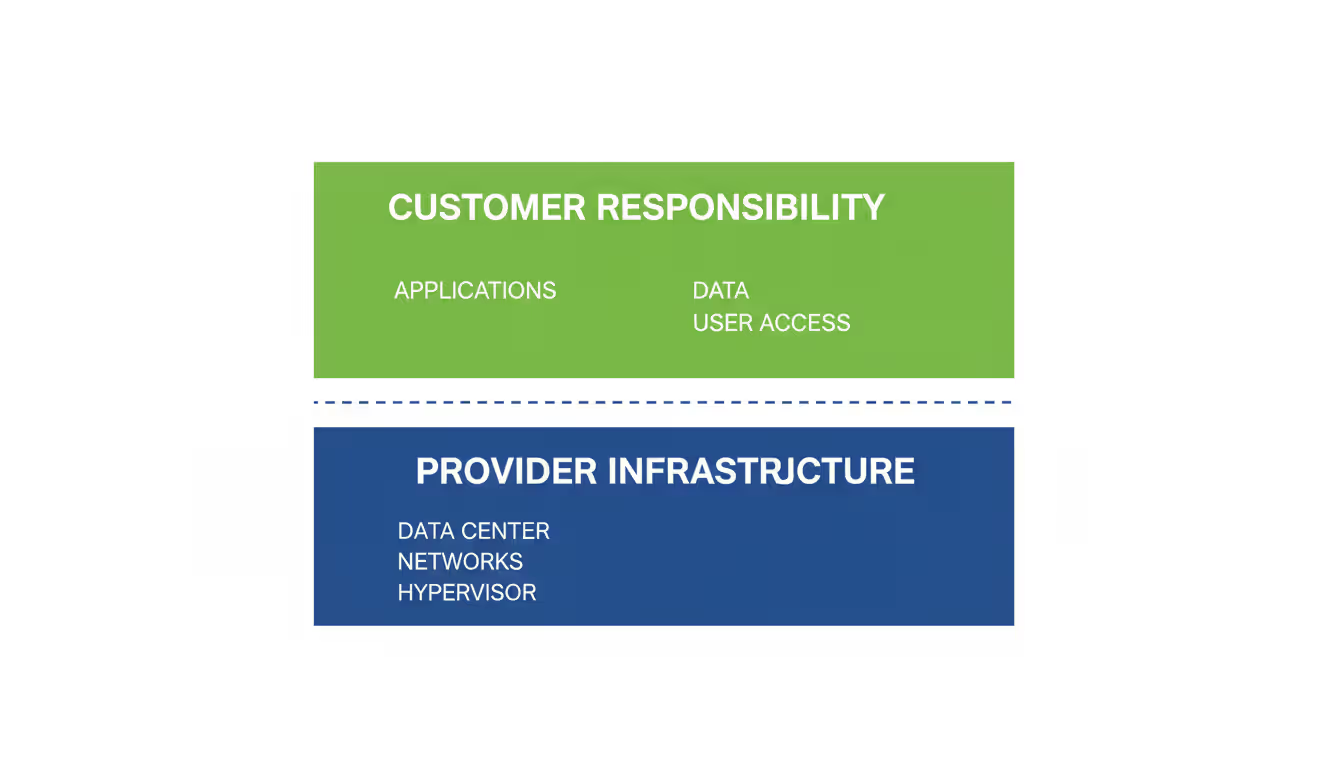
Cloud providers operate under what's called shared responsibility. They secure the foundation—data center physical security, hypervisor hardening, network infrastructure, base platform services. You secure everything you build on top—operating systems on your virtual machines, application code, database configurations, user access controls, sensitive data encryption. Amazon, Microsoft, and Google pour billions into infrastructure security and employ hundreds of specialized security engineers. Their foundational security probably exceeds what most individual companies can achieve. However, customer misconfigurations cause breaches constantly. Leave a database exposed to the internet by accident? That's on you, not the provider.
Compliance requirements significantly shape these decisions. Regulations like HIPAA, GDPR, or CMMC mandate specific controls over data handling. Cloud providers pursue compliance certifications demonstrating their platforms meet various standards, potentially simplifying your compliance work. But some regulations require data stay within specific countries or prohibit certain types of third-party processing. A German manufacturer subject to strict data residency rules might find keeping systems on-premise simpler than decoding cloud region configurations and cross-border data agreements.
Healthcare, finance, and government sectors face especially stringent requirements. A community bank might keep core transaction processing on-premise to maintain complete audit trails while running customer mobile apps in the cloud. Defense contractors handling controlled information often require on-premise systems or specialized government cloud environments with enhanced protections.
That shared responsibility model creates awkward gaps. After breaches, providers point at customer misconfigurations while customers blame inadequate provider controls. Nobody feels fully accountable. You need crystal-clear understanding of responsibility boundaries and rigorous configuration management to avoid falling through those gaps.
Author: Ethan Norwood;
Source: baltazor.com
Cost Analysis Over Time
Sticker prices lie. You need total cost of ownership calculated over at least five years to see the real picture.
Let's say you spend $400,000 upfront on on-premise infrastructure. Add $200,000 for implementation and first-year operations—you're at $600,000 after year one. Years two through five cost maybe $150,000 annually for power, maintenance contracts, and staff time. Total five-year cost: roughly $1.2 million. Then hardware reaches end-of-life and you face another capital cycle.
Same workload in the cloud starts at perhaps $12,000 monthly—$144,000 first year. Costs trend upward as applications grow. Year two hits $180,000, year three reaches $210,000, and so on. Optimize aggressively and maybe you hold steady. Let costs drift and you could hit $300,000 annually by year five. Five-year total: somewhere between $1 million and $1.5 million depending on growth patterns and optimization discipline.
Hidden costs lurk everywhere. On-premise estimates often undercount facility expenses—HVAC system upgrades, electrical work, physical security improvements, floor space opportunity costs—plus capital tied up in depreciating assets instead of generating returns elsewhere. Cloud deployments accumulate sneaky charges through data egress fees (they charge when data leaves their network), over-provisioned resources running 24/7 unnecessarily, and premium support contracts.
Workload patterns matter enormously. Run steady, predictable loads around the clock? On-premise usually costs less long-term because fixed capacity matches consistent demand. Experiencing rapid growth or seasonal swings? Cloud flexibility lets you pay only for actual usage rather than maintaining capacity for peak loads.
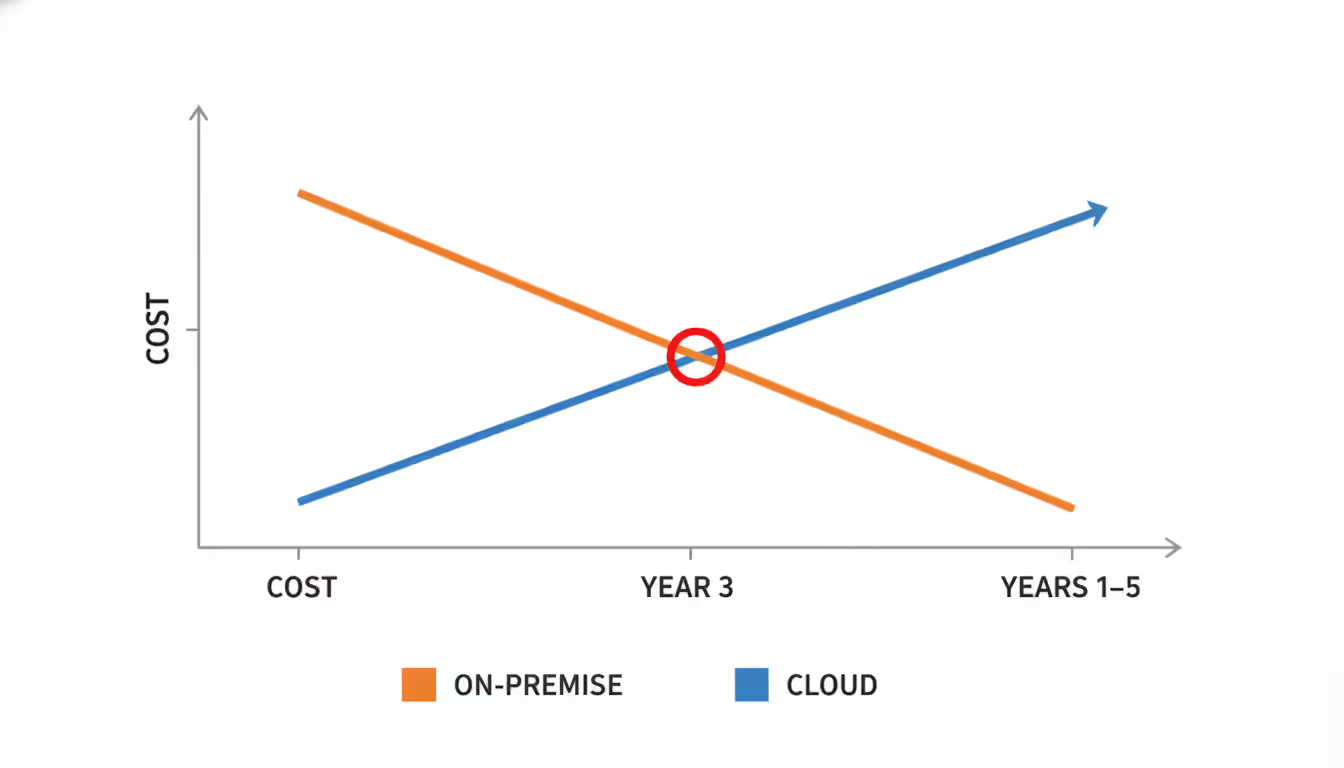
Break-even typically lands somewhere between year three and year five for stable workloads. But that math ignores flexibility value, deployment speed, and capital risk avoidance. A startup uncertain about its trajectory might rationally accept higher cloud costs over the risk of buying wrong-sized hardware.
Author: Ethan Norwood;
Source: baltazor.com
When to Choose On-Premise Over Cloud
Cloud momentum doesn't make on-premise infrastructure obsolete. Specific situations clearly favor owning your hardware:
Strict regulatory requirements around data location: Financial institutions in countries mandating customer data remain within national borders often find on-premise infrastructure simpler than navigating cloud region configurations and data transfer agreements. Compliance certainty outweighs cloud advantages.
Massive, predictable, steady-state workloads: A manufacturing company running ERP systems that process consistent transaction volumes 24/7 for years gains nothing from cloud elasticity. Right-sized on-premise hardware costs less over time while delivering required performance.
Legacy applications with weird dependencies: Older systems built for specific hardware, using operating systems nobody supports anymore, or requiring specialized peripherals often resist cloud migration. Engineering effort to refactor them exceeds any benefit from moving.
Extreme performance demands: Applications needing microsecond latency, specialized processors for specific tasks, or direct hardware access often work better on-premise. Cloud providers offer high-performance options but you can optimize owned hardware precisely for your application's quirks.
Recent major infrastructure investments: Spent $3 million on modern equipment two years ago? Your IT team knows those systems inside out? Migration delivers less value than riding that investment to end-of-life.
Physical device integration: Manufacturing equipment, scientific instruments, medical devices, or industrial control systems often connect directly to computing infrastructure via physical cables. Cloud services can't plug into a robotic assembly line on your factory floor.
Real-world decisions combine multiple factors. A hospital might keep electronic health records on-premise for regulatory simplicity while running appointment scheduling in the cloud. A retail chain might run point-of-sale systems on local servers at each store but centralize inventory analytics in the cloud.
Author: Ethan Norwood;
Source: baltazor.com
Planning Your Migration from On-Premise to Cloud
Moving infrastructure from your data center to cloud environments involves technical complexity, organizational change management, and constant risk assessment. Successful migrations follow structured approaches covering assessment, execution, and optimization.
Assessment phase: Start by inventorying everything—every application, every database, every odd script someone wrote five years ago that turns out to be critical. Document which systems talk to each other, how data flows between applications, what performance levels you actually need, compliance constraints, and business criticality. Migrations frequently derail when teams discover critical dependencies mid-flight. A trading firm once found their main platform depended on a forgotten database running on a server literally sitting under someone's desk—discovered only after primary systems had already migrated.
Evaluate cloud readiness for each application. Some lift-and-shift easily into cloud virtual machines with minimal changes. Others need significant refactoring to leverage cloud-native services properly. A few simply don't fit cloud deployment at all. Prioritize by migration difficulty versus business value. Quick wins—applications delivering substantial value with low migration complexity—build momentum and prove the concept.
Migration approaches: Several strategies work for different situations. Rehosting (lift-and-shift) moves applications to cloud VMs with minimal changes—fast and low-risk but captures few cloud advantages. Replatforming makes targeted optimizations like switching to managed databases while keeping core architecture intact. Refactoring redesigns applications as cloud-native architectures to maximize benefits but requires substantial engineering investment. Most organizations use different strategies for different applications.
Risk management: Run parallel systems during migration. Keep on-premise infrastructure operational while building and testing cloud equivalents. When confidence is high, redirect traffic to cloud systems while maintaining on-premise backup. Only decommission old systems after proving cloud systems work reliably under production load. This costs more temporarily but dramatically cuts migration risk.
On-Premise to Cloud Migration Checklist
Phase
Key Activities
Responsible Party
Completion Criteria
Pre-Migration
Inventory all applications and map dependencies
IT Architecture Team
Documented catalog showing every system, data flow, and interconnection
Pre-Migration
Evaluate cloud readiness and pick migration strategy for each app
Cloud Migration Team
Written migration plan for each application with time and effort estimates
Pre-Migration
Get stakeholder approval and budget commitment
Executive Sponsors
Signed budget approval with timeline endorsed by executives
Pre-Migration
Create cloud governance policies and cost control mechanisms
Cloud Operations Team
Published policies covering resource provisioning, security standards, and spending limits
Pre-Migration
Configure cloud accounts, networking, and security foundations
Cloud Infrastructure Team
Working cloud environment passing security and compliance reviews
Migration
Run pilot migration with low-risk application
Migration Team
Pilot app successfully handling production traffic in cloud
Migration
Execute application migrations in planned waves
Migration Team
Each wave deployed and validated before starting the next
Migration
Move data and verify integrity
Data Engineering Team
All data transferred with validation confirming accuracy and completeness
Migration
Run user acceptance testing for each migrated application
Business Users + QA
Business users signing off that functionality meets requirements
Migration
Train IT staff and end users on cloud systems
Training Team
Training sessions completed with attendance records
Post-Migration
Deploy monitoring and alerting for cloud resources
Cloud Operations Team
Monitoring dashboards tracking system health and performance
Post-Migration
Analyze and optimize resource allocation and spending
FinOps Team
Monthly cost reviews with optimization recommendations implemented
Post-Migration
Write documentation for cloud architecture and procedures
Technical Writers + Ops
Complete documentation accessible to operations teams
Post-Migration
Shut down on-premise infrastructure
IT Infrastructure Team
Hardware decommissioned, data securely wiped, facility space freed up
Communication matters as much as technical execution throughout migration. Regular stakeholder updates, transparent issue reporting, and clear escalation procedures keep projects moving forward. Migrations stretching months or years need sustained organizational commitment. Early wins and visible benefits maintain momentum when inevitable challenges emerge.
Frequently Asked Questions
Is cloud more secure than on-premise?
Neither wins automatically—it depends entirely on who implements it and how carefully. Cloud providers like AWS and Azure operate security infrastructure and hire security specialists most companies can't match. Their foundation is probably more secure than what you'd build yourself. But customers constantly cause breaches through misconfigurations—databases accidentally exposed publicly, storage buckets with wrong permissions, overly permissive access controls. On-premise security depends completely on your team's capabilities. Great for well-resourced organizations with skilled security staff, risky for companies lacking security expertise or budget.
What is the biggest difference between on-premise and cloud?
The fundamental shift from buying assets to renting services. On-premise means large upfront investment in hardware and software you own, which depreciates over 3-5 years. Cloud operates on pay-as-you-go with minimal startup costs but ongoing bills tied directly to usage. This financial model difference cascades through budgeting processes, capacity planning, organizational agility, everything. Cloud lets you start small and grow with actual demand rather than guessing capacity needs months beforehand and hoping you got it right.
How long does it take to migrate from on-premise to cloud?
Anywhere from weeks to years depending on what you're moving and how prepared you are. Simple applications with clean architectures might migrate in 3-4 weeks. Complex enterprise environments with hundreds of interconnected applications, petabytes of data, and strict compliance requirements can take 2-3 years. Most mid-sized companies finish in 6-18 months. Just the assessment phase often consumes 2-4 months for thorough dependency mapping and strategy development. Rush it and you risk outages, data loss, or security holes.
Can you use both on-premise and cloud together?
Absolutely—hybrid approaches combining owned infrastructure with cloud services are increasingly common. Companies keep sensitive data or legacy applications on-premise while using cloud for development, disaster recovery backup, or variable workloads. This requires careful architecture to handle data synchronization, network connectivity, and security spanning both environments. Hybrid setups add operational complexity but let you optimize workload placement based on specific requirements rather than forcing everything into one model.
Which is more cost-effective for small businesses?
Small businesses usually benefit more from cloud economics. Minimal upfront investment, no hardware maintenance burden, and ability to start tiny make cloud attractive when resources are tight. A small business can run complete infrastructure for $500-2,000 monthly without capital investment or specialized IT staff. On-premise requires upfront spending small businesses often can't afford and expertise they don't have in-house. However, a small business with predictable, modest computing needs and existing technical know-how might find basic on-premise infrastructure more economical long-term.
What should be in an on-premise to cloud migration checklist?
A solid migration checklist covers pre-migration work (inventory all applications, map dependencies, evaluate cloud readiness, align stakeholders), execution activities (pilot projects, phased application migration, data transfer with validation, thorough testing, user training), and post-migration tasks (implement monitoring, optimize costs, document everything, decommission old infrastructure). Each phase needs specific deliverables and approval checkpoints before moving forward. Assign clear ownership for every activity and define concrete completion criteria. Schedule regular checkpoint reviews to catch issues before they snowball into project-threatening problems.
Infrastructure choices—on-premise, cloud, or hybrid—shape technology strategy, financial planning, and operational capabilities for years afterward. Neither approach universally beats the other. The right choice depends on your specific situation, workload characteristics, regulatory constraints, and strategic priorities.
Cloud offers flexibility, rapid deployment, and continuously updated services without capital investment. Organizations experiencing growth, uncertainty, or variable demand benefit from elastic scaling and pay-per-use economics. On-premise provides complete control, predictable costs for steady workloads, and simplified compliance for regulated industries. Organizations with substantial existing investments, specialized requirements, or predictable capacity needs often find owned infrastructure more economical over time.
Most organizations eventually land on hybrid approaches, placing each workload wherever it fits best. Core transaction systems might stay on-premise while customer-facing apps run in cloud. Development and testing happen in cloud environments while production stays on-premise. This flexibility demands more sophisticated architecture and operations but optimizes placement for each workload's unique needs.
Migrations from on-premise to cloud require careful planning, phased execution, and sustained commitment. Successful migrations start with thorough assessment, proceed through structured implementation with parallel systems reducing risk, and continue with ongoing optimization long after initial migration completes. Organizations treating migration as a one-time project rather than continuous operational evolution often struggle with surprise costs, performance issues, or security gaps.
Infrastructure decisions should ultimately serve business objectives rather than follow industry trends. Choosing on-premise in 2026 doesn't mean you're behind if that choice best serves your needs. Similarly, rushing to cloud without understanding implications and planning properly creates more problems than it solves. The right infrastructure enables business success—whether that's on-premise, cloud, or hybrid depends entirely on your unique circumstances
Virtual desktop infrastructure represents a fundamental shift in how organizations deliver computing resources. Learn about VDI architecture, deployment models (on-premises, cloud, hybrid), implementation costs, use cases, and how to select the right solution for remote work and centralized management needs
Network administrators who rely on hourly snapshots discover problems only after users complain. A real time network traffic monitor shows what's happening at this exact moment—every packet, every connection, every anomaly as it occurs. Learn how these systems work and how to implement them effectively
Public cloud storage has become the backbone of modern data infrastructure, powering everything from smartphone photo backups to enterprise disaster recovery systems. Learn how it works, key benefits and limitations, security considerations, and how to choose the right provider for your needs
OAuth 2.0 enables secure API access through token-based authorization. This guide explains how OAuth 2.0 works, authorization flows, grant types, and key differences from OpenID Connect to help developers implement secure authentication systems
The content on this website is provided for general informational and educational purposes only. It is intended to explain concepts related to cloud computing, computer networking, infrastructure, and modern IT systems.
All information on this website, including articles, guides, and examples, is presented for general educational purposes. Technology implementations may vary depending on specific environments, business needs, infrastructure design, and technical requirements.
This website does not provide professional IT, engineering, or technical advice, and the information presented should not be used as a substitute for consultation with qualified IT professionals.
The website and its authors are not responsible for any errors or omissions, or for any outcomes resulting from decisions made based on the information provided on this website.