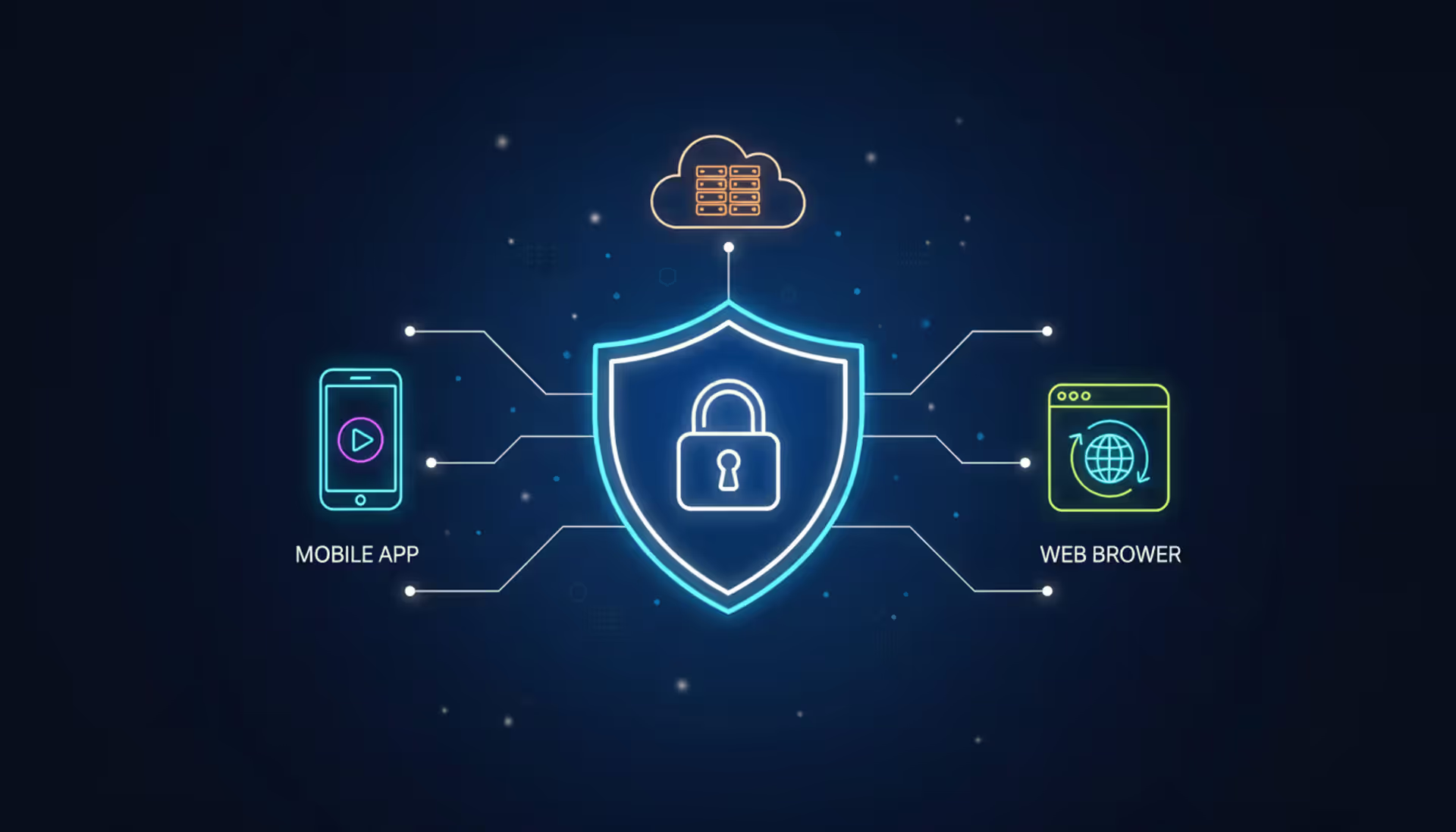
Ever clicked "Continue with Google" and wondered what happens next? Behind that button sits OAuth 2.0—the authorization protocol that's kept your passwords out of third-party databases since the early 2010s. Instead of typing your credentials into every random app, you grant controlled access through tokens.
If you're building software that needs to connect with external services or securing APIs, OAuth 2.0 knowledge isn't just nice to have. Your users expect it, security audits demand it, and honestly, rolling your own authentication system in 2026 is asking for trouble.
What Is OAuth 2.0 and How Does It Work
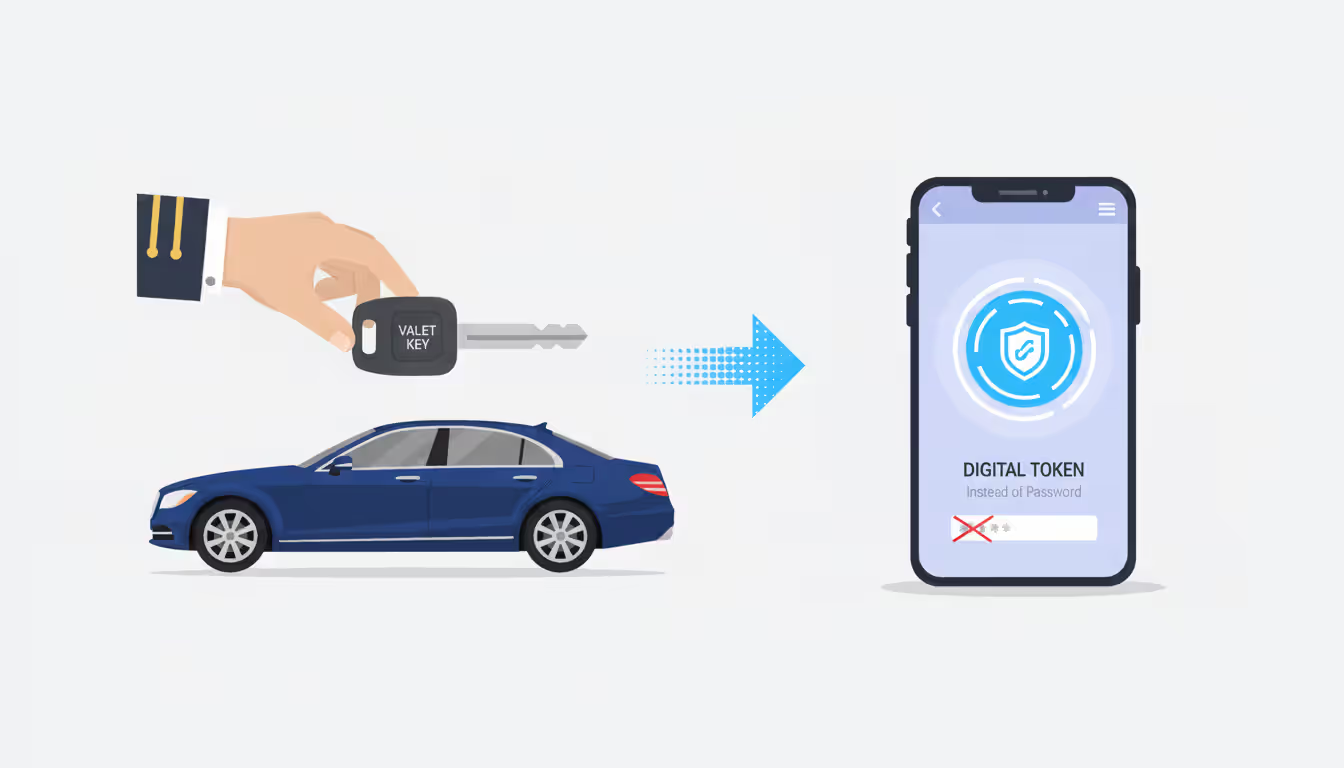
Picture handing your car to a parking attendant. You wouldn't give them your house keys along with the car keys, right? You'd use a valet key—one that starts the ignition but can't open the trunk or glove compartment. That's the mental model behind OAuth 2.0: limited access that doesn't require sharing master credentials.
This isn't about authentication (proving who you are). It's about authorization—deciding what an application can do with your resources. The distinction trips people up constantly, but keep it clear from the start.
Every OAuth 2.0 interaction involves four parties:
Resource Owner: The actual human being who owns the data. Your Gmail inbox belongs to you. Your Spotify playlists are yours. When an app wants access, you're the one deciding yes or no.
Client: Whatever software wants permission—could be a web dashboard analyzing your data, a mobile fitness app syncing workouts, or a Slack bot posting notifications. These clients need to perform actions on your behalf but shouldn't store your password to do it.
Authorization Server: This component checks your identity and hands out tokens after you approve access. When you log into Azure AD or authenticate with GitHub, their authorization servers verify you're legitimate, show what permissions are requested, then issue tokens if you click "Allow."
Resource Server: The API that actually holds your protected information. Dropbox's servers storing your files. Twitter's API serving your tweets. These servers validate tokens before releasing anything.
Here's what makes this architecture secure: clients never touch your password. You authenticate directly with the service you already trust. That service asks what you want to share. Once you approve, it generates a token—essentially a temporary permission slip. The client uses this token for API calls. No password stored, no password transmitted, no password sitting in another database waiting to leak during the inevitable breach.
Before OAuth 2.0 became standard practice (roughly 2012-2014), third-party apps routinely collected and stored user passwords. Every additional service that held your credentials multiplied the risk. One compromised database could expose thousands of accounts across dozens of platforms. Token-based delegation solved this nightmare by removing passwords from the equation entirely.
Author: Megan Holloway;
Source: baltazor.com
OAuth 2.0 Authorization Flow Explained
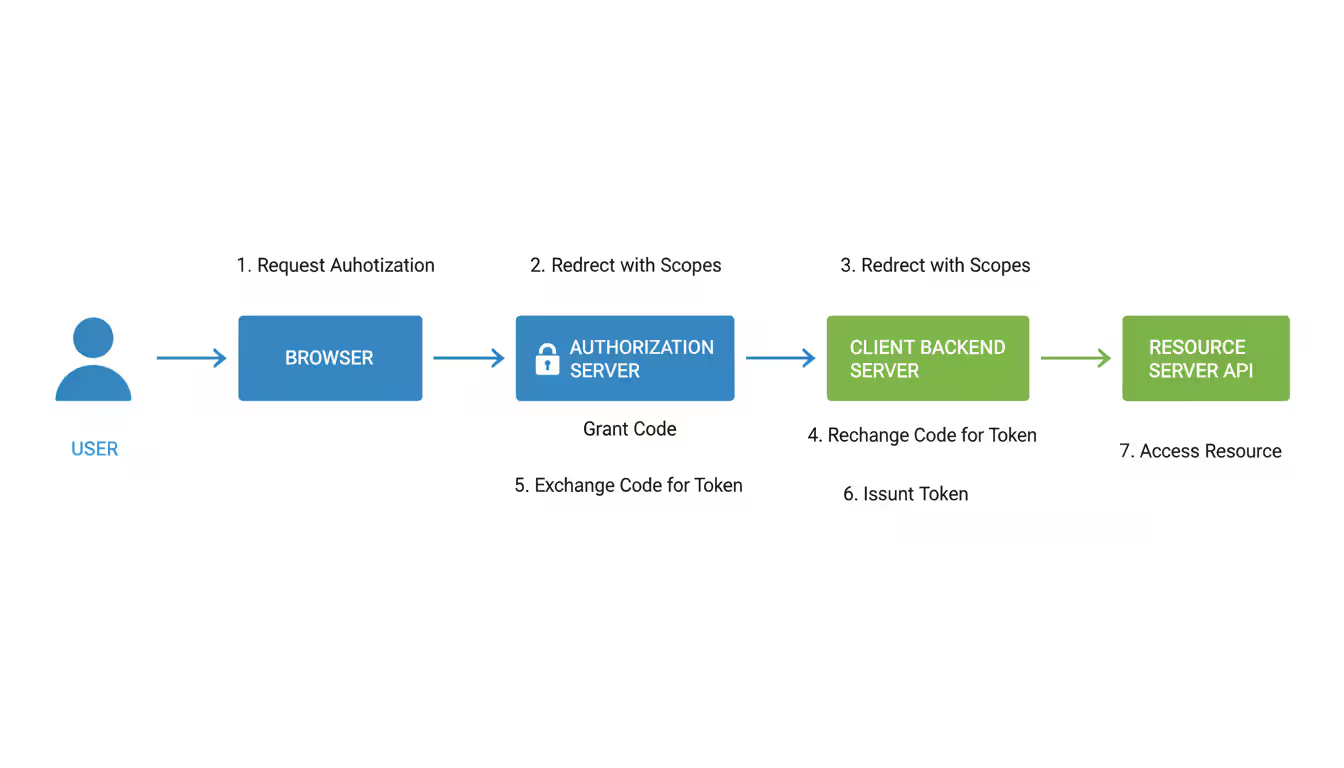
Let's trace what actually happens during a typical oauth 2.0 flow. Suppose you're connecting a continuous deployment platform to your GitHub repositories:
Step 1: You click "Link GitHub Account" in the deployment platform. The platform needs repository access but doesn't have it yet.
Step 2: The platform redirects your browser to GitHub's authorization endpoint. This URL contains several parameters: a client_id identifying the deployment platform, requested scopes (maybe "repo" for repository access), a redirect_uri pointing back to the platform, and a random state value for security.
Step 3: GitHub's authorization server sees you're not authenticated and displays its standard login screen. You type your GitHub username and password directly on github.com—crucially, not on the deployment platform's domain.
Step 4: After confirming your credentials, GitHub shows exactly what's being requested. "DeploymentPlatform wants to: Read your private repositories. Push commits to your repositories." You review these permissions. If they seem excessive, deny them. If reasonable, click authorize.
Step 5: GitHub redirects you back to the deployment platform's redirect_uri. The URL now includes an authorization code (single-use, expires in minutes) plus that state parameter from step 2.
Step 6: The platform's backend validates the state matches what it originally sent (this prevents cross-site request forgery). Then it makes a server-to-server call to GitHub's token endpoint, sending the authorization code, its client_id, its client_secret (known only to the platform's servers), and the redirect_uri for verification.
Step 7: GitHub validates everything—client_secret matches, redirect_uri is correct, authorization code hasn't been used before and hasn't expired. Assuming all checks pass, GitHub responds with an access_token and possibly a refresh_token.
Step 8: The deployment platform stores these tokens securely, then makes API requests to GitHub's resource servers with the access_token in the Authorization header.
Step 9: GitHub's API validates the token—is it valid, unexpired, and scoped appropriately? If yes, it returns the requested repository data.
Author: Megan Holloway;
Source: baltazor.com
Any oauth 2.0 flow diagram would show arrows connecting the browser, client servers, authorization servers, and resource servers. The critical security detail: client_secret stays on backend servers, never exposed in browsers or mobile apps. The authorization code is single-use and short-lived—even if intercepted, it's worthless within minutes and can't be reused.
OAuth 2.0 Grant Types and When to Use Each
OAuth 2.0 defines multiple grant types because a backend server has radically different security capabilities than JavaScript running in a browser. Picking the wrong grant type creates vulnerabilities.
Authorization Code Grant
This should be your default for any application with server-side components. The two-phase process—first obtaining a code, then exchanging it server-side for tokens—ensures secrets never leave your infrastructure.
Security teams prefer this because client_secret remains on servers where you control access. Even if an attacker intercepts the authorization code through network monitoring, they can't exchange it without the secret. And even if they somehow obtained the secret, the authorization server enforces exact redirect_uri matching—no tokens get sent to attacker-controlled domains.
Concrete example: A marketing automation platform integrating with HubSpot. The platform's backend handles token exchange. Users never see tokens in their browsers. The client_secret lives in AWS Secrets Manager with restricted IAM policies. This represents best practice—use authorization code whenever your architecture supports it.
Starting around 2019, combining authorization code with PKCE (Proof Key for Code Exchange) extended this pattern to mobile and browser apps. More on that shortly.
Implicit Grant
This grant was designed for browser-based apps in the early 2010s when CORS limitations made server proxying awkward. It returns tokens directly in the URL fragment—no code exchange, no server involved.
The problem: tokens in URLs create attack vectors everywhere. Browser history records them. Server logs might capture them. Referrer headers can leak them to analytics services. There's no way to authenticate the client since there's no secret involved.
In the OAuth 2.0 Security Best Current Practice document published in 2020, the working group explicitly deprecated implicit grant. If you're starting fresh projects in 2026, skip this entirely. If you're maintaining legacy code still using it, plan migration to authorization code with PKCE.
Client Credentials Grant
When no human is involved, this grant makes sense. A scheduled batch job pulling analytics data at midnight doesn't need user authorization—it needs service-to-service authentication.
The client authenticates using its ID and secret, receiving an access token representing the service itself. Example: an inventory management microservice querying a warehouse management microservice. The inventory service proves its identity, gets a token scoped to warehouse operations, and makes requests.
Security still matters: rotate secrets every 60-90 days minimum. Use dedicated secrets management—HashiCorp Vault, Azure Key Vault, Google Secret Manager. Never commit secrets to Git repositories. If your container gets compromised, minimize damage by ensuring tokens have narrow scope and brief lifetimes (5-15 minutes is reasonable for many internal services).
Resource Owner Password Credentials Grant
This grant lets clients collect usernames and passwords directly, then trade them for tokens. It completely defeats OAuth 2.0's core purpose—eliminating password sharing.
The specification includes this grant exclusively for migration paths. Imagine you're a financial institution modernizing a 10-year-old mobile app. The app and backend both belong to your institution. Users already trust your app with passwords (they've been doing it for years). You can use this grant temporarily while architecting something better.
Never use password credentials for third-party integrations. It trains users to type credentials into apps, making them vulnerable when a phishing app mimics your interface. Even for first-party situations, authorization code with PKCE provides stronger security guarantees.
Refresh Token Grant
Access tokens expire quickly—commonly 15-60 minutes—to limit exposure if stolen. But forcing users to re-authenticate every hour ruins the experience. Refresh tokens bridge this gap.
When issuing an access token, authorization servers often include a refresh token valid for much longer (days to months). When the access token expires, the client submits the refresh token to get a fresh access token without bothering the user.
Modern implementations rotate refresh tokens: each time you exchange one, you get a new access token plus a new refresh token. The old refresh token becomes invalid immediately. This enables theft detection—if an old refresh token is reused, the authorization server knows something's wrong and can revoke all tokens for that session, forcing re-authentication.
Grant Type
Designed For
Secret Storage
Security Profile
Token Types
Authorization Code
Server-rendered web apps
Backend server (secure)
Strong
Access + Refresh
Authorization Code + PKCE
JavaScript apps, mobile apps
None (public clients)
Strong
Access + Refresh
Implicit
Legacy browser apps
None
Weak (deprecated)
Access only
Client Credentials
Service-to-service APIs
Backend server (secure)
Strong for M2M
Access only
Password Credentials
Migration scenarios only
Backend server
Weak (avoid)
Access + Refresh
OAuth 2.0 vs OpenID Connect: Key Differences
Developers routinely mix up authorization and authentication, then wonder why their security audits fail. Let's untangle this confusion because it matters.
OAuth 2.0 solves the question: "Should this app access my calendar?" It handles permission and delegation. When a scheduling app gets an OAuth 2.0 access token for your Google Calendar, that token proves the app has permission to read events. It doesn't reliably tell the app who you are—that's not what access tokens were designed for.
OpenID Connect answers: "Who is this person logging in?" It verifies identity. OIDC builds on OAuth 2.0 by adding an ID token—a cryptographically signed JWT containing verified claims about the authenticated user. Your name, email address, when you authenticated, your unique identifier—all packaged in a standardized format that clients can trust.
Mixing these creates security holes: access tokens target resource servers, not clients. Their format isn't standardized for identity purposes. Some implementations use random strings. Others use JWTs but with claims designed for access control rather than identity. Parsing an access token to extract a user_id might work with Google's implementation and fail with Okta's—or worse, accept forged data because you're not validating signatures.
Real scenario: You're building a task management tool. Users sign in with their Microsoft account. You need their name and email to populate their profile. OAuth 2.0 alone doesn't reliably provide this. An access token lets you call Microsoft's APIs, but extracting identity from it is fragile and non-standard. OIDC gives you an ID token with standardized claims: name, email, sub (the user's unique subject identifier).
When choosing between oauth 2.0 vs oidc, ask: Do I just need to access resources? Use OAuth 2.0. Do I need to authenticate users and know their identity? Use OpenID Connect, which includes OAuth 2.0 flows plus standardized identity features.
Aspect
OAuth 2.0
OpenID Connect
Primary purpose
Granting access to resources
Authenticating user identity
Key token
Access token (for resource APIs)
ID token (identity claims) plus access token
Provides verified identity?
Not in standardized form
Yes, standardized claims in JWT
Standardized user profile endpoint?
Not defined in spec
Yes, /userinfo endpoint
Foundation
Base protocol from 2012
Identity layer on OAuth 2.0
Use case
"Allow this app to post tweets"
"Sign in with your company account"
Common OAuth 2.0 Implementation Mistakes
After reviewing security assessments for dozens of organizations, certain vulnerabilities appear with depressing regularity. Here's what catches developers off guard:
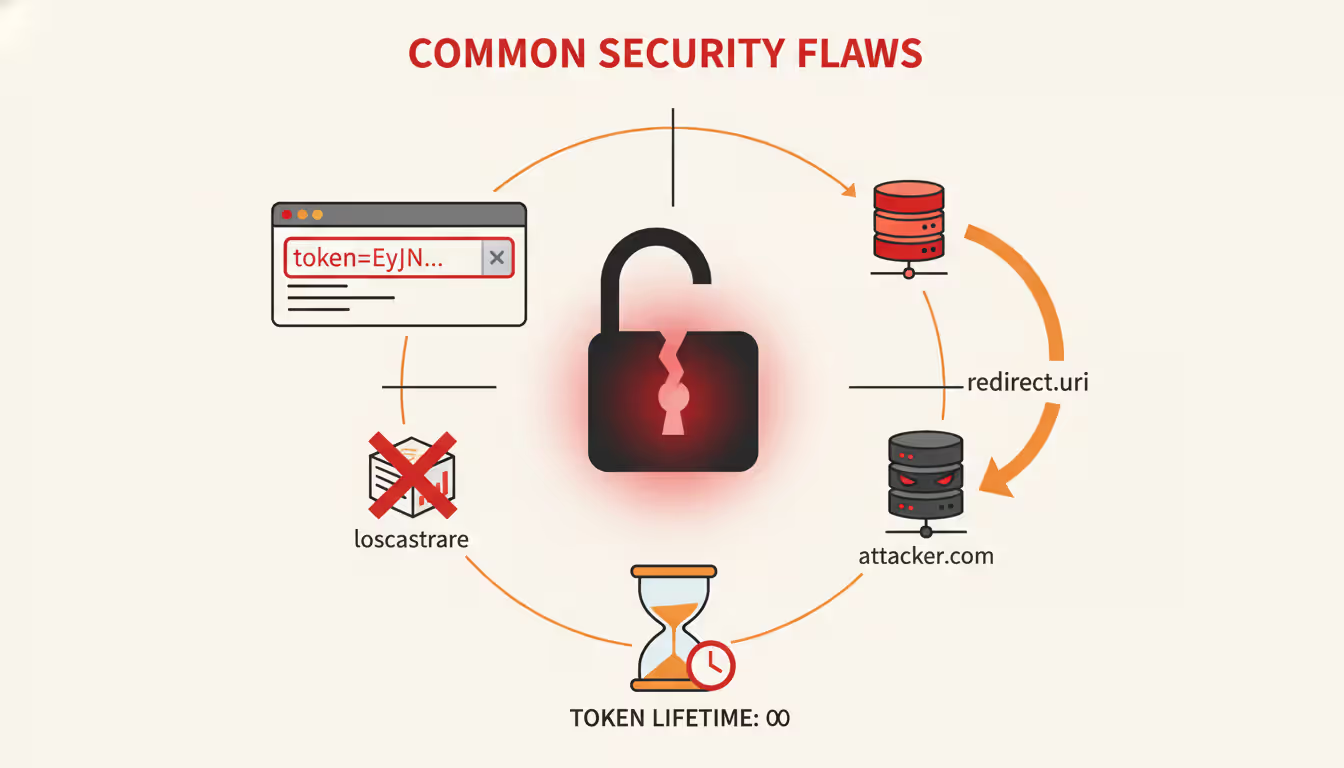
Token Storage Blunders: Storing tokens in localStorage feels convenient—simple JavaScript access, survives page refreshes. Unfortunately, any XSS vulnerability can exfiltrate localStorage contents. If a compromised third-party analytics script injects code into your page, it can read every token. For browser apps, httpOnly cookies with SameSite=Strict attributes provide better XSS resistance. For mobile apps, use platform-specific secure storage—iOS Keychain and Android Keystore use hardware-backed encryption when available.
Author: Megan Holloway;
Source: baltazor.com
Redirect URI Validation Failures: Imagine an authorization server allows redirect URIs matching https://app.example.com/*. An attacker registers https://app.example.com.attacker.io/callback. Naive substring matching would incorrectly allow this domain. Authorization servers must validate the full redirect_uri exactly—character-by-character comparison, no wildcards, no pattern matching, no "close enough." This prevents attackers from intercepting authorization codes by redirecting them to attacker-controlled domains.
Skipping the State Parameter: The state parameter looks optional in tutorial code snippets. It absolutely is not. Generate a cryptographically random value, store it in the user's session, include it when redirecting to the authorization server, and verify it matches when the callback arrives. Without this check, attackers can launch CSRF attacks where victims unknowingly authorize access to the attacker's account.
Requesting Excessive Scope: Asking for "read, write, delete, admin, modify_billing" permissions when you only need "read" violates principle of least privilege and makes users suspicious. Research from 2023 showed authorization screens requesting minimal scopes received 47% higher approval rates. Request only what you genuinely need right now. If requirements expand later, request incremental authorization rather than front-loading everything.
Defaulting to Deprecated Grants: In 2026, few legitimate reasons exist for implicit grant or password credentials grant. Authorization code with PKCE works for server-rendered apps, single-page applications, mobile apps, and even CLI tools. Yet developers still reach for deprecated flows because outdated blog posts from 2014 or legacy SDK examples demonstrate them.
Forgetting PKCE for Public Clients: For any client without a backend server (mobile apps, JavaScript SPAs), PKCE is mandatory in modern implementations. Without it, malicious apps can register URL schemes or app links to intercept authorization codes. PKCE cryptographically ties the token exchange to the original client, so even if the code is intercepted, it's useless without the code_verifier that only the legitimate client knows.
Token Lifetime Mismanagement: Access tokens valid for 24 hours or refresh tokens valid for years multiply your exposure. If an attacker steals a long-lived token, they maintain access until you detect the breach—which could be days or weeks. Access tokens should live 15-60 minutes maximum. Refresh tokens can be longer but implement rotation on every use and enforce absolute maximum lifetimes (90 days works for many consumer apps, shorter for sensitive domains like healthcare or finance).
How to Choose the Right OAuth 2.0 Flow for Your Application
Selecting the appropriate oauth 2.0 flow depends primarily on your architecture and whether you can protect secrets from users.
Server-Rendered Web Applications: If your application generates HTML on the backend—Ruby on Rails, Django, Express with server-side rendering, Laravel—use authorization code grant. Your backend can securely store client_secret in environment variables or secrets management. Token exchange occurs server-to-server where users never see tokens. Session cookies identify users on subsequent requests. This remains the gold standard when your architecture permits it.
Single-Page Applications: React, Vue, Angular, or Svelte apps with no backend or only API backends face a challenge—nowhere to hide client secrets since all code runs in browsers. Current best practice as of 2020 recommendations: use authorization code with PKCE. The Backend-for-Frontend pattern offers even better security: add a thin backend layer (even a simple Express or Flask server) that handles OAuth flows and issues session cookies to your SPA. The JavaScript never touches tokens.
If adding a backend is truly impossible, authorization code with PKCE in the browser is acceptable but understand the trade-offs. Tokens stored in memory are XSS-resistant but disappear on page refresh. Tokens in localStorage survive refreshes but become vulnerable to XSS attacks.
Mobile Applications: iOS and Android apps are considered public clients—anyone can decompile your app binary and extract embedded "secrets." Use authorization code with PKCE. For the authorization step, always launch the system browser (ASWebAuthenticationSession on iOS, Chrome Custom Tabs on Android), never embedded webviews. Users can verify the address bar shows the real authorization server's domain, not a phishing page your app controls.
Backend Services and Microservices: When no user is involved—just services authenticating to other services—client credentials grant fits perfectly. Your order processing service authenticating to the payment gateway. Your ETL pipeline authenticating to the analytics API. Store credentials in proper secrets management (Vault, AWS Secrets Manager, Azure Key Vault). Rotate secrets quarterly. Use short-lived tokens (5-15 minutes is reasonable for internal services).
First-Party Mobile Apps: Suppose you work at a bank building your official mobile banking app. The app and API both belong to your organization. Technically, resource owner password credentials grant is acceptable since trust is complete and users already enter passwords in your app. But consider: authorization code with PKCE provides stronger security and doesn't normalize password entry in apps. Unless you're maintaining legacy systems, prefer authorization code even for first-party scenarios.
Command-Line Tools: CLI tools can use authorization code with PKCE plus a local redirect server (temporarily listen on http://localhost:8080). Alternatively, the device authorization flow (OAuth 2.0 Device Flow) was purpose-built for this: the CLI displays a short code, the user visits a URL on their phone or laptop, enters the code there, and authorizes. The CLI polls the token endpoint until authorization completes.
Quick decision framework: Can you keep secrets server-side? → Authorization Code. Can't keep secrets? → Authorization Code + PKCE. Service-to-service with no user? → Client Credentials.
OAuth 2.0 is not an authentication protocol. It's important to understand that OAuth 2.0 provides authorization—delegated access to resources—not user authentication. For authentication, you need OpenID Connect, which is built on top of OAuth 2.0
— Eran Hammer
Frequently Asked Questions About OAuth 2.0
Is OAuth 2.0 secure for mobile applications?
Yes, when implemented correctly—which requires specific precautions. Mobile apps must use authorization code with PKCE since apps can't protect embedded secrets (anyone with time and tools can decompile your binary). Always launch the system browser (SFSafariViewController, ASWebAuthenticationSession on iOS; Chrome Custom Tabs on Android) rather than embedded webviews. This lets users verify the authorization server's domain in the address bar. Store tokens in platform secure storage: iOS Keychain or Android Keystore. Never use UserDefaults on iOS or SharedPreferences on Android—these aren't encrypted by default and are trivial to access on jailbroken/rooted devices.
Can OAuth 2.0 be used for authentication?
Not reliably, and trying causes security problems. OAuth 2.0 was designed for authorization (delegating resource access), not authentication (verifying user identity). Access tokens prove authorization happened but don't reliably identify who the user is. The format isn't standardized for identity claims. Some providers use opaque tokens, others use JWTs with access-control claims rather than identity claims. For "Sign in with..." functionality, use OpenID Connect. OIDC extends OAuth 2.0 with ID tokens—standardized JWTs containing verified identity claims you can trust.
What is the difference between access tokens and refresh tokens?
Access tokens are short-lived credentials (typically 15-60 minutes) you include in API requests to access protected resources. They're designed to be somewhat disposable—if one leaks, it expires quickly. Refresh tokens are longer-lived credentials (days to months) used exclusively to obtain new access tokens when old ones expire. You send the refresh token to the authorization server's token endpoint and receive fresh access tokens. This balances security (short-lived access tokens minimize breach impact) with user experience (not forcing re-authentication every hour). Treat refresh tokens as extremely sensitive—store them securely and implement rotation where each use produces a new refresh token.
How long should OAuth 2.0 tokens be valid?
Access tokens: 15-60 minutes for typical applications. High-security contexts like financial services often use 5-10 minutes. Consumer social apps might stretch to 60 minutes. Refresh tokens: 30-90 days with rotation is common. Mobile apps where re-authentication severely hurts user experience might extend to 6 months, but implement rotation and theft detection. For administrative actions modifying security settings, consider requiring re-authentication regardless of token validity. Context drives these decisions—a photo sharing app tolerates longer lifetimes than a healthcare portal. The guiding principle: minimize token lifetime while maintaining acceptable experience.
Do I need HTTPS for OAuth 2.0?
Absolutely required for production, no exceptions. Without TLS encryption, authorization codes, access tokens, refresh tokens, and client secrets are plaintext on the network—anyone between the user and server can intercept them. The OAuth 2.0 specification mandates HTTPS for all authorization server endpoints. Most authorization servers reject non-HTTPS redirect URIs except localhost during development. Even between microservices inside your datacenter, use TLS—lateral movement after one service is compromised shouldn't expose tokens. If certificate costs are a concern, Let's Encrypt provides free automated certificates.
What happens if an OAuth 2.0 access token is stolen?
An attacker with a valid access token can impersonate the legitimate client until expiration. This is exactly why short token lifetimes are critical—you're limiting the exposure window. If you detect theft (unusual API patterns, requests from unexpected geolocations, impossible travel between requests), immediately revoke the token through the authorization server's revocation endpoint. Newer standards like DPoP (Demonstrating Proof-of-Possession) and token binding cryptographically tie tokens to specific clients, so stolen tokens are useless without the client's private key. Implement monitoring and anomaly detection to catch theft quickly—the faster you detect and respond, the less damage occurs.
OAuth 2.0 evolved from a specification into the foundation of how modern software shares data securely. Getting implementation right means understanding which grant type fits your architecture, following security practices like PKCE and state validation, and recognizing when you actually need OpenID Connect rather than OAuth 2.0 alone.
Start with these fundamentals: use authorization code with PKCE for nearly all client applications, reserve client credentials for backend service communication, and remember that authorization differs fundamentally from authentication. When you need to verify user identity—like "Sign in with..." buttons—extend your implementation with OpenID Connect instead of misusing access tokens as proof of identity.
Security emerges from details: strict redirect_uri validation, proper state parameter handling, secure token storage appropriate to your platform, and token lifetimes matching your risk profile. Combined with selecting the correct grant type, these practices protect user data while enabling the seamless integrations users expect.
As you build, reference the OAuth 2.0 Security Best Current Practice document maintained by the OAuth working group. It captures hard lessons from real breaches, emerging attack patterns, and evolving threats since the original 2012 specification. The framework continues evolving with extensions like PKCE (now mandatory for public clients) and DPoP (preventing token theft) while maintaining backward compatibility with existing deployments worldwide.
Virtual desktop infrastructure represents a fundamental shift in how organizations deliver computing resources. Learn about VDI architecture, deployment models (on-premises, cloud, hybrid), implementation costs, use cases, and how to select the right solution for remote work and centralized management needs
Network administrators who rely on hourly snapshots discover problems only after users complain. A real time network traffic monitor shows what's happening at this exact moment—every packet, every connection, every anomaly as it occurs. Learn how these systems work and how to implement them effectively
Public cloud storage has become the backbone of modern data infrastructure, powering everything from smartphone photo backups to enterprise disaster recovery systems. Learn how it works, key benefits and limitations, security considerations, and how to choose the right provider for your needs
Choosing between on-premise and cloud infrastructure affects budget, security, compliance, and agility. Understand cost structures, security trade-offs, and migration planning to make informed decisions aligned with your business requirements and strategic goals
The content on this website is provided for general informational and educational purposes only. It is intended to explain concepts related to cloud computing, computer networking, infrastructure, and modern IT systems.
All information on this website, including articles, guides, and examples, is presented for general educational purposes. Technology implementations may vary depending on specific environments, business needs, infrastructure design, and technical requirements.
This website does not provide professional IT, engineering, or technical advice, and the information presented should not be used as a substitute for consultation with qualified IT professionals.
The website and its authors are not responsible for any errors or omissions, or for any outcomes resulting from decisions made based on the information provided on this website.