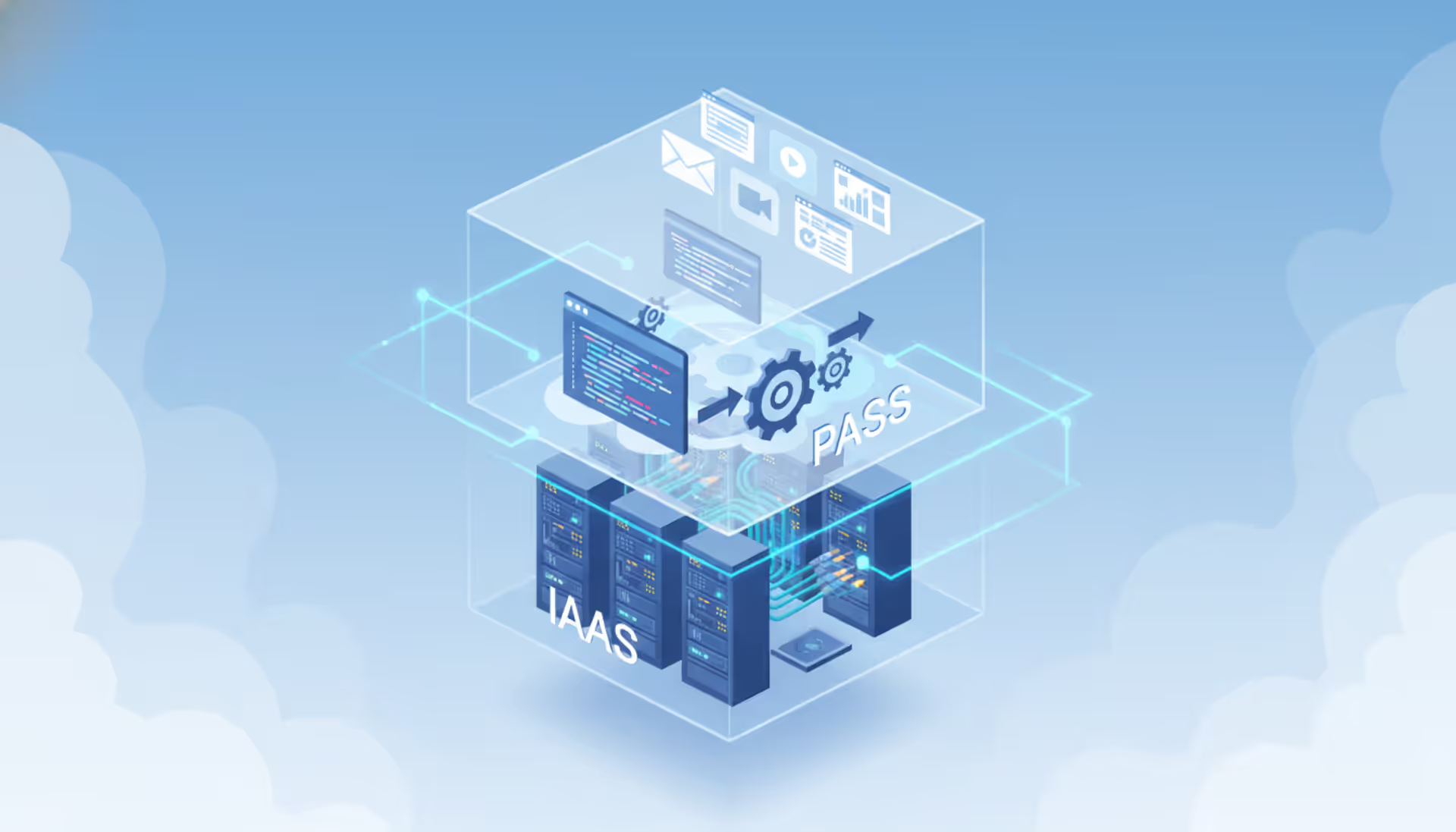
Three transparent layered blocks representing IaaS PaaS and SaaS cloud service models with server hardware code window and application icons connected by glowing lines against blue sky background
You're about to spend thousands—maybe millions—on cloud infrastructure. Here's the uncomfortable truth: most companies pick the wrong service tier and don't realize it until they're locked into year-long contracts. I've watched a healthcare startup burn $40,000 rebuilding their application because they chose IaaS when PaaS would've gotten them to market four months faster. Another client, a logistics firm, went with SaaS and then discovered they couldn't export data in the format their compliance audit required.
The difference between Infrastructure as a Service, Platform as a Service, and Software as a Service isn't academic. It's the difference between shipping your product next quarter or next year.
What Are Cloud Service Models
Think of cloud service models as a responsibility contract. Where does the vendor's job end and yours begin?
You've got three main options. Infrastructure as a Service hands you virtual servers and storage—you handle pretty much everything else. Platform as a Service gives you a ready-made environment for deploying code; they manage the servers, you manage the application. Software as a Service delivers a complete solution; you're just a user with admin privileges.
Here's what actually matters: the shared responsibility framework. Every cloud arrangement splits duties between you and the provider. The physical stuff—data centers, cooling systems, fiber optic cables—always belongs to them. What you're responsible for changes dramatically depending on which tier you select.
Pick IaaS? You're managing operating systems, installing security patches, configuring firewalls, setting up databases, deploying applications, and protecting data. That's on you. With PaaS, the vendor handles OS patches and runtime environments while you focus on your application code and the data it processes. Choose SaaS and you're basically just deciding who gets access and how the software should behave within its preset boundaries.
A regional bank needing custom fraud detection algorithms with specific regulatory controls probably needs IaaS-level access. Their marketing department launching an email campaign? They need Mailchimp or HubSpot—straight SaaS, no technical overhead.
I see companies mess this up constantly. They underestimate how much work IaaS requires, or they pick SaaS and then complain they can't customize workflows that were never meant to be customizable. Your model should match what your team can actually support and what your business actually needs. Not the flashy demo that impressed your CTO at a conference.
Infrastructure as a Service Breakdown
IaaS rents you virtualized computing power over the internet. You get virtual machines, block storage, networking, and load balancers. It's like leasing servers without the physical hardware headaches.
AWS EC2, Azure Virtual Machines, and Google Compute Engine lead this space. They're selling raw computing capacity with minimal guardrails. You pick your instance size, attach storage drives, configure network rules, and install whatever software your workload demands.
The experience feels like running your own data center. You provision servers, apply patches, set firewall rules, schedule backups, and watch performance metrics. This granular control lets you optimize for unusual workloads, but you need people who know what they're doing.
Where does IaaS shine? Custom applications needing specific OS configurations. Batch processing jobs that spike unpredictably. Dev and test environments mimicking production exactly. Massive datasets requiring non-standard access patterns. Organizations with security requirements so strict they need to control everything down to kernel parameters often land here.
Billing follows actual consumption. You pay for every compute hour, every gigabyte stored, every byte transferred across the network. Additional services like elastic IPs or managed load balancers add to your tab. This transparency sounds great until someone forgets to shut down test environments and your bill triples.
Author: Ethan Norwood;
Source: baltazor.com
When IaaS Makes Sense for Your Organization
You need in-house technical talent. Not just "pretty good with computers"—I mean people comfortable with SSH, system administration, and network configuration. If your developers are asking for root access or need to compile custom kernel modules, IaaS might be your only option.
Unpredictable traffic patterns make IaaS economics attractive. An online retailer selling holiday decorations can spin up 50 additional servers every November and December, then drop back to baseline in January. You're paying for actual usage instead of maintaining hardware that sits idle 10 months a year.
Disaster recovery setups frequently use IaaS. Keep replica systems dormant in the cloud, paying only for storage. When your primary data center fails, activate those replicas and reroute traffic. You get geographic redundancy without the expense of building a second physical facility.
"Lift and shift" migrations from on-premises infrastructure usually start here. You're basically moving existing VMs to the cloud without rewriting applications. It's not elegant, but it gets you migrated fast. You can optimize later after your data center lease expires.
But here's the catch nobody mentions upfront: operational overhead doesn't disappear. You're still patching servers, monitoring performance, configuring autoscaling, and managing security. One healthcare client told me their IaaS "savings" evaporated once they hired two additional DevOps engineers to manage everything.
Platform as a Service vs Infrastructure as a Service
PaaS abstracts away infrastructure headaches. Instead of configuring virtual machines, you push code to a managed environment that handles scaling, patching, and runtime management automatically.
Consider Heroku, Google App Engine, or Azure App Service. You write code in Python, Node.js, Ruby, or Java, then deploy through command-line tools or CI/CD pipelines. The platform handles literally everything else. No server configuration, no OS updates, no capacity planning.
This targets developers who want to build features, not babysit infrastructure. Need a PostgreSQL database? It's a one-line config file change. Want Redis caching? Check a box. Authentication? Built-in. These integrations collapse weeks of infrastructure work into minutes, though you're stuck with the platform's architectural opinions.
Cloud service automation reaches its zenith here. Traffic surge? The platform scales automatically. Code pushed to GitHub? Automatic deployment after tests pass. Application crashed? Automatic restart and alert. These automations eliminate grunt work but hide what's actually happening under the hood.
That abstraction creates the core tradeoff. You can't install custom network drivers, modify kernel parameters, or SSH into production boxes—there aren't any boxes to SSH into. Your application must fit the platform's constraints around language versions, framework support, and resource limits.
Where PaaS excels: web applications, REST APIs, and microservices using standard frameworks. A fintech startup building mobile banking APIs benefits enormously. They ship features instead of managing Kubernetes clusters. A three-person team accomplishes what used to require dedicated operations staff.
Pricing typically charges per application instance or bundled resource consumption rather than granular compute hours. Many platforms offer free tiers perfect for side projects and MVPs. Just watch those costs once you exceed free tier limits—they can jump dramatically.
Author: Ethan Norwood;
Source: baltazor.com
Software as a Service in Modern Enterprises
SaaS hands you complete applications accessed through browsers or mobile apps. You're not installing anything, managing any infrastructure, or deploying any code. The vendor handles servers, application updates, security patches, everything.
Look around your company. Salesforce manages customer relationships. Microsoft 365 handles documents and email. Slack connects teams. Workday runs HR and payroll. Zoom hosts video calls. These tools require zero infrastructure investment beyond internet connectivity and user licenses.
These applications target business users, not technical staff. Configuration happens through web interfaces, not code repositories. Marketing teams can set up email campaigns. Sales reps can customize dashboards. Nobody needs command-line access or API documentation.
Subscription pricing dominates—monthly or annual fees per user, usually with feature tiers. Basic plans might cost $10 per user monthly; enterprise versions hit $100+. This predictable expense simplifies budgeting compared to variable infrastructure costs, though per-seat pricing can shock rapidly growing companies.
Integration determines whether SaaS actually delivers value in complex environments. Your average mid-size company runs 30-40 different SaaS applications. When Salesforce doesn't talk to QuickBooks and nobody knows what data lives where, you've created expensive chaos. Modern SaaS platforms offer APIs and pre-built connectors, but complex integrations often require Zapier, MuleSoft, or custom development.
Here's where frustration builds: customization limits. SaaS vendors design for thousands of customers, not your specific workflow. You can change colors, add custom fields, maybe rearrange some screens. Fundamental process changes? Often impossible. I watched a manufacturing client spend six months trying to force Salesforce to match their quoting process before finally accepting they needed to change their process instead.
Data control becomes critical in regulated industries. Your information lives on vendor infrastructure. Where geographically? Who has access? How's it encrypted? Can you export everything if you switch vendors? A medical device company discovered their SaaS vendor's data export format was missing half the metadata they needed for FDA audits. That was an expensive surprise.
Choosing the Right Model for Your Cloud Service Company
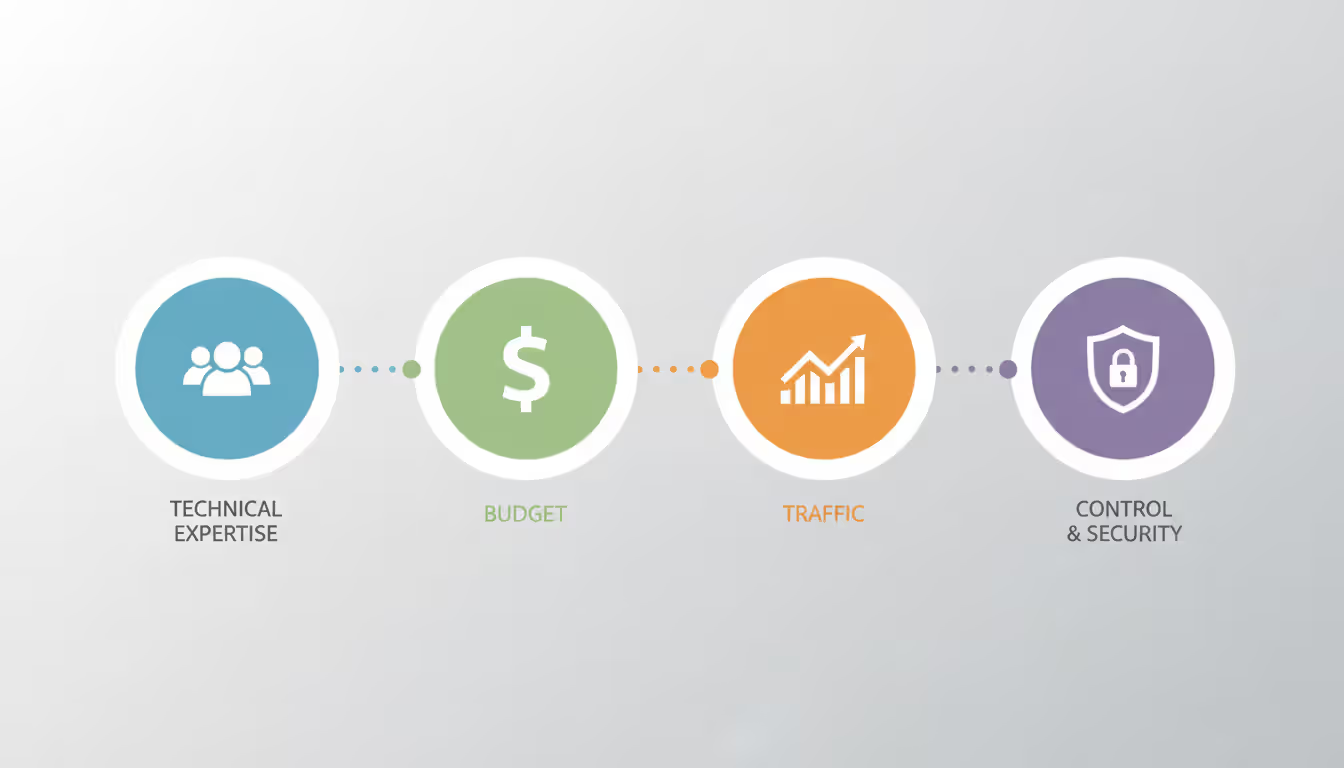
Build your decision framework around four factors: what your team actually knows, what your budget actually includes, how your traffic actually behaves, and what control you actually require.
Technical expertise matters most. A cloud service company employing senior DevOps engineers can squeeze impressive performance from IaaS. Teams without infrastructure specialists waste money on misconfigured servers and accumulate security vulnerabilities. Be honest about current capabilities, not the team you hope to hire someday.
Budget analysis requires looking beyond monthly bills. That $800 IaaS invoice becomes $9,600 annually in cloud costs plus $120,000 for the engineer managing it. PaaS might bill $2,000 monthly but includes operational overhead. Calculate total cost of ownership—personnel, training, tools, monitoring, everything.
Scalability requirements depend on traffic patterns. Steady, predictable load suits SaaS or PaaS with fixed-tier pricing. Wildly variable traffic benefits from IaaS granular billing. Hypergrowth scenarios favor PaaS automatic scaling over manually orchestrated IaaS infrastructure.
Control needs stem from compliance, security policies, or technical constraints. HIPAA-regulated healthcare applications need audit trails and encryption controls that basic SaaS rarely provides. Legacy applications hard-coded to specific IP addresses might require IaaS networking flexibility unavailable in PaaS abstractions.
When evaluating a cloud service solution, map out the transition path. Starting with IaaS gives you unlimited flexibility but slowest time-to-market. Beginning with SaaS accelerates deployment but might force process changes. Most successful organizations mix approaches: SaaS for commodity functions like email, PaaS for customer-facing applications, IaaS for specialized workloads with unique requirements.
Time pressure tips decisions toward higher abstraction. Startups racing to secure Series A funding choose PaaS or SaaS to avoid infrastructure rabbit holes. Established enterprises with existing IT departments might prefer IaaS to leverage current skills and integrate with on-premises systems they can't retire yet.
The vendor's ecosystem matters long-term. A cloud service solution with extensive third-party integrations, active Stack Overflow discussions, and thorough documentation makes future problems solvable. Niche providers offering attractive pricing might leave you stranded when you need help at 2 AM debugging a production outage.
Author: Ethan Norwood;
Source: baltazor.com
Common Mistakes When Selecting a Cloud Service Solution
Migration costs get ignored until they explode budgets. Teams obsess over monthly operating expenses while overlooking data egress fees, application refactoring effort, and the six months running parallel environments. A proper migration budget often exceeds the first year's operating costs.
Training gets severely underestimated. Cloud platforms require different mental models than traditional infrastructure. Developers comfortable with SSH access struggle when PaaS removes that access entirely. IT teams who've managed physical servers for 15 years need substantial time mastering cloud-native patterns. Budget actual training time and expect productivity drops during transitions.
Vendor lock-in intensifies as abstraction increases. Migrating IaaS virtual machines between AWS and Azure involves work but remains feasible. Moving PaaS applications built on platform-specific services—AWS Lambda, Google Cloud Run—requires significant rewrites. SaaS data exports sometimes lack the fidelity needed for clean vendor switches. Evaluate exit strategies before signing contracts.
Cloud service backup planning gets deferred until something breaks. IaaS makes you responsible for backup tools, schedules, retention policies, and testing. PaaS platforms typically include automatic backups, but retention might be only seven days or recovery granularity might be too coarse. SaaS backup capabilities vary wildly—Salesforce offers robust point-in-time recovery; some smaller SaaS vendors provide only CSV exports. Verify backup specifics match your recovery objectives before going live, not after disaster strikes.
Compliance requirements surface late in the process. Different models shift who's accountable for which controls. IaaS gives you configuration responsibility and compliance accountability. PaaS and SaaS vendors handle more controls but might lack certifications for HIPAA, PCI-DSS, or SOC 2. Review compliance documentation and shared responsibility matrices before deployment, not during your first audit.
Premature optimization wastes weeks. Teams spend enormous effort selecting optimal IaaS instance types before understanding actual workload characteristics. Start with reasonable configurations, monitor real usage for a month, then optimize based on data. Early optimization delays launches without meaningful savings.
Shadow IT sprawls when cloud adoption lacks governance. Developers spin up PaaS environments for side projects. Departments purchase SaaS subscriptions independently. Six months later you're paying for 40 different services and nobody knows who owns what. Establish lightweight approval processes and cost allocation before adoption spreads.
Companies choose based on what they're comfortable with rather than what the workload actually needs. I worked with a firm that had deep Linux expertise—10 senior engineers who could configure anything. Naturally they picked IaaS for everything, including a straightforward web application that would've deployed in an afternoon on Heroku. Instead, they spent three months building infrastructure that delivered zero customer value. Match the model to the business outcome you need, not your team's comfort zone. You can train people on new platforms; you can't recover months wasted building infrastructure that platforms would've provided free
— Marcus Chen
Frequently Asked Questions About Cloud Service Models
How do IaaS, PaaS, and SaaS actually differ in practice?
IaaS rents you virtualized infrastructure—servers, storage, networks—that you're responsible for managing and securing. PaaS provides a managed development environment handling infrastructure and runtime layers while you control applications and data. SaaS delivers turnkey applications where the vendor manages everything and you just use the software. The core distinction: what you must manage versus what the vendor handles for you.
Can I mix different cloud service models in the same organization?
Absolutely—most companies do. You might run email on SaaS (Microsoft 365), customer-facing web applications on PaaS (Heroku), and specialized analytics workloads on IaaS (EC2 instances with custom GPUs). Matching each workload to the appropriate model optimizes cost and effort rather than forcing everything into one approach.
Which model makes financial sense for startups with limited funding?
PaaS and SaaS usually win for early-stage companies. They minimize upfront investment and reduce the engineering headcount needed to launch. SaaS handles standard business functions (CRM, accounting, communication) instantly. PaaS gets custom applications deployed without infrastructure expertise. IaaS demands more technical personnel than most startups can justify before product-market fit.
How does backup strategy change across different service models?
Backup responsibility follows the shared responsibility framework. With IaaS, you implement backup solutions yourself using snapshots, third-party tools, or custom scripts—you choose retention periods and test restores. PaaS platforms typically include automated backups with configurable retention, though options vary by vendor. SaaS backup ranges from robust point-in-time recovery (enterprise tiers) to basic CSV exports (entry-level plans). Always verify backup granularity, retention limits, and restoration procedures regardless of which model you choose.
Do I need technical staff to handle cloud service automation effectively?
It depends on the model. IaaS automation requires scripting skills, infrastructure knowledge, and familiarity with tools like Terraform or Ansible—you definitely need dedicated technical resources. PaaS includes built-in automation for deployment, scaling, and monitoring that developers can manage without specialized infrastructure expertise. SaaS needs virtually no technical management, though connecting multiple SaaS applications through workflow automation might require integration specialists or tools like Zapier.
What's involved in switching between cloud service models later?
Switching models means significant migration effort. Moving from IaaS to PaaS requires refactoring applications to fit platform constraints—removing OS-specific dependencies, adopting platform services, adjusting for resource limits. Transitioning from PaaS to IaaS means assuming all the management responsibilities the platform previously handled. SaaS transitions depend on data export quality and whether the new application can import that data cleanly. Plan these transitions as essentially new implementation projects, not simple configuration changes.
Choosing your cloud service model demands honest assessment—what your team genuinely knows, what your business actually requires, and how operationally mature your organization really is.
IaaS makes sense when you need granular control and have the expertise to wield it. PaaS accelerates development when you're building applications with standard frameworks. SaaS provides immediate access to commodity business functions where customization adds no competitive advantage.
The most successful strategies mix models strategically. Use SaaS for standard operations—email, document collaboration, video conferencing—where differentiation provides zero business value. Deploy custom applications on PaaS when standard frameworks suffice and you want speed over control. Reserve IaaS for workloads demanding specialized configurations or deep integration with existing infrastructure.
Cloud computing continues evolving. Serverless functions, container orchestration platforms, and specialized AI services blur traditional model boundaries. Don't chase technical novelty for its own sake. The best cloud service solution solves your specific problems efficiently, regardless of which model currently dominates conference presentations.
Start with small pilot projects. Measure actual results against predictions. Expand based on evidence rather than vendor marketing promises. Pilots reveal hidden costs, operational challenges, and skill gaps before they impact production systems. Build expertise incrementally, document what you learn, and create governance preventing sprawl while enabling innovation.
Your cloud journey starts with model selection, not ends there. Infrastructure decisions made today shape organizational agility, security posture, and competitive positioning for years ahead. Choose deliberately based on real requirements, plan thoroughly including migration costs and training needs, and stay flexible as both your needs and available technologies continue evolving.
A software defined network (SDN) separates control intelligence from physical equipment, enabling centralized management and programmable network behavior. Discover the three-layer architecture, key components, and how SDN transforms enterprise networking
A complete guide to setting up an intranet for your organization. Covers planning requirements, choosing between cloud and self-hosted platforms, technical setup steps, common mistakes to avoid, and strategies for maintaining and scaling your intranet over time
Remote desktop hosting delivers centralized desktop environments accessible from anywhere. This guide covers infrastructure selection, security implementation with multi-factor authentication and VPN, printing solutions, and common pitfalls to avoid when deploying remote desktop services for your business
Private cloud infrastructure dedicates computing resources to a single organization, offering control and compliance advantages over shared public cloud. This guide examines architecture, platform choices, managed services options, and decision criteria for enterprises evaluating private cloud deployment
The content on this website is provided for general informational and educational purposes only. It is intended to explain concepts related to cloud computing, computer networking, infrastructure, and modern IT systems.
All information on this website, including articles, guides, and examples, is presented for general educational purposes. Technology implementations may vary depending on specific environments, business needs, infrastructure design, and technical requirements.
This website does not provide professional IT, engineering, or technical advice, and the information presented should not be used as a substitute for consultation with qualified IT professionals.
The website and its authors are not responsible for any errors or omissions, or for any outcomes resulting from decisions made based on the information provided on this website.