Cloud based VoIP systems represent a fundamental shift in how American businesses handle their communication infrastructure. Unlike traditional phone lines that require physical hardware installations and costly maintenance contracts, these systems operate entirely over the internet, delivering voice communication through data packets rather than copper wires. The technology has matured significantly, with over 60% of US businesses now relying on internet-based telephony for their primary communication needs.
Traditional phone systems—known as Public Switched Telephone Network (PSTN) or Plain Old Telephone Service (POTS)—depend on dedicated phone lines and on-premise Private Branch Exchange (PBX) hardware. This equipment sits in your office, requires specialized technicians for repairs, and becomes obsolete within 7-10 years. Cloud based VoIP systems eliminate this hardware dependency by hosting the phone system infrastructure in remote data centers managed by service providers.
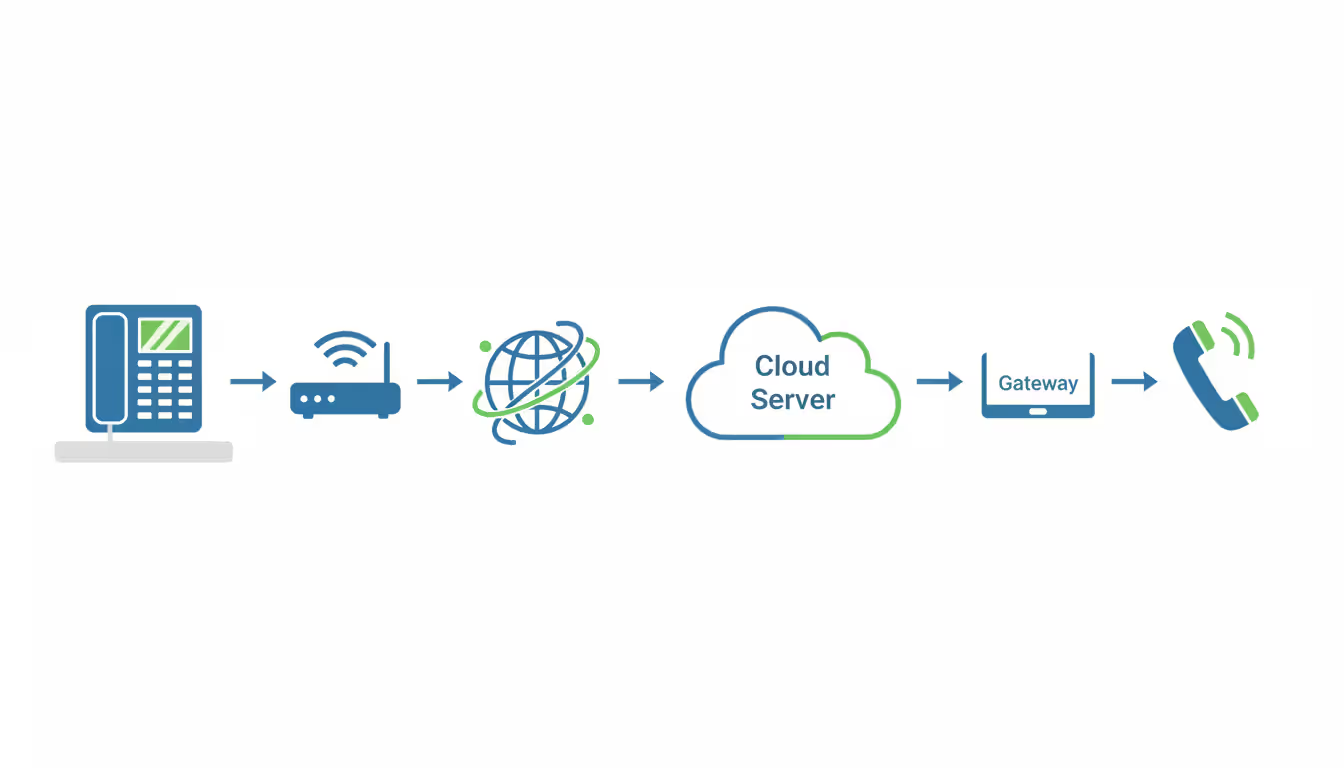
The architecture consists of three main components: endpoint devices (desk phones, softphones, or mobile apps), your internet connection, and the provider's cloud servers. When you make a call, your voice converts into digital packets that travel through your internet connection to the provider's servers, which then route the call to its destination—whether that's another VoIP user, a mobile phone, or a traditional landline.
What Are Cloud Based VoIP Systems
Voice over Internet Protocol technology converts analog voice signals into digital data packets. Cloud based VoIP systems take this concept further by removing the need for any on-site telephony equipment beyond the phones themselves. The "cloud based" designation means the PBX functionality—call routing, voicemail storage, conference bridging, and call management features—runs on servers maintained by your provider in geographically distributed data centers.
This differs fundamentally from hosted VoIP, where a provider might maintain dedicated hardware for your company in their facility. True cloud systems use multi-tenant architectures where multiple businesses share the same infrastructure, though their data remains completely segregated. This shared model drives down costs while maintaining security through encryption and logical separation.
The typical setup requires minimal equipment: IP phones or adapters for existing phones, a reliable internet connection with sufficient bandwidth, and a router capable of Quality of Service (QoS) prioritization. Many businesses skip desk phones entirely, using desktop and mobile applications instead. A 50-person company can deploy a full phone system in an afternoon—no electricians, no punch-down blocks, no equipment closets.
Consider the difference in failure scenarios. When an on-premise PBX fails, your entire phone system goes dark until a technician arrives, diagnoses the problem, and either repairs or replaces hardware. With cloud systems, if your internet connection fails, calls can automatically forward to mobile phones or alternative locations. If the provider's data center experiences issues, redundant systems in other locations take over within seconds.
How Cloud Based VoIP Systems Work
The technical process begins when you lift your handset or click to dial. Your IP phone or softphone application establishes a connection with your provider's Session Border Controller (SBC), which handles call setup, security, and protocol translation. The SBC verifies your credentials, checks your dialing permissions, and initiates the call routing process.
Voice data converts to digital packets using codecs—compression algorithms that balance audio quality against bandwidth consumption. Common codecs include G.711 (high quality, 64 kbps per call) and G.729 (compressed quality, 8 kbps per call). Most providers default to G.722, which delivers HD voice quality at 64 kbps. These packets receive headers containing destination information, sequencing numbers, and timing data.
Your router sends these packets across your internet connection to the provider's network. Here's where internet quality matters critically. VoIP packets are time-sensitive—delays exceeding 150 milliseconds create noticeable lag, while packet loss above 1% degrades audio quality. Your router's QoS settings should prioritize VoIP traffic over other data types like file downloads or video streaming.
The provider's infrastructure receives your packets at their edge servers, which perform several functions: they reassemble packets that arrive out of order, compensate for jitter (variation in packet arrival times), and route the call to its destination. For calls to other VoIP users, packets route directly through the internet. For calls to traditional phone numbers, the provider's gateway converts the digital signal back to analog and connects to the PSTN.
Author: Logan Kessler;
Source: baltazor.com
Internet requirements vary by call volume. A single call requires approximately 100 kbps of bandwidth (accounting for overhead and both directions). A 10-person office making simultaneous calls needs at least 1 Mbps dedicated to voice traffic, but most providers recommend 3-5 Mbps to ensure quality during peak usage. Upload speed matters as much as download speed—a common mistake when businesses rely on consumer internet packages with asymmetric bandwidth.
Role of Cloud Based Platform Infrastructure
The cloud based platform hosting your phone system consists of multiple layers. At the foundation sit physical servers in carrier-grade data centers with redundant power supplies, cooling systems, and network connections. These facilities maintain 99.999% uptime (five nines), translating to less than six minutes of downtime annually.
Above the hardware runs virtualization software that creates isolated environments for different services. Your call routing logic, voicemail storage, and configuration settings exist as software instances that can migrate between physical servers without interrupting service. When providers perform maintenance or upgrades, they move your virtual phone system to different hardware transparently.
Geographic distribution provides disaster recovery and latency reduction. Reputable providers operate data centers in multiple US regions—typically East Coast, West Coast, and Central locations. Your account data replicates across these sites continuously. If you're based in Chicago and your primary data center is in Illinois, your calls route through nearby servers with minimal latency. If that facility becomes unavailable, servers in Texas or Virginia handle your traffic automatically.
The platform also integrates with other cloud services. Call recordings might store in cloud based storage systems like Amazon S3 or Microsoft Azure Blob Storage, providing scalable capacity without the provider managing physical disk arrays. Some systems connect with cloud based intranet platforms, allowing employees to initiate calls directly from internal communication tools or employee directories.
Platform requirements from your perspective are minimal. You need a modern web browser for administration, sufficient internet bandwidth, and network equipment capable of handling real-time traffic. Unlike on-premise systems requiring Windows Server licenses, SQL databases, and backup infrastructure, the provider handles all platform maintenance, security patches, and capacity planning.
Key Benefits for US Businesses
Cost savings manifest in multiple ways. Eliminate the $10,000-$50,000 upfront investment for PBX hardware. Remove the $200-$500 monthly maintenance contract with your telecom vendor. Reduce per-user costs from $40-$60 monthly for traditional lines to $20-$35 for cloud VoIP seats. Long-distance charges essentially disappear—calls anywhere in the US typically cost nothing beyond your monthly subscription.
A manufacturing company with offices in Michigan and California previously paid $3,200 monthly for two separate phone systems and long-distance charges. After migrating to cloud VoIP, their total cost dropped to $1,400 monthly for more users and features. The seven-month payback period included number porting fees and new IP phones.
Scalability happens in real-time. Adding users during seasonal hiring takes minutes through a web portal rather than waiting for technician visits and hardware installations. A retail business adding 20 temporary customer service agents for the holiday season simply purchases additional licenses, ships phones to remote workers, and activates them remotely. When the season ends, they scale back down without equipment sitting idle.
Author: Logan Kessler;
Source: baltazor.com
Remote work support has become non-negotiable for US businesses. Cloud systems treat office phones, home computers, and mobile devices identically. An employee in New York receives calls on their desk phone, while another in Florida answers through a laptop application, and a third in Texas uses their smartphone—all appearing as the same company number to customers. Call transfers, conferencing, and collaboration features work identically regardless of physical location.
Maintenance advantages eliminate the scramble when hardware fails. No more emergency service calls at $150 per hour. No more discovering your phone system vendor went out of business and replacement parts don't exist. The provider handles all infrastructure maintenance, security updates, and feature enhancements. Your responsibility reduces to maintaining internet connectivity and endpoint devices.
Integration capabilities extend your phone system's value. Connect with Salesforce, HubSpot, or Microsoft Dynamics to display customer records during incoming calls. Link with help desk systems to automatically create tickets from voicemails. Sync with calendar applications to update availability status. These integrations happen through APIs without custom programming or middleware servers.
Common Features and Capabilities
Call management features include hunt groups that ring multiple phones simultaneously, call queues for handling high volumes, and time-based routing that sends calls to different destinations based on business hours. A medical office might route calls to the front desk during office hours, to an answering service after hours, and directly to the on-call physician for emergency extensions.
Voicemail-to-email converts messages to audio files delivered to your inbox, often with transcription services that attempt to convert speech to text. Transcription accuracy hovers around 85% for clear messages—sufficient for determining urgency without listening to the full recording. Messages also appear in mobile apps with playback controls and callback options.
Auto-attendant functionality replaces human receptionists for basic call routing. Callers hear professional greetings with menu options: "Press 1 for Sales, 2 for Support, 3 for Billing." Multi-level menus allow complex routing, though best practice suggests limiting options to four per menu and two levels deep. Beyond that, caller frustration increases and abandonment rates spike.
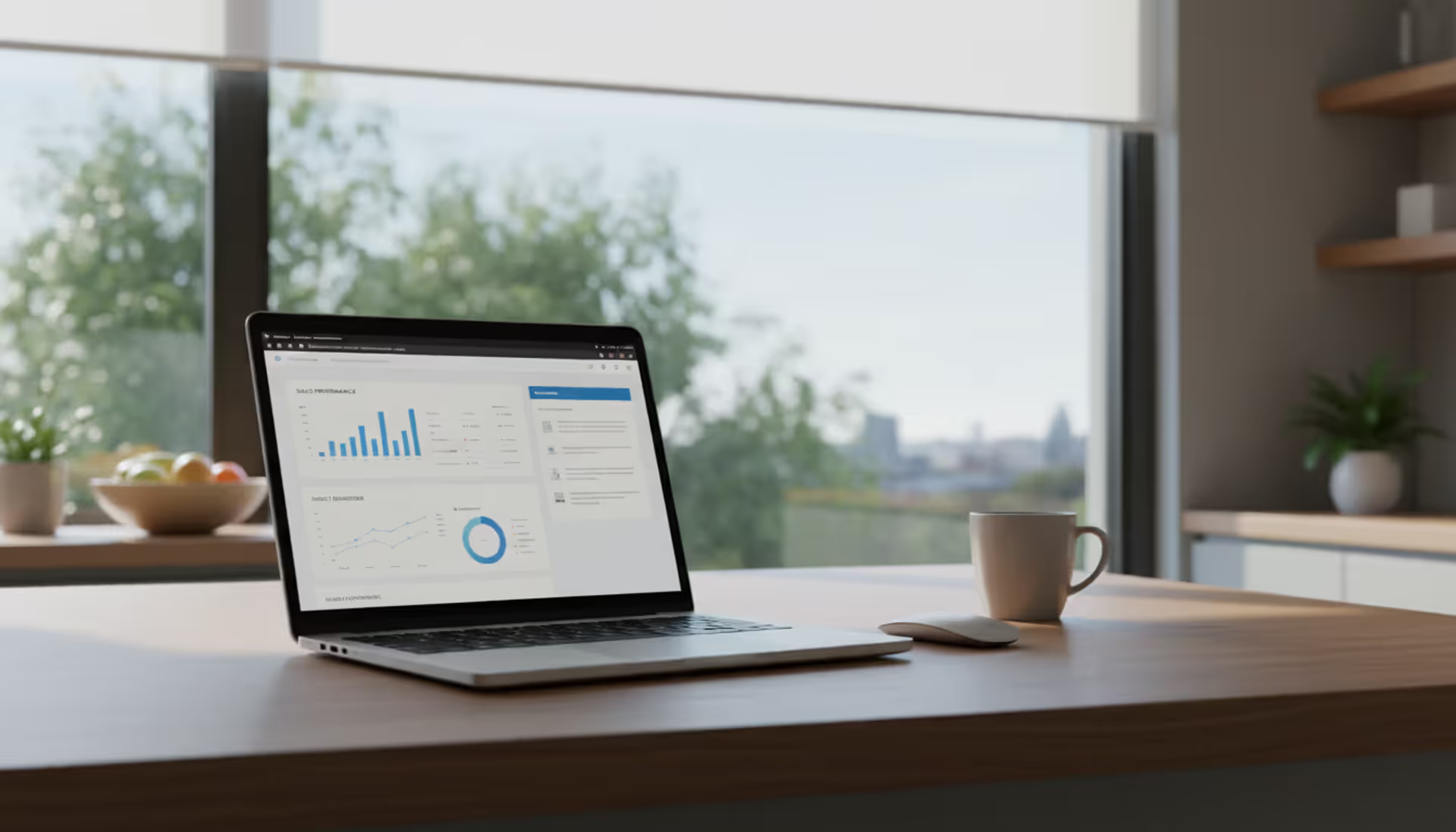
Analytics dashboards track metrics like call volume by hour, average wait times, missed calls, and individual agent performance. A customer service manager might discover that Tuesday mornings generate 40% more calls than other times, justifying schedule adjustments. Or identify that 15% of callers abandon queues after 90 seconds, suggesting insufficient staffing during peak periods.
Mobile apps transform smartphones into full-featured business phones. Make and receive calls using your business number, access voicemail, view call logs, and participate in conferences. The app uses data or WiFi, preserving personal mobile minutes. When traveling internationally, calls route through the cloud system at no additional cost rather than triggering expensive roaming charges.
CRM integration creates screen pops showing customer information when calls arrive. A sales representative sees the caller's name, company, recent orders, open support tickets, and interaction history before answering. This context improves service quality and reduces call handling time. After the call, notes and call recordings attach to the customer record automatically.
Call recording serves quality assurance, training, and compliance purposes. Financial services firms must record certain transaction-related calls per SEC and FINRA regulations. Healthcare organizations record patient interactions for HIPAA compliance. Recordings typically store in cloud based storage systems with retention policies matching regulatory requirements—seven years for broker-dealers, six years for investment advisers.
Some advanced systems integrate with cloud based intranet platforms, allowing employees to click names in company directories to initiate calls. Others connect with cloud-based digital signage systems to display real-time call center statistics on lobby screens. Video calling capabilities often leverage cloud based video encoding to optimize bandwidth usage while maintaining quality during multi-party conferences.
How to Choose a Cloud Based VoIP System
Bandwidth requirements form the foundation of your selection criteria. Test your current internet connection using VoIP quality assessment tools that measure latency, jitter, and packet loss. Latency should stay below 100 milliseconds, jitter under 30 milliseconds, and packet loss under 0.5%. If your connection fails these thresholds, upgrading internet service takes priority over selecting a provider.
Calculate required bandwidth by multiplying simultaneous calls by 100 kbps, then adding 20% overhead. A 30-person office where 10 people might be on calls simultaneously needs at least 1.2 Mbps (10 calls × 100 kbps × 1.2). Most providers recommend symmetrical business internet with at least 10 Mbps per 25 users. Asymmetric connections like cable internet can work but may cause quality issues during large file uploads.
Number of users influences pricing models and feature availability. Providers offer different tiers: basic plans for under 20 users with essential features, professional plans for 20-100 users adding call recording and analytics, and enterprise plans for 100+ users with advanced routing and dedicated support. Accurately forecasting user count for the next 2-3 years prevents outgrowing your plan prematurely.
Author: Logan Kessler;
Source: baltazor.com
Budget considerations extend beyond per-user monthly fees. Account for one-time costs like number porting ($15-$25 per number), phone hardware ($75-$300 per device), and potential network upgrades. Monthly costs include user licenses, phone number fees ($2-$5 each), toll-free numbers ($5-$10 monthly plus per-minute charges), and optional features like call recording or advanced analytics.
A realistic budget for a 25-person business might include: $625 monthly for licenses at $25 per user, $50 for five phone numbers, $15 for a toll-free number, $100 for call recording, and $75 for SMS capabilities—totaling $865 monthly. Add $3,500 upfront for 25 desk phones at $140 each. Compare this to $2,500 monthly for traditional phone service, and the cloud system pays for itself in eight months.
Vendor reliability requires investigation beyond marketing claims. Check how long they've operated (prefer providers established before 2020), their customer count (10,000+ businesses suggests stability), and their infrastructure redundancy. Ask specific questions: How many data centers do you operate? What's your guaranteed uptime percentage? What's your average time to resolve service issues?
Review third-party ratings on sites like G2, Capterra, or Trustpilot, focusing on reviews from businesses similar to yours in size and industry. A five-star rating from 50 reviews matters less than a 4.2-star rating from 2,000 reviews. Look for patterns in negative reviews—occasional complaints about specific features are normal, but recurring mentions of poor call quality or unresponsive support signal problems.
Compliance needs for US regulations vary by industry. Healthcare organizations need HIPAA-compliant systems with business associate agreements, encrypted storage, and audit logging. Financial services require systems meeting SEC Rule 17a-4 for communications retention. Call centers must comply with TCPA regulations for outbound calling and recording consent. Payment card processing requires PCI DSS compliance if you handle credit card numbers over the phone.
Ask providers directly about compliance certifications. HIPAA-compliant providers should readily provide their BAA and explain their security measures. PCI-certified providers should detail their compliance scope and validation. Generic responses like "we take security seriously" without specific certifications or documentation suggest inadequate compliance programs.
Integration requirements depend on your existing technology stack. List the software your team uses daily—CRM systems, help desk platforms, email, calendar, messaging apps—and verify the VoIP provider offers native integrations or documented APIs. Native integrations work better than third-party middleware, which adds complexity and potential failure points.
Cloud-based digital signage integration might matter if you operate retail locations or call centers where displaying real-time metrics motivates teams. Cloud based video encoding capabilities become relevant if you conduct frequent video conferences and need to optimize bandwidth across multiple participants. Evaluate these advanced features only after confirming the provider meets your core telephony requirements.
Implementation and Setup Process
Timeline expectations for mid-sized deployments typically span 2-4 weeks. Week one involves account setup, ordering phone numbers, and configuring basic call routing. Week two covers number porting requests and configuring advanced features like auto-attendants and voicemail. Week three focuses on user training and testing. Week four completes the cutover from your old system with monitoring for issues.
Smaller businesses with under 10 users can complete implementation in 3-5 business days. Larger enterprises with 500+ users, complex call routing, and integration requirements might need 8-12 weeks. Rushing implementation increases the risk of misconfigurations that frustrate users and damage adoption.
Equipment needs vary by deployment approach. Desk phone deployments require IP phones compatible with your provider—either purchased outright ($75-$300 each) or leased monthly ($5-$12 per device). Softphone deployments need only computers or smartphones with adequate processing power and audio capabilities. Many businesses adopt a hybrid model: desk phones for receptionists and executives, softphones for everyone else.
Author: Logan Kessler;
Source: baltazor.com
Network equipment may require upgrades. Your router must support QoS to prioritize voice traffic. Switches should offer Power over Ethernet (PoE) if you want to power desk phones through network cables rather than individual power adapters. A 50-person office might need a new PoE switch ($400-$800) and router with VoIP optimization ($200-$500).
Porting numbers from your existing provider to the new system requires careful coordination. Submit porting requests 2-3 weeks before your desired cutover date. You'll need your current provider's account number, billing telephone number, and service address exactly as they appear on your bill. Errors in this information delay porting by 7-10 business days.
During the porting process, maintain your existing service. Canceling prematurely causes your numbers to be released, making them unportable. The actual port occurs during a scheduled maintenance window—typically overnight or early morning—and takes 2-4 hours. Brief service interruptions of 5-15 minutes are normal during the final cutover.
Training staff prevents the common mistake of assuming phones are intuitive. Schedule 30-minute sessions covering call handling basics, voicemail access, call forwarding, conferencing, and mobile app usage. Record these sessions for employees who miss them or need refreshers. Create quick reference guides with common tasks: transferring calls, checking voicemail remotely, updating availability status.
Testing phase should involve real-world scenarios. Have employees call between extensions, transfer calls to different departments, test voicemail delivery, and verify mobile apps function on cellular networks and WiFi. Call your main numbers from external phones to test auto-attendants and call routing. Place test calls during peak internet usage to identify quality issues.
Monitor call quality closely during the first two weeks. Most providers offer quality dashboards showing metrics like Mean Opinion Score (MOS), packet loss, and jitter for each call. MOS scores below 3.5 indicate quality problems requiring investigation. Common culprits include insufficient bandwidth, missing QoS configuration, or network equipment unable to handle VoIP traffic.
Cloud-Based vs. On-Premise VoIP Systems Comparison
Factor
Cloud-Based VoIP
On-Premise VoIP
Initial Cost
$50-$150 per user (phones only)
$10,000-$50,000+ (hardware + installation)
Monthly Cost
$20-$35 per user
$5-$15 per user (plus maintenance contracts)
Maintenance
Provider handles all updates and repairs
Requires IT staff or service contracts ($200-$500/month)
Scalability
Add/remove users instantly through web portal
Requires hardware upgrades when exceeding capacity
Hardware Requirements
Only phones and network equipment
PBX server, gateway cards, backup power, dedicated space
Setup Time
3-7 days for small businesses
4-12 weeks for installation and configuration
Disaster Recovery
Automatic failover to redundant data centers
Requires separate backup systems and procedures
Remote Work Support
Native support for any location with internet
Requires VPN configuration and may have limitations
Feature Updates
Automatic, included in subscription
Manual upgrades, often requiring paid professional services
Lifespan
Indefinite (provider maintains infrastructure)
7-10 years before hardware replacement needed
Implementation and Setup Process
The successful deployment of cloud based VoIP systems depends on methodical planning and realistic timelines. Rushing the process creates user frustration and may require expensive remediation later.
Begin with a thorough assessment of your current phone usage. Document how many simultaneous calls occur during peak periods, which features your team uses most frequently, and any specialized requirements like overhead paging or door phone integration. This baseline prevents selecting a system that lacks critical functionality.
Create a cutover plan that minimizes business disruption. Most companies choose weekend deployments or after-hours cutovers to avoid impacting customer service. A common mistake is scheduling the cutover during busy periods—never implement new phone systems during tax season if you're an accounting firm or during November if you're in retail.
Assign an internal project champion who serves as the liaison between your team and the provider. This person should understand your business processes, have technical aptitude, and possess the authority to make decisions. Projects without clear ownership tend to drift, missing deadlines and exceeding budgets.
Plan for the unexpected. Order extra phones for inevitable failures or additional hires. Budget an extra 10% beyond quoted costs for unforeseen requirements. Schedule go-live dates with buffer time before critical business periods. A system deployed two weeks before your busy season allows time to resolve issues when stakes are lower.
The shift to cloud-based communication systems represents more than cost savings—it's about business agility.Our clients who moved to cloud VoIP in 2024 and 2025 handled the transition to hybrid work models seamlessly, while those still running on-premise systems struggled with remote access and capacity constraints. The gap in operational flexibility has become too significant to ignore
— Jennifer Martinez
Frequently Asked Questions
What internet speed do I need for cloud based VoIP systems?
You need at least 100 kbps of bandwidth per simultaneous call, plus 20% overhead for packet headers and network protocols. A practical guideline: 1 Mbps supports up to 8 concurrent calls, 10 Mbps handles up to 80 calls. However, bandwidth represents only part of the equation. Low latency (under 100ms), minimal jitter (under 30ms), and packet loss below 1% matter equally. Business-grade internet with symmetrical upload and download speeds works better than consumer packages. Test your connection using tools like VoIP speed tests before committing to a provider.
How much do cloud based VoIP systems cost per user?
Monthly costs range from $20-$35 per user for standard business plans, with enterprise plans reaching $40-$50 per user for advanced features. Basic plans around $15-$20 per user offer limited functionality suitable only for very small businesses. Additional costs include phone numbers at $2-$5 monthly each, toll-free numbers at $5-$10 plus per-minute charges, and optional features like call recording ($5-$15 per user monthly). One-time costs include number porting fees ($15-$25 per number) and phone hardware if purchasing devices ($75-$300 per phone). Total cost of ownership for a 25-person business typically runs $800-$1,200 monthly after initial setup.
Are cloud based VoIP systems secure for business use?
Modern cloud VoIP systems employ multiple security layers: TLS encryption for signaling, SRTP encryption for voice data, and secure authentication protocols. Reputable providers maintain SOC 2 Type II certifications demonstrating security controls, conduct regular penetration testing, and implement intrusion detection systems. However, security requires shared responsibility. You must secure your network with firewalls, use strong passwords, enable multi-factor authentication, and train employees to recognize phishing attempts targeting VoIP credentials. Industries with strict compliance requirements (healthcare, finance) should verify providers offer appropriate certifications like HIPAA compliance or PCI DSS validation.
Can I keep my existing phone numbers when switching?
Yes, you can port existing phone numbers to cloud based VoIP systems through a regulated process governed by the FCC. Submit a Letter of Authorization (LOA) with your current account details 2-3 weeks before your desired cutover date. The information must match your current provider's records exactly—account number, billing telephone number, and service address. Porting typically takes 7-14 business days, though complex scenarios involving multiple locations or carriers may take longer. During porting, maintain service with your current provider until the port completes. Toll-free numbers follow a different process through the RespOrg system but are equally portable.
What happens if my internet goes down?
Most cloud VoIP systems offer several failover options. Configure automatic call forwarding to mobile phones or alternative locations when your internet connection fails. Some providers offer cellular backup devices that switch to 4G/5G networks automatically. For businesses requiring maximum uptime, deploy redundant internet connections from different providers using different technologies (fiber and cable, for example). Your VoIP system can detect when the primary connection fails and route calls through the backup. Without these measures, losing internet means losing phone service—making internet reliability critical for businesses dependent on phone communications.
Do cloud based VoIP systems work with mobile devices?
Yes, all major providers offer mobile applications for iOS and Android that transform smartphones into full-featured business phones. These apps make and receive calls using your business number, access voicemail, view call logs, and participate in conferences using either cellular data or WiFi. Calls placed through the app use your business phone system rather than cellular minutes, and international calls route through your provider at their rates rather than triggering expensive roaming charges. The apps typically consume 1-2 MB of data per minute of talk time. Some systems also support desk phone features like presence indicators showing when colleagues are available, busy, or in meetings.
Cloud based VoIP systems have evolved from experimental technology to the standard communication infrastructure for American businesses. The combination of reduced costs, enhanced flexibility, and comprehensive features makes traditional phone systems increasingly difficult to justify. Companies implementing these systems gain immediate advantages in remote work support, scalability, and operational agility.
The selection process requires careful evaluation of your specific needs rather than chasing the lowest price. Bandwidth requirements, compliance obligations, integration needs, and vendor reliability all influence long-term satisfaction. Businesses that invest time in proper planning, realistic timelines, and thorough testing report smooth implementations and rapid user adoption.
The technology will continue advancing, with artificial intelligence enhancing features like automated transcription, sentiment analysis during calls, and predictive routing based on caller behavior patterns. However, the fundamental benefits—cost savings, flexibility, and reduced maintenance burden—remain consistent regardless of which advanced features emerge next. For most US businesses evaluating their communication infrastructure in 2026, the question is no longer whether to adopt cloud VoIP, but rather which provider and implementation approach best matches their specific requirements.
Software-defined WAN transforms network architecture by enabling intelligent traffic routing across multiple connection types. Learn how SD-WAN works, security considerations, deployment options, and when your business should adopt this technology for improved performance and cost savings
Remote work has made remote access essential for millions. This comprehensive guide explains remote access meaning, compares VPN solutions against remote desktop programs, covers security risks, and helps you choose the right remote access program for your needs
Multi cloud architectures now power 87% of enterprise infrastructure strategies. This comprehensive guide examines how multi cloud works, why businesses adopt it, key components including platforms, storage, data architecture, and IAM, plus practical strategies for implementation and management
Hybrid cloud combines on-premises infrastructure with public cloud services through secure, orchestrated connections. This comprehensive guide covers hybrid cloud architecture, common deployment models, security best practices, implementation challenges, and when organizations should choose a hybrid cloud environmen
The content on this website is provided for general informational and educational purposes only. It is intended to explain concepts related to cloud computing, computer networking, infrastructure, and modern IT systems.
All information on this website, including articles, guides, and examples, is presented for general educational purposes. Technology implementations may vary depending on specific environments, business needs, infrastructure design, and technical requirements.
This website does not provide professional IT, engineering, or technical advice, and the information presented should not be used as a substitute for consultation with qualified IT professionals.
The website and its authors are not responsible for any errors or omissions, or for any outcomes resulting from decisions made based on the information provided on this website.